Introduction
This manual provides comprehensive instructions for the operation and maintenance of your LASIKA Digital Kids Watch, model w-f82. Please read this manual carefully to ensure proper use and to fully understand the features of your watch. Keep this manual for future reference.
Product Overview
The LASIKA w-f82 is a digital watch designed for unisex-child use, featuring a clear digital display, a durable rubber band, and multiple functions including time, date, alarm, stopwatch, and backlight. Its robust design is suitable for daily wear.
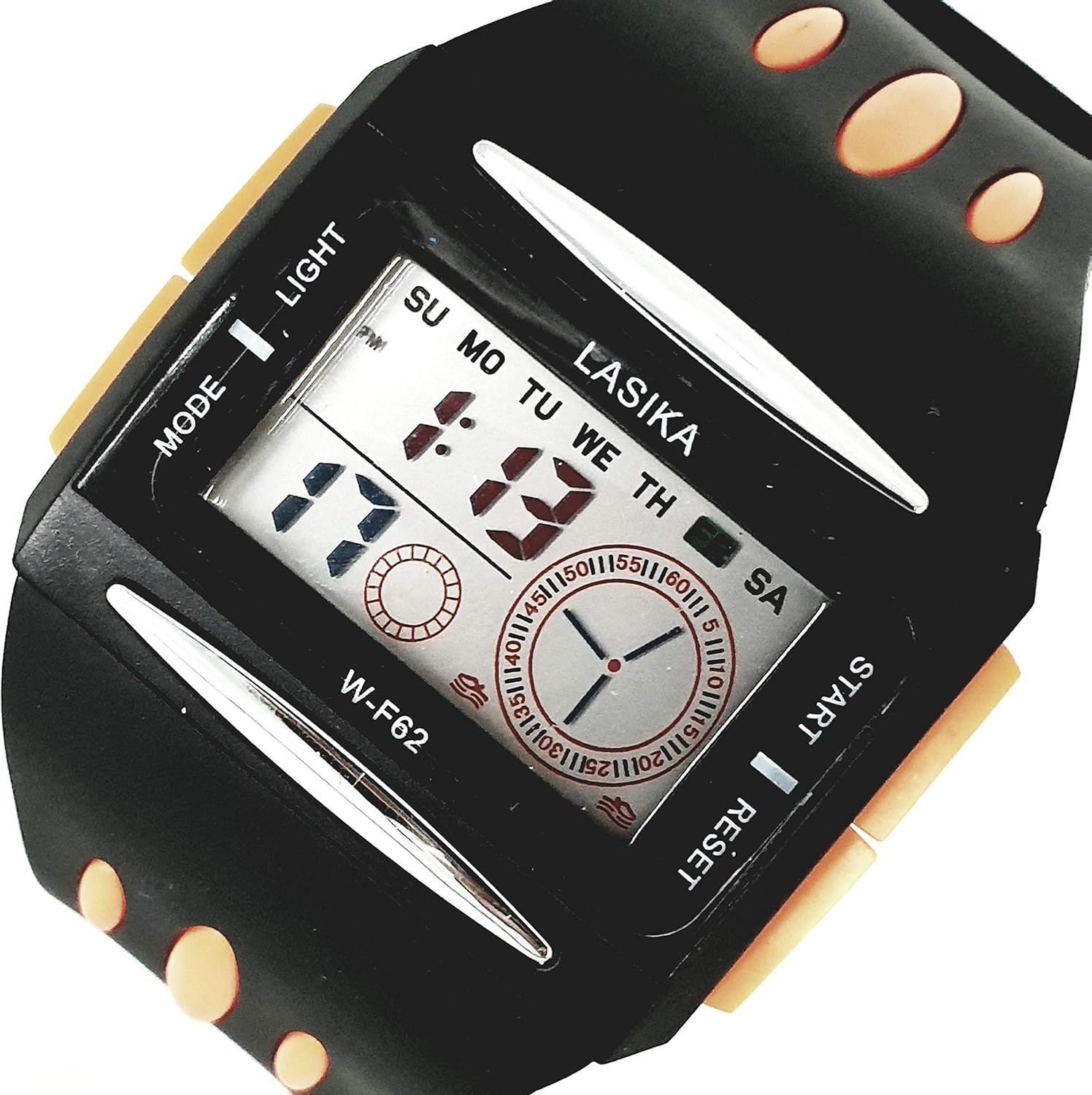
Image Description: A close-up view of the LASIKA Digital Kids Watch model w-f82. The watch has a black rectangular case with orange accents on the buttons. The digital display shows "1:19" and the days of the week (SU MO TU WE TH FR SA). Four buttons are visible: "MODE" on the top left, "LIGHT" on the bottom left, "START" on the top right, and "RESET" on the bottom right. The watch strap is black rubber.
Watch Components
- MODE Button: Used to cycle through different display modes (Time, Alarm, Stopwatch, Date).
- LIGHT Button: Activates the LED backlight for visibility in low light conditions.
- START Button: Used to start/stop the stopwatch, adjust values during setting, or view the date.
- RESET Button: Used to reset the stopwatch, confirm settings, or switch between 12/24 hour format.
- Digital Display: Shows time, date, day of week, and other function indicators.
- Rubber Strap: Durable and comfortable for extended wear.
Setup
Initial Activation
Your watch is typically ready for use upon receipt. If the display is blank, the battery may be depleted, or it might be in a power-saving mode. Press any button to activate the display. If the time is incorrect, proceed to the "Setting Time and Date" section.
Operating Instructions
1. Setting Time and Date
- From the normal time display, press the MODE button three times to enter the time setting mode. The seconds digits will begin to flash.
- Press the RESET button to cycle through the setting options: Seconds → Hours → Minutes → Month → Date → Day of Week.
- While the desired value is flashing, press the START button to adjust the value. Hold START to rapidly advance the numbers.
- To switch between 12-hour and 24-hour format, press the RESET button when the hour is flashing. "PM" will indicate afternoon hours in 12-hour format.
- Once all settings are correct, press the MODE button to exit the setting mode and return to the normal time display.
2. Using the Alarm Function
- From the normal time display, press the MODE button once to enter the Alarm mode. "AL" will be displayed.
- Press the START button to turn the alarm ON or OFF. An alarm icon will appear when the alarm is active.
- To set the alarm time, press the RESET button. The hour digits will flash.
- Press the START button to adjust the hour.
- Press the RESET button again to select the minute digits.
- Press the START button to adjust the minutes.
- Press the MODE button to exit the alarm setting mode.
- When the alarm sounds, press any button to stop it.
3. Using the Stopwatch
- From the normal time display, press the MODE button twice to enter the Stopwatch mode. "00:00:00" will be displayed.
- Press the START button to begin timing.
- Press the START button again to pause the timing.
- Press the RESET button while paused to reset the stopwatch to "00:00:00".
- Press the MODE button to exit the stopwatch mode.
4. Activating the Backlight
- Press the LIGHT button to illuminate the display. The LED backlight will provide a clear view of the time in dark environments.
- The backlight will remain on for a few seconds before automatically turning off to conserve battery.
Maintenance
- Cleaning: Wipe the watch with a soft, damp cloth. Avoid using harsh chemicals or abrasive materials.
- Water Resistance: This watch is water resistant up to 30 meters. It is suitable for splashes or brief immersion in water, but not for swimming, diving, or hot water activities (e.g., showering). Do not press buttons underwater.
- Battery: The watch uses a standard watch battery. When the display becomes dim or functions are erratic, the battery may need replacement. Battery replacement should ideally be performed by a qualified technician to ensure water resistance is maintained.
- Storage: Store the watch in a cool, dry place away from direct sunlight and extreme temperatures.
Troubleshooting
| Problem | Possible Cause | Solution |
|---|---|---|
| Display is blank or dim. | Low battery or power-saving mode. | Press any button to activate. If still dim, replace battery. |
| Time is incorrect. | Time not set correctly or reset. | Follow "Setting Time and Date" instructions. |
| Alarm does not sound. | Alarm is not activated or set incorrectly. | Ensure alarm is ON (icon visible) and time is set correctly. |
| Buttons are unresponsive. | Temporary software glitch or low battery. | Try pressing all buttons. If issue persists, consider battery replacement. |
Specifications
| Brand | LASIKA |
| Model Number | w-f82 |
| Display Type | Digital |
| Movement Type | Quartz |
| Targeted Group | Unisex-Child |
| Band Material | Rubber |
| Watch Shape | Rectangle |
| Dial Case Diameter Size | 48 millimeters |
| Water Resistance | Up to 30 meters |
| Time System | 12/24 hour system |
| Features | Daily, weekly, and monthly date display, LED backlight, Stopwatch, Alarm |
| Item Weight | 39 g |
| Package Dimensions | 4.17 x 3.46 x 2.29 cm |
Warranty and Support
For warranty information or technical support, please refer to the purchase documentation or contact the retailer where the product was purchased. Keep your proof of purchase for any warranty claims.
For general inquiries about LASIKA products, please visit the official LASIKA website or contact their customer service department.