
1. Introduction
This manual provides detailed instructions for the installation, operation, and maintenance of the DEWIN XTM75S-U Single-Phase 2-Wire Electronic KWh Energy Meter. Please read this manual thoroughly before installation and use to ensure safe and correct operation.

Figure 1: Front view of the DEWIN XTM75S-U Energy Meter.
2. Product Overview and Features
The DEWIN XTM75S-U is a single-phase two-wire electronic energy meter designed for measuring active energy consumption. It features a compact design suitable for DIN rail mounting and provides accurate readings for various applications.
Key Features:
- Measures single-phase two-wire active energy consumption.
- Conforms to IEC 62053-21 standard.
- Features a 5+1 digit LCD display (up to 99999.1 kWh).
- Standard 35mm DIN rail installation, compliant with DIN EN50022.
- Six-pole width (12.5mm module), compliant with JB/T7121-1993.
- Equipped with a standard short terminal cover, with an option for an extension cover for enhanced safety.

Figure 2: Energy meter highlighting 35mm DIN rail installation and six-pole width.

Figure 3: Side view showing the quality certificate label.
3. Specifications
| Parameter | Value |
|---|---|
| Model | XTM75S-U |
| Accuracy Class | Class 1 |
| Rated Voltage | 220V |
| Rated Current | 5(30)A (Optional: 15(60)A, 20(80)A) |
| Insulation Performance | AC voltage 4kV for 1 minute, Impulse voltage 1.2/50us 6kV |
| Dimensions (L x W x H) | 10 x 7.6 cm (3.94 x 2.99 inches) / Product: 15 x 8 x 6 cm |
| Weight | Approx. 270-280g |
| Frequency | 50Hz |
| Pulse Constant | 1600imp/kWh |
4. Safety Information
WARNING: Risk of electric shock. Installation and maintenance should only be performed by qualified personnel.
- Ensure power is disconnected before any installation, wiring, or maintenance work.
- Verify that the voltage and current ratings of the meter match your electrical system.
- Do not operate the meter if it appears damaged.
- Follow all local electrical codes and regulations during installation.
- The meter is designed for indoor use in a dry environment. Avoid exposure to moisture or extreme temperatures.
5. Setup and Installation
5.1 Mounting
The DEWIN XTM75S-U energy meter is designed for standard 35mm DIN rail installation. Ensure the DIN rail is securely mounted in a suitable electrical enclosure.

Figure 4: Rear view of the meter with the DIN rail mounting clip.
5.2 Wiring Diagram
Refer to the wiring diagram below for correct connection. It is crucial to connect the Live (L) and Neutral (N) wires correctly to ensure accurate measurement and safe operation. The meter supports a two-wire single-phase connection.
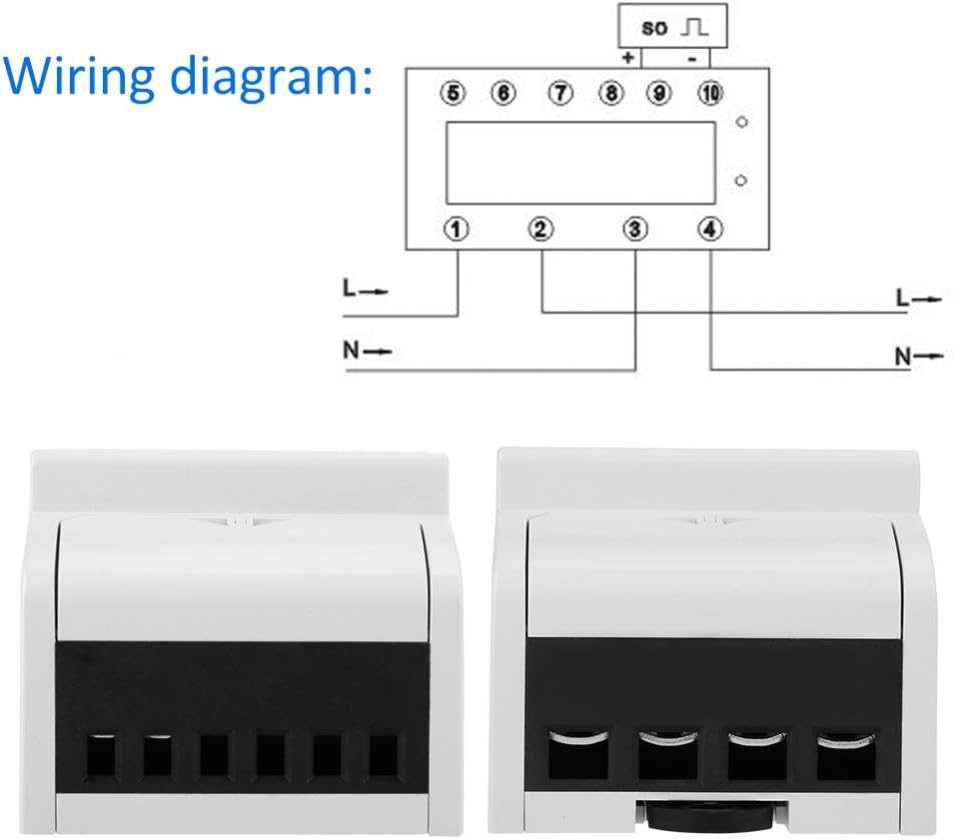
Figure 5: Wiring diagram for the energy meter. Connect L (Live) and N (Neutral) as indicated.
5.3 Terminal Connections
Ensure all wire connections are tight and secure to prevent loose contacts and potential hazards. The meter is equipped with terminal covers for safety.

Figure 6: Top view of the meter's input terminals.

Figure 7: Bottom view of the meter's output terminals.
6. Operating Instructions
Once properly installed and powered, the meter will automatically begin measuring energy consumption.
6.1 LCD Display
The meter features a 5+1 digit LCD display, showing energy consumption in kilowatt-hours (kWh). The last digit (after the decimal point) represents tenths of a kWh.

Figure 8: Close-up of the 5+1 digit LCD display showing energy consumption.
6.2 Indicator Lights
- POWER Indicator: This LED illuminates when the meter is powered on and functioning correctly.
- PULSE Indicator: This LED flashes to indicate energy consumption. Each flash corresponds to a specific amount of energy (e.g., 1600 imp/kWh means 1600 flashes per kilowatt-hour consumed). A faster flash rate indicates higher power consumption.
7. Maintenance
The DEWIN XTM75S-U energy meter is designed for long-term, maintenance-free operation. However, periodic checks are recommended:
- Cleaning: Gently wipe the meter's exterior with a dry, soft cloth. Do not use abrasive cleaners or solvents.
- Inspection: Periodically inspect the wiring connections to ensure they remain secure and free from corrosion.
- Environment: Ensure the operating environment remains within specified temperature and humidity ranges.
WARNING: Do not attempt to open or repair the meter yourself. Refer all servicing to qualified personnel.
8. Troubleshooting
If you encounter issues with your energy meter, refer to the following common problems and solutions:
| Problem | Possible Cause | Solution |
|---|---|---|
| Meter display is blank. | No power supply or incorrect wiring. | Check power supply to the meter. Verify wiring connections according to the diagram. Ensure circuit breaker is on. |
| PULSE indicator not flashing with load. | No load connected, incorrect wiring, or meter malfunction. | Ensure a load is connected and drawing power. Re-check wiring. If problem persists, contact support. |
| Inaccurate readings. | Incorrect wiring, meter damage, or external interference. | Verify wiring. Ensure the meter is not exposed to strong magnetic fields. If suspected damage, contact support. |
If the problem persists after attempting these solutions, please contact customer support.
9. Warranty and Support
Warranty information for the DEWIN XTM75S-U energy meter is typically provided with your purchase documentation. Please refer to those documents for details regarding warranty coverage and terms.
For technical support, service, or further inquiries, please contact your retailer or the manufacturer directly. Ensure you have your product model number (XTM75S-U) and purchase details available when seeking assistance.