
CaseBot CB-EIAYUS
CaseBot Slim Shell Stand Cover User Manual
Model: CB-EIAYUS | Brand: CaseBot
Introduction
This manual provides instructions for the CaseBot Slim Shell Stand Cover, designed specifically for the Lenovo Tab M10 Plus (2020 2nd Gen) TB-X606F/X606X 10.3 Inch FHD Tablet. This lightweight and durable protective case offers enhanced functionality and protection for your device.

Image: The CaseBot Slim Shell Stand Cover in black, shown with a Lenovo Tab M10 Plus tablet inserted and propped up in viewing mode. The case is also shown closed, highlighting its slim profile.
Compatibility
This case is exclusively designed for the Lenovo Tab M10 Plus TB-X606F / TB-X606X 10.3 Inch FHD (2020 2nd Gen) Android Tablet. It is important to verify your tablet model number to ensure proper fit.
Important: This case is not compatible with the Lenovo Tab M10 Plus Gen 3rd 10.6" (2022 release), Lenovo Tab M10 (3rd Gen) 10.1" (2022), or Lenovo Tab M10 HD (2nd Gen) 10.1" (2020).

Image: A visual guide indicating that the case fits the Lenovo Tab M10 Plus 10.3" (2020) models TB-X606X/TB-X606F, and explicitly states it does not fit 10.6" or 10.1" models from different generations.
Setup: Installing the Case
The CaseBot Slim Shell Stand Cover features an easy clip-on application for secure installation of your tablet.
- Ensure your Lenovo Tab M10 Plus (2020 2nd Gen) is clean and free of debris.
- Align your tablet with the hardback shell of the case, ensuring the camera and ports match the precise cutouts.
- Gently press the tablet into the shell until it securely clips into place. The corners of the case are designed to provide a snug fit and protection.

Image: Detailed view of the case's precise cutouts for the tablet's speakers, buttons, and charging port, ensuring full accessibility.
Operating the Case Features
Auto Sleep/Wake Function
The case is equipped with a magnetic strip that automatically wakes your tablet when the cover is opened and puts it to sleep when the cover is closed. This feature helps conserve battery life.

Image: A visual representation of the auto sleep/wake feature, showing the tablet screen turning on when the cover is opened (green arrow) and turning off when closed (red arrow).
Viewing and Typing Stand Modes
The tri-fold front cover allows you to transform the case into a versatile stand for different uses:
- Viewing Stand: Fold the cover into a triangular stand to prop up your tablet at an ideal angle for watching videos, movies, or video calls.
- Typing Stand: Fold the cover into a lower angle to provide a comfortable position for typing or browsing.
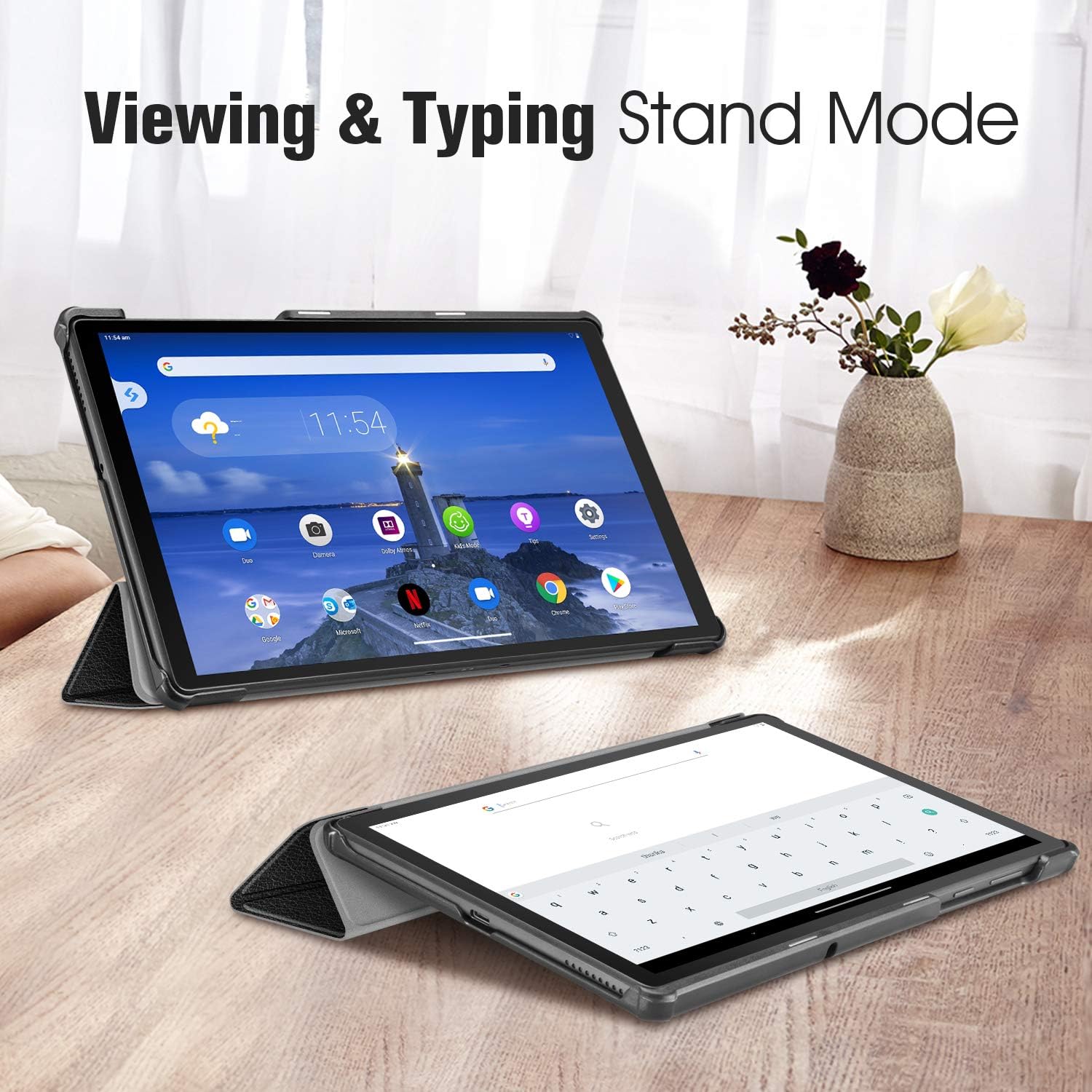
Image: The case demonstrating two different stand configurations: one upright for viewing content and another at a lower angle suitable for typing.
Maintenance
To ensure the longevity and appearance of your CaseBot Slim Shell Stand Cover, follow these simple maintenance guidelines:
- Cleaning: Wipe the exterior with a soft, damp cloth. Avoid using harsh chemicals or abrasive cleaners, as these can damage the premium quality PU leather.
- Interior Care: The soft scratch-free microfiber interior can be gently wiped with a dry, lint-free cloth to remove dust or smudges.
- Storage: When not in use, store the case in a cool, dry place away from direct sunlight or extreme temperatures.
- Avoid Sharp Objects: Keep the case away from sharp objects to prevent scratches or punctures to the material.
Troubleshooting
Auto Sleep/Wake Function Not Working
If the auto sleep/wake feature is not functioning correctly, consider the following:
- Tablet Compatibility: Double-check that your tablet is indeed the Lenovo Tab M10 Plus (2020 2nd Gen) TB-X606F/X606X. This feature relies on specific magnetic sensors in compatible tablet models.
- Tablet Settings: Ensure that the "Smart Cover" or "Sleep/Wake" function is enabled in your tablet's display settings. Refer to your tablet's user manual for specific instructions.
- Magnetic Interference: Ensure there are no other strong magnets or metallic objects near the case that could interfere with the magnetic sensor.
- Tablet Software: In rare cases, a tablet software update might affect this functionality. Check for any pending system updates for your tablet.
If the issue persists after checking these points, please contact CaseBot customer support for further assistance.
Specifications
| Feature | Detail |
|---|---|
| Brand | CaseBot |
| Model Number | CB-EIAYUS |
| Compatible Devices | Lenovo Tab M10 Plus (2020 2nd Gen) TB-X606F/X606X 10.3 Inch FHD Tablet |
| Color | Black |
| Material | Premium Quality PU Leather (exterior), Soft Scratch-Free Microfiber (interior), Hard PC (back shell) |
| Item Weight | 8.1 ounces |
| Package Dimensions | 9.88 x 7.2 x 0.75 inches |
| Special Features | Auto Sleep/Wake, Multi-angle Viewing/Typing Stand, Precise Cutouts, Reinforced Corners |

Image: An exploded view highlighting the case's construction, including the hard PC back shell, high-quality material, microfiber soft lining, and protective features for the screen, camera, and corners.
Official Product Video
Watch the official product video for a visual demonstration of the CaseBot Slim Shell Stand Cover's features and functionality.
Video: An official demonstration video by Fintie (CaseBot's parent company) showcasing the Slimshell Case for Lenovo M10 Plus, highlighting its design, fit, and various features.
Warranty and Support
For warranty information or technical support regarding your CaseBot Slim Shell Stand Cover, please refer to the manufacturer's official website or contact their customer service directly. You can also visit the CaseBot Store on Amazon for more information and contact options.
Ask a question about this manual
Ask about setup, troubleshooting, compatibility, parts, safety, or missing instructions. Manuals+ will review the question and use this page’s manual context to help answer it.