1. Introduction
Thank you for choosing the JIACOM FR800 Non-Contact Infrared Forehead Thermometer. This device is designed to provide accurate and quick temperature readings for adults, children, and babies without physical contact. Its advanced infrared technology ensures instant and precise results, making temperature monitoring effortless and hygienic.
The FR800 features a clear digital display, a fever indicator, and a memory function to help you track temperature changes over time. This medical-grade thermometer is suitable for various settings, offering reliable and efficient temperature measurement.
2. Safety Information
- Do not immerse the thermometer in water or other liquids.
- Keep the device away from direct sunlight, dust, and extreme temperatures.
- Avoid dropping the thermometer or subjecting it to strong impacts.
- Do not attempt to disassemble or repair the device yourself. Contact qualified personnel for service.
- This thermometer is intended for household use. Consult a medical professional for any health concerns.
- Keep out of reach of children and pets.
3. Product Overview
The JIACOM FR800 thermometer is designed for ease of use and accurate readings. Familiarize yourself with its components:

Figure 3.1: JIACOM FR800 Thermometer from various angles.
This image displays the JIACOM FR800 thermometer from multiple perspectives, highlighting its ergonomic shape, the blue "SCAN" and "0/1" buttons, and the central digital display. The non-contact sensor is visible at the top.
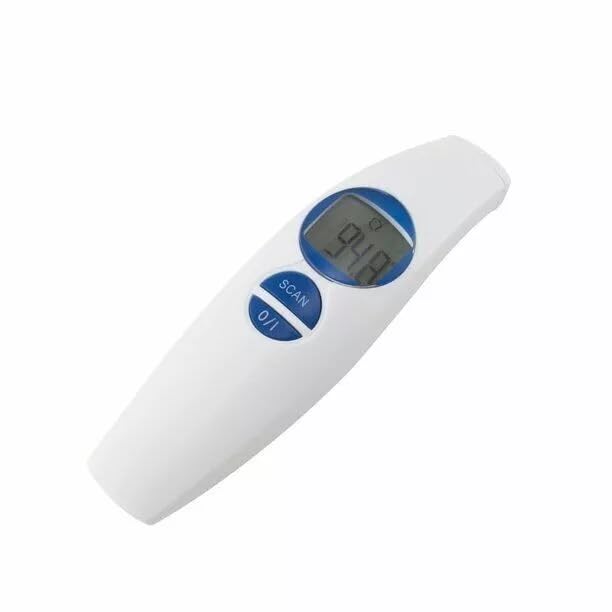
Figure 3.2: JIACOM FR800 Thermometer displaying a temperature.
A close-up view of the JIACOM FR800 thermometer's digital screen, clearly showing a temperature reading of 94.8 degrees Fahrenheit. This illustrates the device in active use, displaying measurement results.
Components:
- Infrared Sensor: Located at the top, used for non-contact temperature measurement.
- LCD Display: Shows temperature readings, mode indicators, and battery status.
- SCAN Button: Initiates a temperature scan.
- 0/1 Button (Power/Mode): Powers the device on/off and switches between measurement modes (forehead/object).
- Battery Compartment: Located at the bottom, holds 2 AAA batteries.
4. Setup
4.1 Battery Installation
The JIACOM FR800 requires 2 AAA batteries (included). Follow these steps to install them:
- Locate the battery compartment cover at the bottom of the thermometer.
- Slide the cover open in the direction indicated by the arrow.
- Insert two AAA batteries, ensuring the positive (+) and negative (-) terminals are aligned correctly as shown inside the compartment.
- Close the battery compartment cover until it clicks securely into place.
Note: Ensure batteries are inserted correctly. Incorrect insertion may prevent the device from powering on.
4.2 Initial Power-On and Unit Selection
After battery installation, press the 0/1 button to power on the thermometer. The device will perform a self-test, and the display will show the last measured temperature or "Lo" if no previous reading exists.
To switch between Celsius (°C) and Fahrenheit (°F):
- With the thermometer powered on, press and hold the 0/1 button for approximately 3 seconds.
- The unit of measurement on the display will change. Release the button when your desired unit is shown.
5. Operating Instructions
5.1 Taking Forehead Temperature
- Ensure the thermometer is in Forehead Mode (indicated by a forehead icon on the display). If not, press the 0/1 button briefly to toggle modes until the forehead icon appears.
- Hold the thermometer approximately 1-2 inches (2-5 cm) from the center of the forehead.
- Press the SCAN button. A beep will sound, and the temperature reading will appear on the display within 1 second.
- If a fever is detected (temperature above a preset threshold, typically 100.4°F / 38°C), the thermometer may emit a different alert sound or change backlight color (if applicable).
Tip: For consistent readings, ensure the forehead is clean and dry, and avoid taking measurements immediately after physical activity or bathing.
5.2 Taking Object/Ambient Temperature
The FR800 can also measure the temperature of objects or the ambient room temperature.
- Press the 0/1 button briefly to switch to Object Mode (indicated by an object icon or no specific body icon).
- Point the thermometer at the object or area you wish to measure, maintaining a distance of 1-2 inches (2-5 cm).
- Press the SCAN button. The temperature reading will be displayed.
5.3 Memory Function
The thermometer stores previous temperature readings to help you monitor trends.
- When the thermometer is powered on, briefly press the SCAN button repeatedly to cycle through stored readings.
- The display will show "M" followed by the memory number (e.g., "M1", "M2") and the corresponding temperature.
- The FR800 typically stores the last 32 readings.
6. Maintenance
6.1 Cleaning
To ensure accurate readings and prolong the life of your thermometer, clean it regularly:
- Wipe the thermometer body with a soft, damp cloth.
- For the infrared sensor, gently clean with a cotton swab lightly moistened with alcohol. Allow it to dry completely before use.
- Do not use abrasive cleaners or immerse the device in water.
6.2 Storage
Store the thermometer in a cool, dry place, away from direct sunlight and extreme temperatures. Keep it in its original packaging or a protective case when not in use.
6.3 Battery Replacement
When the low battery indicator appears on the display, replace both AAA batteries promptly. Follow the battery installation steps in Section 4.1.
7. Troubleshooting
| Problem | Possible Cause | Solution |
|---|---|---|
| Device does not power on. | Batteries are dead or incorrectly installed. | Replace batteries, ensuring correct polarity (+/-). |
| Inaccurate readings. | Sensor is dirty; incorrect measurement distance; environmental factors (drafts, direct sunlight). | Clean the sensor; ensure proper distance (1-2 inches); avoid drafts; allow thermometer to acclimate to room temperature. |
| "Lo" or "Hi" displayed. | Temperature is outside the measurable range. | Ensure the measurement is within the specified operating range (32-105°F / 0-40.6°C). |
| No response from buttons. | Device frozen or low battery. | Remove and reinsert batteries to reset; replace batteries. |
If you encounter issues not listed here, please refer to the support section.
8. Specifications
- Model: FR800
- Measurement Range: 32-105°F (0-40.6°C)
- Resolution: 0.1°F / 0.1°C
- Power Source: 2 x AAA Batteries
- Display Type: Digital LCD
- Measurement Time: Approximately 1 second
- Memory Function: Stores last 32 readings
- Special Feature: Non-Contact, Fever Indicator
- Outer Material: Plastic
- Color: White
- Product Care: Wipe Clean
- Item Dimensions: 8.46 x 3.9 x 2.05 inches
- Item Weight: 4.6 ounces
- Specification Met: Medical Standards (inferred from description)
9. Warranty and Support
For information regarding the product warranty, please refer to the warranty card included with your purchase or visit the official JIACOM website. Warranty terms and conditions may vary.
If you require technical support, have questions about the product, or need assistance with troubleshooting, please contact the seller or the manufacturer directly. Contact details are typically provided on the product packaging or the manufacturer's official website.


