1. Introduction
This manual provides essential information for the setup, operation, maintenance, and troubleshooting of your ASUS ROG Strix Scar 15 Gaming Laptop, model G532LWS-DS76. Please read this manual thoroughly to ensure proper use and to maximize the performance and longevity of your device.

Figure 1: ASUS ROG Strix Scar 15 Gaming Laptop (Model G532LWS-DS76)
2. Key Features
The ASUS ROG Strix Scar 15 is designed for high-performance computing and gaming, incorporating advanced hardware and cooling solutions.
- Graphics: NVIDIA GeForce RTX 2070 SUPER 8GB GDDR6 with ROG Boost (Base: 1140MHz, Boost: 1380MHz, TDP: 115W) for exceptional visual performance.
- Processor: Latest 10th Gen Intel Core i7-10875H Processor, providing robust processing power.
- Display: 240Hz 3ms 15.6” Full HD (1920x1080) IPS-Type Display for smooth and responsive visuals.
- Memory & Storage: 16GB DDR4 3200MHz RAM and 1TB PCIe SSD for fast loading times and ample storage.
- Cooling: ROG Intelligent Cooling thermal system featuring Thermal Grizzly Liquid Metal Thermal Compound for efficient heat dissipation.
- Operating System: Pre-installed with Windows 10 Home.
3. Initial Setup
Follow these steps to set up your new ASUS ROG Strix Scar 15 laptop.
- Unpacking: Carefully remove the laptop and all accessories from the packaging. Ensure all components listed in the packing list are present.
- Power Connection: Connect the AC adapter to the laptop's power input port and then plug it into a power outlet. It is recommended to fully charge the battery before initial use.
- First Boot: Open the laptop lid and press the power button. The laptop will guide you through the initial Windows 10 Home setup process. Follow the on-screen instructions to configure your region, language, network, and user account.
- Software Updates: After completing the initial setup, connect to the internet and check for system updates. This ensures your operating system and drivers are up-to-date for optimal performance and security.
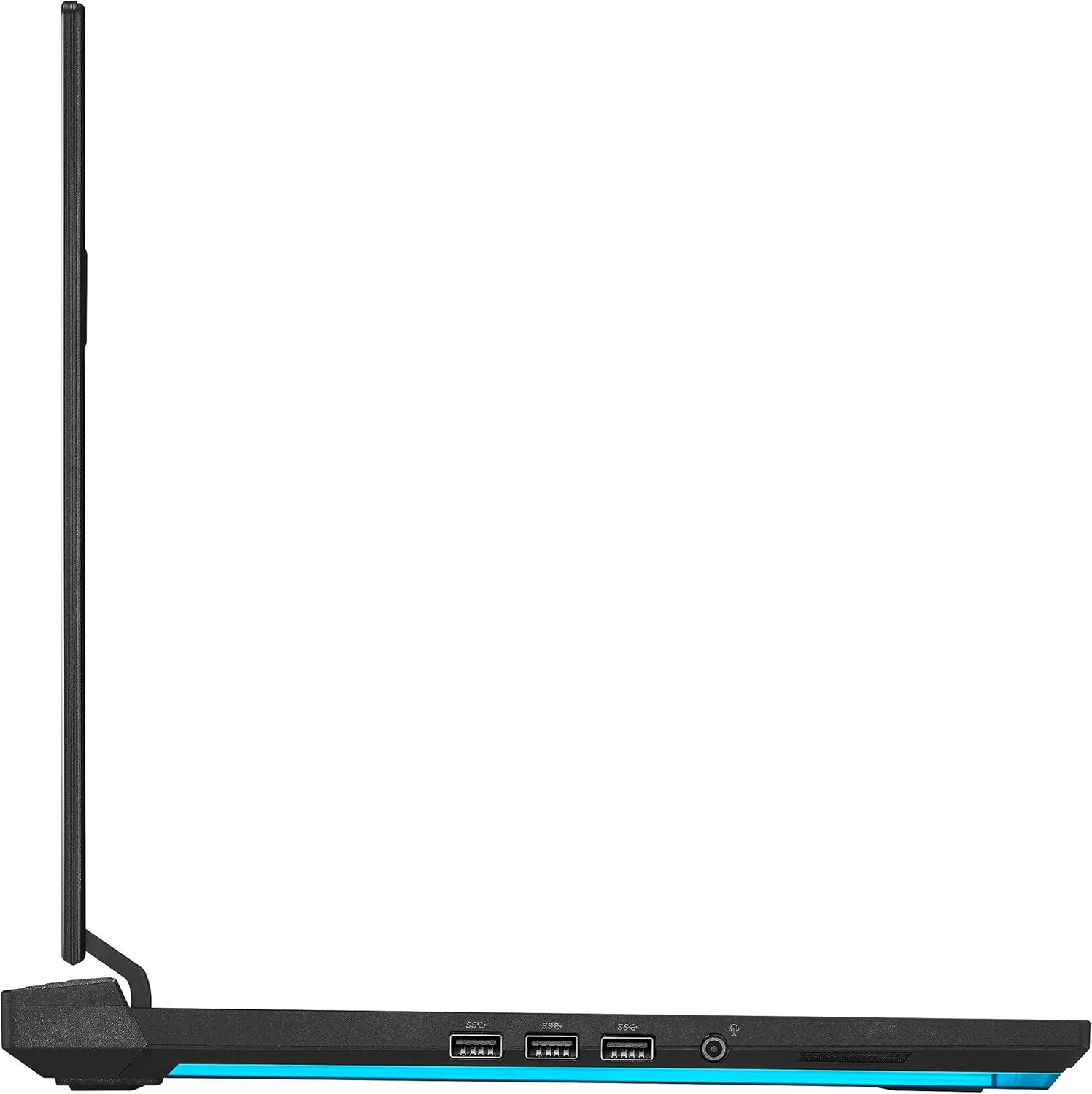
Figure 2: Side view with connectivity ports (USB 3.0, Audio Jack)
4. Operation
This section covers general operation and key functionalities of your laptop.
4.1 Keyboard and Touchpad
The laptop features a Per-Key RGB backlit keyboard and a precision touchpad. Familiarize yourself with the layout and function keys (Fn) for quick access to system settings like volume, brightness, and keyboard backlighting.

Figure 3: Keyboard and Touchpad Layout
4.2 Display Settings
Your laptop is equipped with a 240Hz 3ms Full HD IPS display. You can adjust display settings, refresh rate, and color profiles through Windows display settings or the NVIDIA Control Panel for optimal visual experience, especially during gaming.
4.3 MyASUS Application
The MyASUS application provides a centralized platform for system diagnostics, software updates, customer support, and various customization options for your laptop. It helps keep your system updated and allows for personalized settings.
Video 1: MyASUS Product Video - Demonstrates features like system updates, diagnostics, and customization options within the MyASUS application.
5. Maintenance
Regular maintenance helps preserve your laptop's performance and extend its lifespan.
- Cleaning: Use a soft, lint-free cloth to clean the screen and chassis. For stubborn smudges, dampen the cloth slightly with water or a screen cleaner. Avoid harsh chemicals. Regularly clean the keyboard to prevent dust buildup.
- Cooling System: Ensure the laptop's vents are clear of obstructions to allow for proper airflow. The ROG Intelligent Cooling system with liquid metal compound is designed for efficient heat management, but external blockages can hinder its effectiveness.
- Battery Care: To prolong battery life, avoid frequently discharging the battery completely. If storing the laptop for an extended period, charge it to about 50-60% and store it in a cool, dry place.
- Software Updates: Regularly check for and install operating system updates, driver updates (especially for graphics and chipset), and MyASUS application updates. These updates often include performance improvements, security patches, and bug fixes.
- Data Backup: Periodically back up important data to an external drive or cloud storage to prevent data loss.
6. Troubleshooting
This section addresses common issues you might encounter and provides basic solutions.
| Problem | Possible Cause | Solution |
|---|---|---|
| Laptop does not power on | No power, discharged battery, power button issue. | Ensure AC adapter is securely connected and plugged into a working outlet. Try a different outlet. Allow the battery to charge for at least 30 minutes before attempting to power on again. |
| Display is blank or black | Sleep mode, external display connected, display driver issue. | Press any key or move the mouse to wake the laptop. Disconnect any external monitors. Restart the laptop. Update graphics drivers via MyASUS or NVIDIA's website. |
| Poor performance or overheating | Excessive background processes, blocked vents, outdated drivers. | Close unnecessary applications. Ensure vents are clear. Check MyASUS for system diagnostics and driver updates. Consider adjusting fan profiles in MyASUS. |
| Wi-Fi connectivity issues | Router issue, incorrect Wi-Fi settings, driver problem. | Restart your router and modem. Check Wi-Fi settings in Windows. Ensure Wi-Fi drivers are updated through MyASUS or ASUS support website. |
For more detailed diagnostics and support, utilize the "One-click diagnosis" feature within the MyASUS application or contact ASUS customer support.
7. Specifications
Detailed technical specifications for the ASUS ROG Strix Scar 15 (G532LWS-DS76).
| Feature | Detail |
|---|---|
| Model Name | ROG Strix Scar 15 (G532LWS-DS76) |
| Display Size | 15.6 Inches |
| Screen Resolution | 1920 x 1080 pixels (Full HD) |
| Refresh Rate | 240Hz |
| Response Time | 3ms |
| Processor | Intel Core i7-10875H (5.1 GHz max) |
| RAM | 16 GB DDR4 3200MHz |
| Storage | 1 TB PCIe SSD |
| Graphics Coprocessor | NVIDIA GeForce RTX 2070 SUPER (8GB GDDR6) |
| Operating System | Windows 10 Home |
| Wireless Connectivity | 802.11ax (Wi-Fi 6), Bluetooth |
| USB Ports | 4 x USB 3.0 Ports |
| Item Weight | 5.67 pounds (approx. 2.57 kg) |
| Product Dimensions (LxWxH) | 14.2 x 10.8 x 0.98 inches (approx. 36.07 x 27.43 x 2.49 cm) |
| Color | Black |
| Batteries | 1 Lithium Ion battery (included) |
8. Warranty and Support
Your ASUS ROG Strix Scar 15 laptop comes with a standard manufacturer's warranty. For specific warranty terms and conditions, please refer to the warranty card included with your product or visit the official ASUS support website.
For technical assistance, driver downloads, FAQs, and service requests, please visit the ASUS Support Website or use the MyASUS application on your laptop. The MyASUS application offers diagnostic tools and direct contact options for support.
Contact ASUS Support:
- Visit the official ASUS support website for your region.
- Use the "Contact ASUS" feature within the MyASUS application.


