
Barkan E3423
Barkan 13-58 inch Full Motion TV Wall Mount User Manual
Brand: Barkan | Model: E3423
1. Introduction
This manual provides detailed instructions for the safe and proper installation, operation, and maintenance of your Barkan Full Motion TV Wall Mount, model E3423. Please read this manual thoroughly before beginning installation and keep it for future reference.
1.1. What's in the Box
- TV Mount
- Hardware Kit
- Manual (this document)
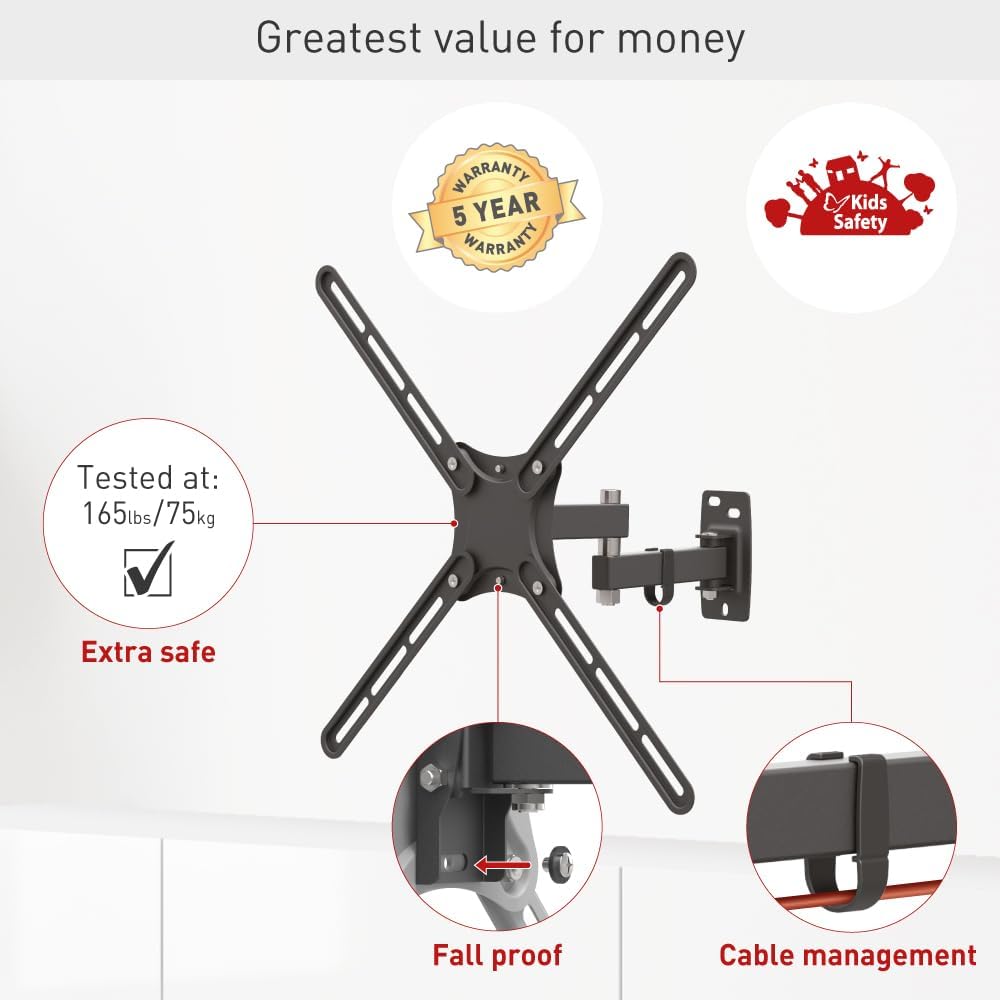
For a visual representation of the product and its components, please refer to the image below:

Additional detailed installation and safety information can be found in the official PDF documents:
2. Safety Information
Your safety and the safety of your television are paramount. Please adhere to all safety guidelines during installation and use.
- Ensure the wall structure can support the weight of the mount and the TV.
- Do not exceed the maximum weight capacity of 55 lbs (25 kg).
- Always use appropriate tools and safety gear, such as safety glasses, during installation.
- The Barkan TV mounts include a Fall Proof system designed to prevent disengagement of the screen, enhancing child safety by reducing tip-over risks.
- If you are unsure about any part of the installation process, consult a qualified professional.
3. Setup and Installation
The Barkan TV Wall Mount is designed for self, easy, and fast assembly. Follow these steps carefully for a secure installation.
3.1. Assembly Steps (1-2-3)
- Attach the adapters to the rear side of the TV: Secure the TV plate to the back of your television using the provided screws and spacers.
- Install the bracket on the wall: Mount the wall bracket securely to your chosen wall location. Ensure it is level and properly anchored.
- Snap the TV onto the bracket: Carefully lift the TV and snap it onto the wall bracket, ensuring it is fully engaged and secure.

3.2. Hardware Kit
The mount comes with a comprehensive hardware kit. Ensure you use the correct screws and anchors for your wall type and TV model.

3.3. Wall Compatibility and Required Tools
This mount is compatible with drywall with wood studs and concrete walls. It is NOT suitable for drywall/gypsum/plaster walls without studs.
Required Tools:
- Drill (1/4" - 6mm or 3/8" - 10mm bit)
- Level
- Safety glasses
- Stud finder

4. Operating the Mount
The Barkan Full Motion TV Wall Mount offers versatile adjustments to achieve the perfect viewing angle.
4.1. Movement Capabilities
The mount features 3 pivots for extensive movement:
- Rotation: Rotates near the wall up to 180°.
- Fold: Folds up to 360°.
- Swivel: Swivels near the screen connection plate up to 180°.
- Tilt: Tool-free tilt adjustment from -5° to +15°.
- Leveling: Screen leveling of ±5°.
- Extension: Extends from the wall a minimum of 2.6" (6.5cm) to a maximum of 11.9" (30.5cm).
You can easily rotate, swivel, or tilt the TV by gently pushing or pulling it to the desired angle. This allows for a wide range of viewing angles suitable for various sitting positions.

5. Maintenance
To ensure the longevity and safe operation of your Barkan TV Wall Mount, follow these simple maintenance guidelines:
- Periodically check all screws and bolts to ensure they remain tight and secure.
- Clean the mount with a soft, dry cloth. Avoid using abrasive cleaners or solvents.
- Inspect the mount for any signs of wear or damage. If any issues are found, contact Barkan customer support immediately.
6. Troubleshooting
If you encounter any issues with your Barkan TV Wall Mount, consider the following general advice:
- Mount feels loose: Re-check all wall anchors and TV connection screws. Ensure they are tightened according to the installation instructions.
- Difficulty adjusting movement: Ensure no cables are snagged or obstructing the mount's articulation points.
- TV not level: Use the leveling adjustment feature to correct the screen's horizontal alignment.
For more complex issues or if the problem persists, please refer to the support section or contact Barkan customer service.
7. Specifications
| Feature | Detail |
|---|---|
| Model Number | E3423 |
| Compatible TV Sizes | 13-58 inches |
| Maximum Load Capacity | 55 lbs (25 kg) |
| VESA Standard (Bracket Mounting Holes Patterns) | 75x75, 100x100, 100x200, 200x100, 200x200, 300x300, 300x400, 400x200, 400x300, 400x400 mm |
| Movement Type | Articulating (Full Motion) |
| Tilt Angle | -5° to +15° |
| Swivel Angle | 180° (near screen connection plate) |
| Rotation Angle | 180° (near wall) |
| Distance from Wall | Min. 2.6" (6.5cm) / Max. 11.9" (30.5cm) |
| Material | Metal |
| Color | Black |
| Item Weight | 3.94 pounds |
| UPC | 818212002398 |
7.1. Backscreen Connection Positioning Options
The mount supports various backscreen connection patterns. Refer to the diagram below to identify the correct positioning for your TV.

8. Warranty
The Barkan 13-58 inch Full Motion TV Wall Mount comes with a 5-Year Warranty. This warranty covers defects in materials and workmanship under normal use. Please retain your proof of purchase for warranty claims.
9. Customer Support
Barkan Mounts is committed to enhancing your viewing experience. Our customer service experts are available every day of the week and are ready to help with any questions or concerns you may have.
For more information, FAQs, video demonstrations, and other helpful tools, please visit the official Barkan website:
Ask a question about this manual
Ask about setup, troubleshooting, compatibility, parts, safety, or missing instructions. Manuals+ will review the question and use this page’s manual context to help answer it.