
Introduction
This manual provides detailed instructions for the setup, operation, and maintenance of your Douk Audio M4 4-Channel Bluetooth Amplifier. Please read this manual thoroughly before using the product to ensure proper function and longevity.

Image: Front view of the Douk Audio M4 4-Channel Bluetooth Amplifier, showcasing its compact design and control knobs.
Product Features
- 4-Channel Output: Provides 50W x 4 audio power, with independent volume control for each channel.
- Multiple Audio Inputs: Supports wired stereo RCA (2 groups) and wireless Bluetooth 5.0 input.
- U-disk Playback: Functions as a digital music player, supporting MP3, WAV, APE, FLAC, and WMA lossless formats.
- Flexible RCA Configuration: One group of stereo RCA (CH3 and CH4) can be switched between audio input or output.
- Advanced Bluetooth: Bluetooth 5.0 with high-gain antenna for stable and fast transmission.
- Durable Construction: CNC machined aluminum alloy case with anodizing process.
Package Contents
Verify that all items are present in the package:
- 1x Douk Audio M4 Amplifier
- 1x 24V Power Supply
- 1x Bluetooth Antenna
- 1x Raw Cable Speaker Jacks (Connector Block)

Image: Diagram showing the Douk Audio M4 amplifier, 24V power supply, Bluetooth antenna, and raw cable speaker jacks included in the package.
Setup Instructions
1. Front and Rear Panel Overview

Image: Detailed diagram illustrating the front panel controls (power switch, U-disk input, Bluetooth/U-disk indicator, volume knobs for CH1-CH4) and rear panel connections (CH1&CH2 RCA input, CH3&CH4 RCA input/output, CH3&CH4 mode switch, Bluetooth interface, DC 12V-24V IN, speaker output).
2. Connecting Speakers
The M4 amplifier features 4 groups of speaker sockets. Connect your passive speakers to these terminals. Ensure correct polarity (+ to + and - to -) for optimal sound quality.

Image: The Douk Audio M4 amplifier positioned in a home theater setup, connected to four floor-standing speakers and a television, demonstrating its 4-channel speaker output capability.
3. Audio Input Connections
The amplifier supports multiple input sources:
- RCA Input: Connect audio sources like CD players, TVs, or computers using RCA cables to the CH1&CH2 RCA input or the CH3&CH4 RCA input (when set to input mode).
- Bluetooth Input: Pair your Bluetooth-enabled device (phone, tablet, computer) wirelessly.
- U-disk Input: Insert a USB flash drive containing audio files into the USB port.
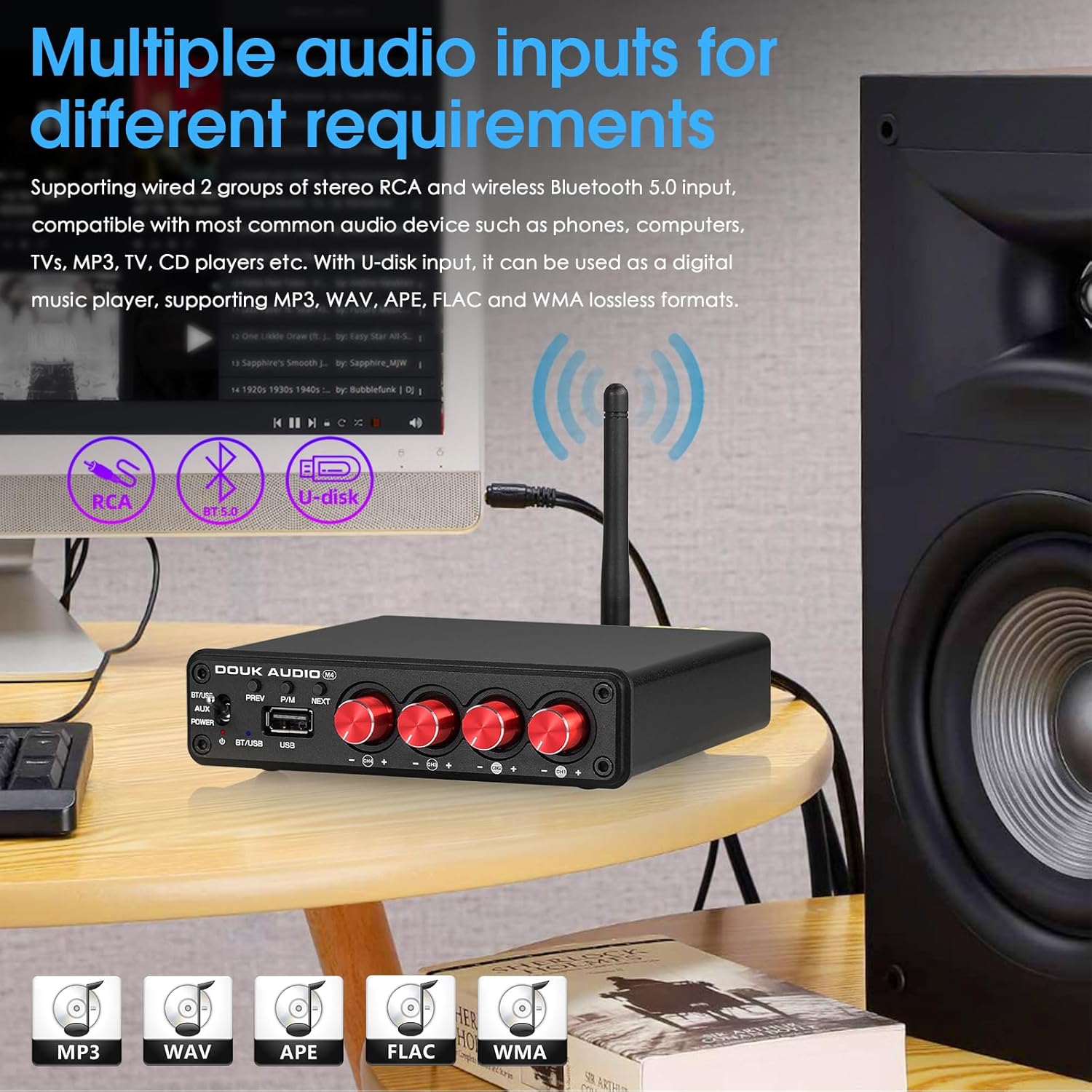
Image: The Douk Audio M4 amplifier on a table next to a speaker and a laptop, illustrating its support for RCA, Bluetooth 5.0, and U-disk inputs for various audio sources.
4. CH3/CH4 RCA Mode Selection
The CH3/CH4 RCA jacks offer dual functionality, configurable via the "SELECT" switch on the rear panel:
- Audio Input Mode: When the switch is set to "IN", the CH3/CH4 RCA jacks function as an additional stereo audio input. This allows two groups of stereo audio signals (or four groups of mono audio signals) to be input simultaneously.
- Audio Output Mode (Line Out): When the switch is set to "OUT", the CH3/CH4 RCA jacks provide a line-level audio output. This can be used to connect to another amplifier (e.g., another M4 unit for multi-room audio) or active speakers, allowing the audio signal to be shared across multiple rooms or systems.

Image: Diagram illustrating the rear panel connections with the CH3/CH4 switch set to "IN" for audio input, showing various devices connected as sources in mono and stereo modes.

Image: Diagram illustrating the rear panel connections with the CH3/CH4 switch set to "OUT" for audio output, demonstrating how multiple M4 amplifiers can be cascaded for a multi-room audio system.
Video: An overview of the Douk Audio M4 4-Channel Bluetooth Amplifier, demonstrating its features and connectivity options.
Operating Instructions
1. Power On/Off and Input Selection
- Use the toggle switch on the front panel to power the unit ON or OFF.
- This switch also functions as the input selector:
- BT/USB: Selects Bluetooth or U-disk input. U-disk has priority if both are connected.
- AUX: Selects the RCA audio inputs.
- The power indicator (red) illuminates when the unit is on. The Bluetooth (blue) / U-disk (red) indicator shows the active digital input.
2. Volume Control
The M4 amplifier features four independent volume knobs for each channel (CH1, CH2, CH3, CH4). Adjust these knobs to set the desired volume level for individual speakers or speaker pairs.
3. U-disk Playback Controls
When using a U-disk as the audio source:
- PREV: Short press to go to the previous song.
- P/M (Play/Pause): Short press to play or pause the current track. Long press to switch between U-disk and Bluetooth input.
- NEXT: Short press to go to the next song.
4. Bluetooth Pairing
- Switch the input selector to "BT/USB".
- The Bluetooth indicator (blue) will flash, indicating it's in pairing mode.
- On your device (smartphone, tablet, computer), search for Bluetooth devices and select "Douk Audio M4" to pair.
- Once paired, the Bluetooth indicator will remain solid blue.
Maintenance
- Cleaning: Use a soft, dry cloth to clean the amplifier's exterior. Avoid liquid cleaners or solvents.
- Placement: Place the amplifier in a well-ventilated area to prevent overheating. Avoid direct sunlight, heat sources, and excessive moisture.
- Power: Disconnect the power supply when the unit is not in use for extended periods.
Troubleshooting
| Problem | Possible Cause | Solution |
|---|---|---|
| No sound output |
|
|
| Bluetooth not pairing |
|
|
| U-disk not playing |
|
|
Specifications
| Feature | Detail |
|---|---|
| Brand | Douk Audio |
| Model Number | SUC-M4 |
| Number of Channels | 4 |
| Output Power | 50W x 4 (Total 200 Watts) |
| Bluetooth Version | 5.0 |
| Input Voltage | DC 12-24 Volts |
| Supply Current | 4.5 Amps |
| Material | Aluminum |
| Item Weight | 2.42 pounds (1.10 kg) |
| Package Dimensions | 11.61 x 9.13 x 2.52 inches |
| Certifications | CE, FCC |
Customer Support
For any questions, technical assistance, or support regarding your Douk Audio M4 amplifier, please contact Douk Audio customer service. Refer to your purchase documentation for specific contact details or visit the official Douk Audio website.
Note: While a return policy is mentioned, specific warranty details should be confirmed with the seller or manufacturer.


