1. Introduction
Welcome to the Sanyo Denki DC Fan 9LG0912H4001 user manual. This document provides essential information for the safe and efficient installation, operation, and maintenance of your Sanyo Denki DC cooling fan. Please read this manual thoroughly before using the product and retain it for future reference.
2. Safety Information
Observe the following safety precautions to prevent injury or damage to the product:
- Electrical Safety: Ensure the power supply matches the fan's voltage (12V DC). Incorrect voltage can cause damage or fire. Disconnect power before installation or maintenance.
- Handling: Avoid touching the fan blades while the fan is operating or connected to power. Keep fingers and foreign objects away from moving parts.
- Installation Environment: Install the fan in a well-ventilated area, free from excessive dust, moisture, or corrosive gases. Ensure proper clearance for airflow.
- Mounting: Securely mount the fan using appropriate fasteners to prevent vibration and accidental detachment.
3. Product Overview
The Sanyo Denki DC Fan 9LG0912H4001 is a high-performance cooling fan designed for various industrial and electronic applications. It provides efficient airflow to dissipate heat, ensuring optimal operating temperatures for components and systems.
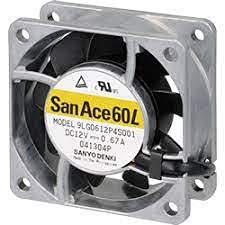
Figure 1: Representative Sanyo Denki DC Fan. Note: The model number shown on the fan in this image (9LG0612P4S001) may differ from the specific product model (9LG0912H4001) covered by this manual. This image serves as a general visual reference.
4. Specifications
Key technical specifications for the Sanyo Denki DC Fan 9LG0912H4001:
| Feature | Detail |
|---|---|
| Manufacturer | Sanyo Denki |
| Part Number (Model) | 9LG0912H4001 |
| Product Weight | 3.17 Kilograms |
| Product Dimensions (LxWxH) | 9.2 x 2.5 x 2.5 cm |
| Voltage | 12 Volts DC |
| Cooling Method | Air |
| UPC | 790409680162 |
5. Setup and Installation
Follow these steps for proper installation of your DC fan:
- Unpacking: Carefully remove the fan from its packaging. Inspect for any visible damage.
- Mounting Location: Choose a mounting location that allows for unrestricted airflow and is free from excessive heat, dust, or moisture. Ensure the fan is positioned to draw air from the desired area and exhaust it effectively.
- Mounting: Secure the fan to the desired surface using appropriate screws or mounting hardware (not included). Ensure the fan is firmly attached to prevent vibration and noise during operation. The fan typically has mounting holes on its frame for this purpose.
- Wiring: Connect the fan's power leads to a stable 12V DC power source. Observe correct polarity: typically, the red wire is positive (+) and the black wire is negative (-). Incorrect polarity will prevent the fan from operating or may cause damage.
- Final Check: Before applying power, double-check all connections and ensure no wires are loose or exposed.
6. Operating Instructions
Once installed, operating the Sanyo Denki DC Fan 9LG0912H4001 is straightforward:
- Power On: Apply 12V DC power to the fan. The fan blades should begin to rotate, generating airflow.
- Continuous Operation: The fan is designed for continuous operation within its specified voltage and temperature ranges.
- Monitoring: Periodically check the fan's operation to ensure it is spinning freely and providing adequate cooling. Listen for unusual noises.
- Power Off: To stop the fan, disconnect the 12V DC power supply.
7. Maintenance
Regular maintenance helps ensure the longevity and optimal performance of your fan:
- Cleaning: Periodically clean dust and debris from the fan blades and grille. Use a soft brush or compressed air. Always disconnect power before cleaning.
- Inspection: Regularly inspect the fan for any signs of wear, such as loose wires, damaged blades, or excessive vibration.
- Environment: Maintain a clean operating environment to minimize dust accumulation on the fan.
8. Troubleshooting
If you encounter issues with your Sanyo Denki DC Fan, refer to the following common problems and solutions:
| Problem | Possible Cause | Solution |
|---|---|---|
| Fan does not spin | No power, incorrect wiring, faulty power supply, obstructed blades. | Check power connection and polarity. Verify power supply output. Ensure blades are free from obstructions. |
| Excessive noise or vibration | Loose mounting, foreign object in blades, worn bearings. | Tighten mounting screws. Disconnect power and remove any obstructions. If bearings are worn, replacement may be necessary. |
| Reduced airflow | Dust accumulation, obstructed intake/exhaust. | Clean fan blades and grilles. Ensure intake and exhaust paths are clear. |
If the problem persists after attempting these solutions, contact Sanyo Denki customer support or a qualified technician.
9. Warranty Information
Sanyo Denki products are manufactured to high-quality standards. This product is covered by the manufacturer's standard warranty. For specific warranty terms and conditions, please refer to the documentation provided with your purchase or visit the official Sanyo Denki website.
10. Customer Support
For technical assistance, spare parts, or further inquiries regarding your Sanyo Denki DC Fan 9LG0912H4001, please contact Sanyo Denki customer support. Contact information can typically be found on the official Sanyo Denki website or on your product packaging.
Please have your model number (9LG0912H4001) and purchase details ready when contacting support.