
1. Product Overview
The BILIONE 3-in-1 Multi-Function Desktop Microphone Stand is designed for stability and versatility, supporting various microphones and functioning as a cell phone stand. Its weighted base and adjustable height make it suitable for podcasting, live streaming, recording, conferences, and lectures.
2. What's in the Box
Upon unboxing your BILIONE Desktop Microphone Stand, you should find the following components:
- Weighted Round Base
- Adjustable Stand Pole
- Microphone Clip
- Cell Phone Clip
- 5/8" Male to 3/8" Female Metal Adapter

Figure 1: All components included in the package.
3. Setup Instructions
3.1 Assembling the Stand
- Attach the Stand Pole to the Base: Screw the adjustable stand pole clockwise into the weighted round base until secure.
- Adjust Height: Loosen the knob on the stand pole to extend or retract the pole to your desired height (from 8.2" to 12.8"). Tighten the knob to lock the height.

Figure 2: Adjusting the stand height.
3.2 Attaching Accessories
The stand supports both a microphone clip and a cell phone clip. Use the included 5/8" Male to 3/8" Female Metal Adapter if your microphone or shock mount requires it.
- For Microphones:
- Screw the microphone clip onto the top of the stand pole.
- If your microphone or shock mount has a 3/8" thread, first screw the 5/8" Male to 3/8" Female Metal Adapter onto the stand pole, then attach your microphone clip or shock mount to the adapter.
- Insert your microphone into the clip. The clip allows for 180° angle adjustment.
- For Cell Phones:
- Screw the cell phone clip onto the top of the stand pole.
- Place your cell phone into the clip. The clip supports phones with screen widths from 2" to 5" and allows for 180° rotation and 90° tilt.

Figure 3: Microphone clip assembly and angle adjustment.
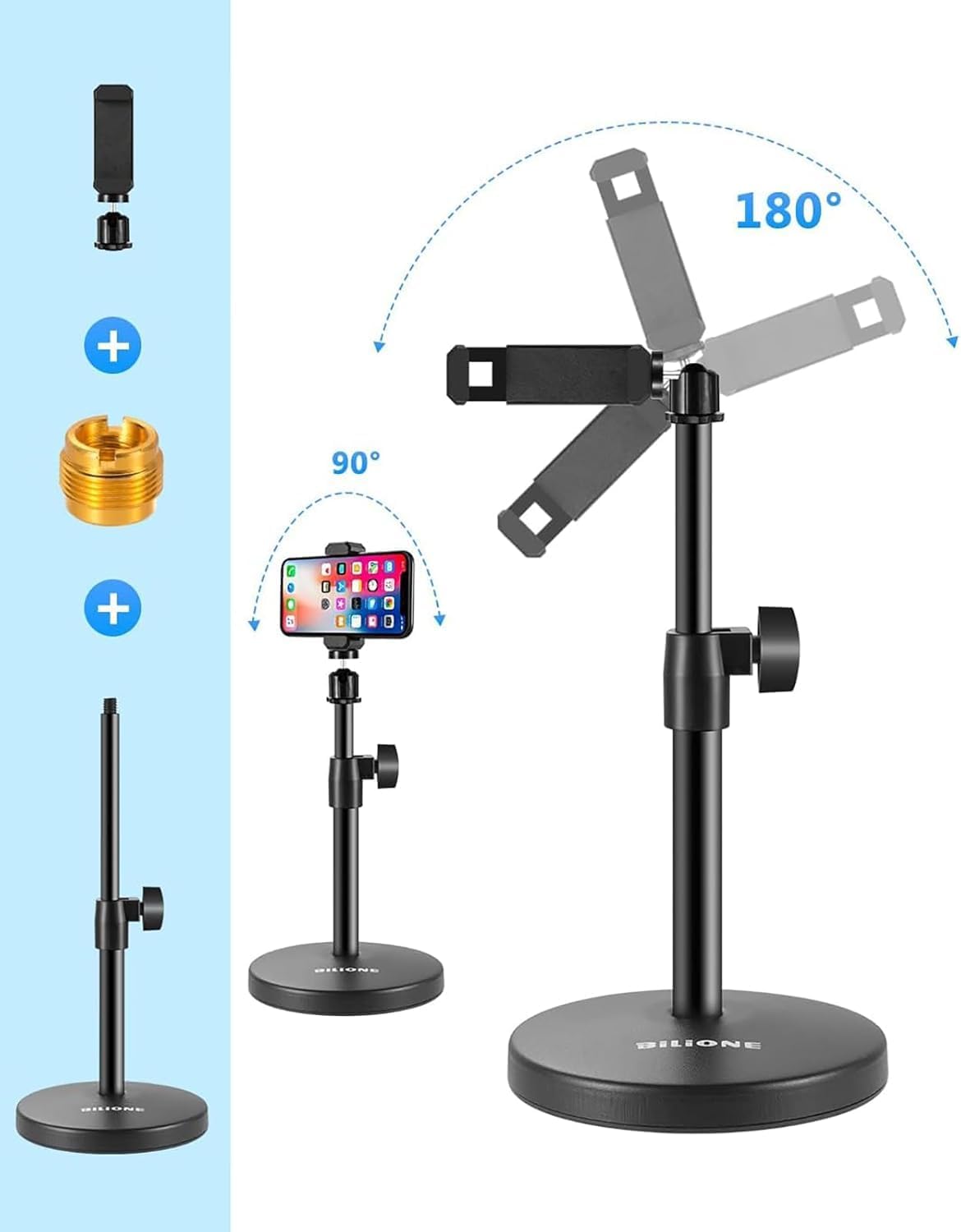
Figure 4: Cell phone clip assembly and rotation/tilt adjustment.
4. Operating Instructions
4.1 Using with a Microphone
The BILIONE stand is compatible with most vocal dynamic microphones, handheld microphones, and USB microphones. The weighted base (1.02 lbs) provides stability, preventing accidental tipping. For heavy-duty microphones, ensure the clamp screw is tightened securely with a screwdriver.

Figure 5: The weighted base ensures stability for your microphone.
4.2 Using as a Cell Phone Stand
Easily switch to the cell phone clip to use the stand for recording videos, live streaming, or video calls. The adjustable angles allow you to position your phone for optimal viewing or recording.
Video 1: Official demonstration of the BILIONE 3-in-1 Multi-Function Desktop Microphone Stand, showcasing its assembly and use with both microphone and cell phone clips, including height and angle adjustments.
5. Maintenance
- Cleaning: Wipe the stand with a soft, dry cloth to remove dust and debris. Avoid using abrasive cleaners or solvents.
- Storage: Store the stand in a dry place away from extreme temperatures.
- Inspection: Periodically check all screws and connections to ensure they are tight and secure.
6. Troubleshooting
6.1 Stand Instability
- Issue: The stand feels wobbly or tips over easily.
- Solution: Ensure the stand pole is fully screwed into the weighted base. If using a heavy microphone, verify the height adjustment knob is securely tightened.
6.2 Microphone/Phone Not Fitting
- Issue: Microphone does not fit the clip or shock mount.
- Solution: Check if the 5/8" Male to 3/8" Female Metal Adapter is needed for your specific microphone or shock mount. Ensure your phone's width is within the supported range of 2" to 5" for the cell phone clip.
7. Specifications
| Feature | Detail |
|---|---|
| Brand | BILIONE |
| Model Number | 101S |
| Material | Metal |
| Item Weight | 1.1 Pounds (weighted base: 1.02 lbs) |
| Item Dimensions (L x W x H) | 6.69 x 5.12 x 2.17 inches |
| Adjustable Height | 8.2" to 12.8" (20.8 cm to 32.5 cm) |
| Microphone Thread Size | 3/8 inch, 5/8 inch (with adapter) |
| Cell Phone Clip Compatibility | Screen width 2" to 5" |
| Included Components | Metal Adapter, Mic Clip, Cell Phone Clip |
8. Warranty and Support
For warranty information or technical support, please refer to the product packaging or contact BILIONE customer service directly. Keep your purchase receipt for warranty claims.