
1. Introduction
This instruction manual provides essential information for the safe and efficient operation, installation, and maintenance of your Frigidaire FFMV1846VS Over-the-Range Microwave. Please read this manual thoroughly before using your appliance and retain it for future reference.
2. Important Safety Information
Observe all safety precautions to reduce the risk of fire, electric shock, injury to persons, or exposure to excessive microwave energy.
- Do not attempt to operate this oven with the door open or if the door is damaged.
- Do not place any metal objects, such as aluminum foil or metal utensils, inside the microwave during operation, as this can cause arcing or fire.
- Ensure proper ventilation during installation and operation.
- Never heat sealed containers, as pressure buildup can cause them to explode.
- Always supervise children when they are near the appliance.
- Do not use corrosive chemicals or vapors in this appliance.
3. Setup and Installation
Your Frigidaire FFMV1846VS microwave is designed for over-the-range installation. Professional installation is recommended to ensure proper mounting and electrical connection.
3.1 Unpacking
- Carefully remove all packaging materials from the microwave oven.
- Inspect the oven for any damage, such as dents or a misaligned door. Do not operate if damaged.
- Ensure all accessories, including the glass turntable and roller ring, are present.
3.2 Installation Considerations
This model is designed for non-ducted venting. A recirculating kit is sold separately if required for your installation type. Refer to the detailed installation instructions provided with the appliance for specific mounting and electrical requirements.
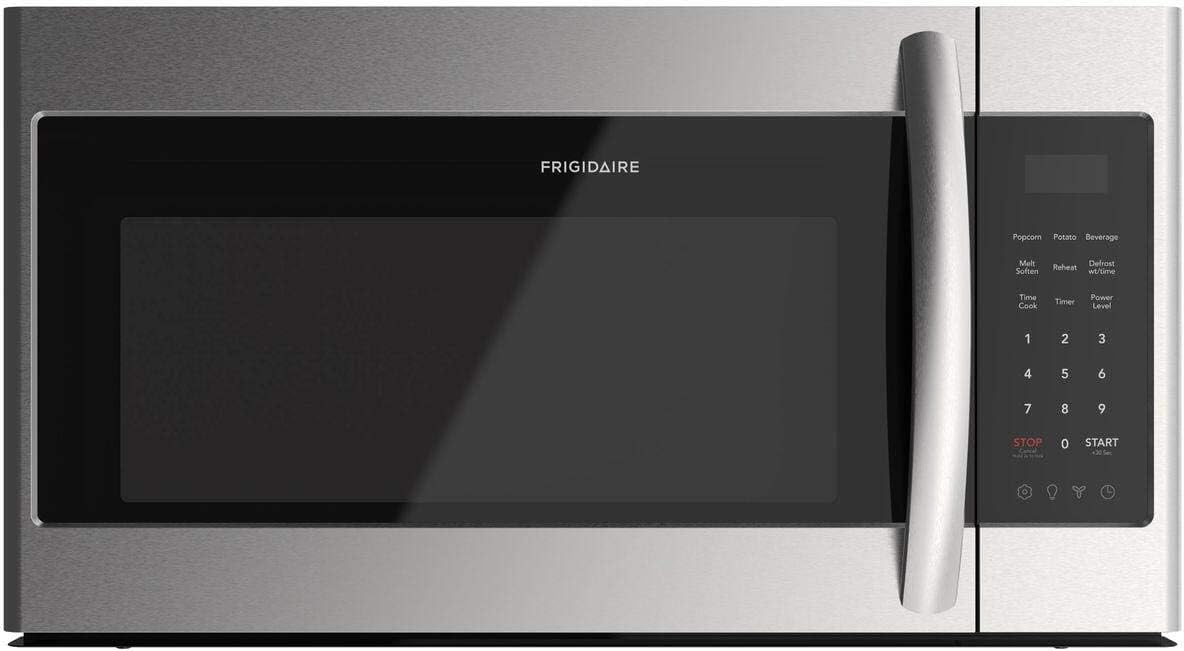
Figure 3.1: Front view of the Frigidaire FFMV1846VS Over-the-Range Microwave.

Figure 3.2: Dimensions of the Frigidaire FFMV1846VS microwave, showing width 29.87", height 15.62", and depth 15.75".
3.3 Initial Power-On and Clock Setting
- After installation, plug the microwave into a grounded electrical outlet.
- The display will show '0:00' or 'ENTER CLOCK TIME'.
- Press the 'Timer' button once.
- Enter the current time using the number pad.
- Press the 'Timer' button again to confirm.
4. Operating Instructions
This section details the various functions and controls of your microwave oven.

Figure 4.1: Close-up view of the microwave's control panel, showing the digital display and various function buttons.
4.1 Basic Microwave Cooking (Time Cook)
- Place food in a microwave-safe container on the glass turntable.
- Close the microwave door securely.
- Press the 'Time Cook' button.
- Enter the desired cooking time using the number pad (e.g., '1' '0' '0' for 1 minute).
- Press 'Start'. The microwave will begin cooking at 100% power.
4.2 Adjusting Power Level
To cook at a power level lower than 100%:
- After entering the cooking time (Step 4 in 4.1), press the 'Power Level' button.
- Enter the desired power level from 1 to 10 (e.g., '7' for 70% power).
- Press 'Start'.
4.3 One-Touch Cooking Functions
The microwave features several convenient one-touch buttons for common items:
- Popcorn: Press for automatic popcorn cooking.
- Potato: Press for automatic potato cooking.
- Beverage: Press for automatic beverage reheating.
- Melt/Soften: Press to melt or soften butter, chocolate, or other items.
- Reheat: Press for automatic reheating of various foods.

Figure 4.2: Detailed view of the control panel, highlighting the 'Popcorn', 'Potato', 'Beverage', 'Melt/Soften', 'Reheat', and 'Defrost wt/time' buttons.
4.4 Defrosting (Weight/Time)
The microwave offers defrosting by weight or by time:
- Defrost wt/time: Press this button, then enter the weight of the food in pounds (e.g., '1' '5' for 1.5 lbs) or the desired defrosting time. Press 'Start'.
4.5 Timer Function
The timer can be used independently of microwave cooking:
- Press the 'Timer' button.
- Enter the desired time using the number pad.
- Press 'Start'. The timer will count down without activating the microwave.
4.6 Child Lock
To prevent unintended operation, activate the Child Lock:
- To activate: Press and hold the 'STOP/Cancel' button for 3 seconds until 'LOCK' appears on the display.
- To deactivate: Press and hold the 'STOP/Cancel' button for 3 seconds until 'LOCK' disappears.

Figure 4.3: Close-up of the lower section of the control panel, showing the 'STOP/Cancel' button and quick add time buttons (+10 Sec, +30 Sec).
4.7 Cooktop Light and Fan Operation
- Cooktop Light: Press the light bulb icon button to cycle through light settings (On/Off). This model features an LED cooktop light.
- Vent Fan: Press the fan icon button to cycle through fan speeds (Low/High/Off). The fan operates at 2 speeds, providing 105/300 CFM.

Figure 4.4: Interior view of the microwave with the door open, showing the cooking cavity and the glass turntable.

Figure 4.5: Close-up view of the removable glass turntable and roller ring inside the microwave cavity.
5. Care and Maintenance
Regular cleaning and maintenance will ensure the longevity and optimal performance of your microwave.
5.1 Cleaning the Exterior
- Wipe the exterior surfaces, including the door and control panel, with a soft, damp cloth and mild soap.
- For stainless steel surfaces, use a stainless steel cleaner and polish, wiping in the direction of the grain.
- Avoid abrasive cleaners or scouring pads, which can scratch the surface.
5.2 Cleaning the Interior
- Clean the interior cavity with a soft cloth, warm water, and mild soap.
- For stubborn food splatters, place a bowl of water with lemon slices inside and microwave for 2-3 minutes. The steam will loosen the residue, making it easier to wipe away.
- Remove the glass turntable and roller ring for cleaning. Wash them in warm, soapy water or in the dishwasher. Ensure they are completely dry before returning them to the microwave.
5.3 Filter Maintenance
- Grease Filters: The grease filters located on the underside of the microwave should be cleaned regularly (monthly or as needed). Remove them by sliding them out and wash in hot, soapy water or a dishwasher.
- Charcoal Filter (if applicable): If your microwave is set up for recirculating (non-ducted) ventilation, it will have a charcoal filter to remove odors. This filter is not washable and should be replaced every 6-12 months, depending on usage. Refer to your installation guide for replacement instructions.
6. Troubleshooting
Before contacting service, review the following common issues and solutions:
| Problem | Possible Cause | Solution |
|---|---|---|
| Microwave does not start. | Door not closed properly; Power cord unplugged; Blown fuse/tripped circuit breaker; Child Lock activated. | Ensure door is firmly closed; Check power cord connection; Reset circuit breaker/replace fuse; Deactivate Child Lock (hold 'STOP/Cancel' for 3 seconds). |
| No heat during cooking. | Incorrect power level set; Malfunction. | Verify power level setting; If problem persists, contact customer support. |
| Turntable does not rotate. | Turntable not properly seated; Obstruction; Motor malfunction. | Ensure turntable and roller ring are correctly positioned; Remove any obstructions; If problem persists, contact customer support. |
| Display shows error message. | Temporary electronic glitch. | Unplug the microwave for 30 seconds, then plug it back in. If the error persists, contact customer support. |
7. Product Specifications
Key technical specifications for the Frigidaire FFMV1846VS Over-the-Range Microwave:
- Model Number: FFMV1846VS
- Capacity: 1.8 cu. ft.
- Cooking Watts: 1000 Watts
- Power Levels: 10
- CFM (Vent Fan): 300 CFM (2 Speeds: 105/300 CFM)
- Venting Type: Non Ducted (Recirculating Kit Sold Separately)
- Voltage: 120 Volts
- Item Weight: 35.00 lbs
- Product Dimensions (D x W x H): 15.75" x 29.87" x 15.62"
- Material: Stainless Steel
- Special Feature: One Touch Button
- Installation Type: Over-the-Range
8. Warranty and Customer Support
Frigidaire provides a limited warranty for this product. For detailed warranty information, including terms, conditions, and registration, please refer to the warranty card included with your appliance or visit the official Frigidaire website.
For technical assistance, troubleshooting beyond this manual, or to schedule service, please contact Frigidaire Customer Support:
- Online Support: Visit the official Frigidaire support website for FAQs, manuals, and service requests.
- Phone Support: Refer to your product documentation for the customer service phone number.
When contacting support, please have your model number (FFMV1846VS) and serial number ready.