
1. Introduction
Thank you for purchasing the Geepas GHP32014 Electric Double Hotplate. This manual provides important information regarding the safe operation, installation, maintenance, and troubleshooting of your appliance. Please read this manual thoroughly before use and retain it for future reference.
2. Important Safety Instructions
When using electrical appliances, basic safety precautions should always be followed to reduce the risk of fire, electric shock, and injury to persons.
- Read all instructions before operating the hotplate.
- Do not touch hot surfaces. Use handles or knobs.
- To protect against electrical shock, do not immerse the cord, plugs, or the appliance body in water or other liquid.
- Close supervision is necessary when any appliance is used by or near children.
- Unplug from outlet when not in use and before cleaning. Allow to cool before putting on or taking off parts, and before cleaning the appliance.
- Do not operate any appliance with a damaged cord or plug, or after the appliance malfunctions or has been damaged in any manner. Contact customer service for examination, repair, or adjustment.
- The use of accessory attachments not recommended by the appliance manufacturer may cause injuries.
- Do not use outdoors.
- Do not let the cord hang over the edge of a table or counter, or touch hot surfaces.
- Do not place on or near a hot gas or electric burner, or in a heated oven.
- Extreme caution must be used when moving an appliance containing hot oil or other hot liquids.
- Always attach plug to appliance first, then plug cord into the wall outlet. To disconnect, turn any control to 'OFF', then remove plug from wall outlet.
- Do not use the appliance for other than intended use.
- Ensure adequate ventilation around the hotplate during operation.
- Do not place flammable materials near the hotplate.
3. Product Overview
The Geepas GHP32014 is a compact and portable electric double hotplate designed for flexible tabletop cooking. It features two heating elements with individual temperature controls.

Image 3.1: Front view of the Geepas GHP32014 Electric Double Hotplate, showing two black heating plates and two control knobs.

Image 3.2: The Geepas Dual Hot Plate positioned on a wooden surface, highlighting its design for flexible tabletop cooking.
Key Components:
- Heating Plates: Two solid cast iron heating elements.
- Temperature Control Knobs: Individual knobs for each hotplate to adjust heat settings.
- Indicator Lights: Illuminates when the hotplate is active and heating.
- Non-Slip Rubber Feet: Provides stability during use.
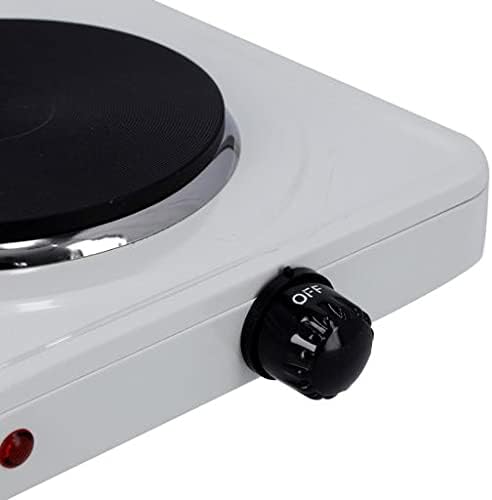
Image 3.3: A close-up view of one of the control knobs, showing the 'OFF' position and various heat settings.
4. Specifications
| Brand | Geepas |
| Model Number | GHP32014 |
| Power | 2000 Watts |
| Voltage | 240 Volts |
| Number of Heating Elements | 2 |
| Burner Type | Open (Cast Iron) |
| Control Type | Knob |
| Material | Cast Iron |
| Product Dimensions (LxWxH) | 46 x 26.5 x 7 cm |
| Item Weight | 2.5 kg |
| Special Features | Auto-Thermostat, Overheat Protection |
5. Setup
Unpacking:
- Carefully remove the hotplate from its packaging.
- Remove all packaging materials, stickers, and labels.
- Inspect the appliance for any damage. Do not use if damaged.
Placement:
- Place the hotplate on a stable, flat, and heat-resistant surface.
- Ensure there is adequate space around the hotplate for ventilation (at least 10-15 cm from walls or other appliances).
- Do not place the hotplate on or near flammable materials such as tablecloths, curtains, or paper.
- Keep the hotplate away from water sources or areas where it could be splashed.
Initial Cleaning:
Before first use, wipe the heating plates and the body of the hotplate with a damp cloth to remove any dust or manufacturing residues. Ensure the appliance is completely dry before plugging it in.
6. Operating Instructions
Connecting to Power:
Plug the power cord into a standard 240V AC electrical outlet. Ensure the outlet is properly grounded.
Using the Hotplate:
- Place appropriate cookware on the desired heating plate. Ensure the cookware base is flat and covers the heating plate adequately for efficient heating.
- Turn the corresponding temperature control knob clockwise from the 'OFF' position to the desired heat setting. The indicator light for that hotplate will illuminate, indicating that the heating element is active.
- The hotplate features an auto-thermostat function. The indicator light will cycle on and off as the hotplate maintains the selected temperature. This is normal operation.
- Adjust the temperature as needed for your cooking requirements. Lower settings are suitable for simmering, while higher settings are for boiling or frying.
- After cooking, turn the control knob back to the 'OFF' position. The indicator light will turn off.
- Unplug the hotplate from the power outlet when not in use.

Image 6.1: The hotplate in operation with a pan containing vegetables on one of the heating elements, demonstrating typical use.
Suitable Cookware:
This hotplate is compatible with all types of flat-bottomed cookware, including:
- Aluminum pans
- Copper pans
- Cast iron frying pans
- Non-magnetic stainless steel pans

Image 6.2: An illustration showing the hotplate's compatibility with different types of cookware, such as aluminum, copper, and cast iron.
7. Maintenance and Cleaning
Regular cleaning and maintenance will ensure the longevity and optimal performance of your hotplate.
Before Cleaning:
- Always unplug the hotplate from the power outlet.
- Allow the appliance to cool down completely before attempting to clean it. Hot surfaces can cause severe burns.
Cleaning the Heating Plates:
- Wipe the heating plates with a damp cloth or sponge. For stubborn food residues, use a mild non-abrasive cleaner.
- Do not use abrasive pads, steel wool, or harsh chemicals, as these can damage the surface.
- Ensure the plates are completely dry before next use or storage.
Cleaning the Body:
- Wipe the exterior body of the hotplate with a soft, damp cloth.
- Do not immerse the hotplate in water or any other liquid.
- Avoid getting water into the electrical components.
Storage:
Store the hotplate in a cool, dry place when not in use. Ensure the power cord is neatly coiled and not kinked.
8. Troubleshooting
If you encounter issues with your hotplate, refer to the following common problems and solutions:
| Problem | Possible Cause | Solution |
|---|---|---|
| Hotplate does not heat up. | Not plugged in; power outage; control knob is OFF; internal fuse tripped. | Ensure the hotplate is securely plugged in. Check the power outlet. Turn the control knob to a heat setting. If the issue persists, contact customer support. |
| Indicator light cycles on and off. | Normal operation of the auto-thermostat. | This is expected behavior as the hotplate maintains the set temperature. No action required. |
| Uneven heating. | Cookware base is not flat; cookware is too small or too large for the heating plate. | Use cookware with a flat base that matches the size of the heating plate. |
| Burning smell during first use. | Residues from manufacturing process. | This is normal for initial use. Operate the hotplate at a medium setting for 10-15 minutes in a well-ventilated area to burn off any residues. The smell should dissipate. |
If the problem persists after trying these solutions, please contact customer support.
9. Warranty and Support
Warranty:
This Geepas GHP32014 Electric Double Hotplate comes with a 2-year warranty from the date of purchase. Please retain your proof of purchase for warranty claims. The warranty covers manufacturing defects and malfunctions under normal use conditions.
Installation Support:
For installation assistance or technical support, please contact the Geepas service centers in your region:
- Riyadh: +966-11-4094006 Ext – 113
- Jeddah: +966-12-6577714
- Dammam: +966-13-8343691
- Qassim: +966 581044198
- Abha: +966 593322785