
OJ Electronics UDG-4999
OJ Microline UTN4-4999 Non-Programmable Thermostat User Manual
Model: UDG-4999 | Brand: OJ Electronics
1. Introduction
This manual provides detailed instructions for the installation, operation, and maintenance of your OJ Microline UTN4-4999 (Model UDG-4999) Non-Programmable Thermostat. This thermostat is designed for electric radiant floor heating systems and features dual sensing (air and floor) and dual voltage capabilities (120V & 240V). It includes a built-in Class A GFCI for enhanced safety.
The OJ Microline UTN4-4999 offers straightforward temperature control without complex programming, making it ideal for users seeking a simple and effective solution for their floor heating needs.

Figure 1: Front view of the OJ Microline UTN4-4999 Non-Programmable Thermostat, displaying time and temperature.
2. Safety Information
Important Safety Instructions:
- Electrical Hazard: Installation must be performed by a qualified electrician in accordance with local and national electrical codes. Disconnect power at the circuit breaker before installation or servicing.
- Ground Fault Circuit Interrupter (GFCI): This thermostat includes a built-in Class A GFCI, which is required for all underfloor heating systems. Test the GFCI regularly as per local codes and manufacturer recommendations.
- Voltage Compatibility: Ensure the thermostat's voltage (120V or 240V) matches your heating system's voltage.
- Floor Sensor: The included floor sensor must be properly installed to prevent overheating and ensure accurate temperature control.
- Do not immerse the thermostat or sensor in water.
- Do not operate the thermostat with damaged wiring or if it has been dropped or damaged.

Figure 2: The OJ Microline thermostat installed in a bathroom, highlighting its sleek design and integration.
3. Setup & Installation
Installation of the OJ Microline UTN4-4999 thermostat requires adherence to electrical safety standards. It is recommended that a qualified electrician performs the installation.
3.1 Pre-Installation Checklist
- Verify that the power supply to the heating system is disconnected at the main circuit breaker.
- Confirm the voltage of your heating system (120V or 240V) matches the thermostat's capabilities.
- Ensure you have all necessary tools: screwdriver, wire strippers, electrical tape, etc.
- Locate a suitable wall box for mounting the thermostat.
3.2 Wiring Diagram
Refer to the wiring diagram below for proper connection. All connections must be secure and comply with local electrical codes.
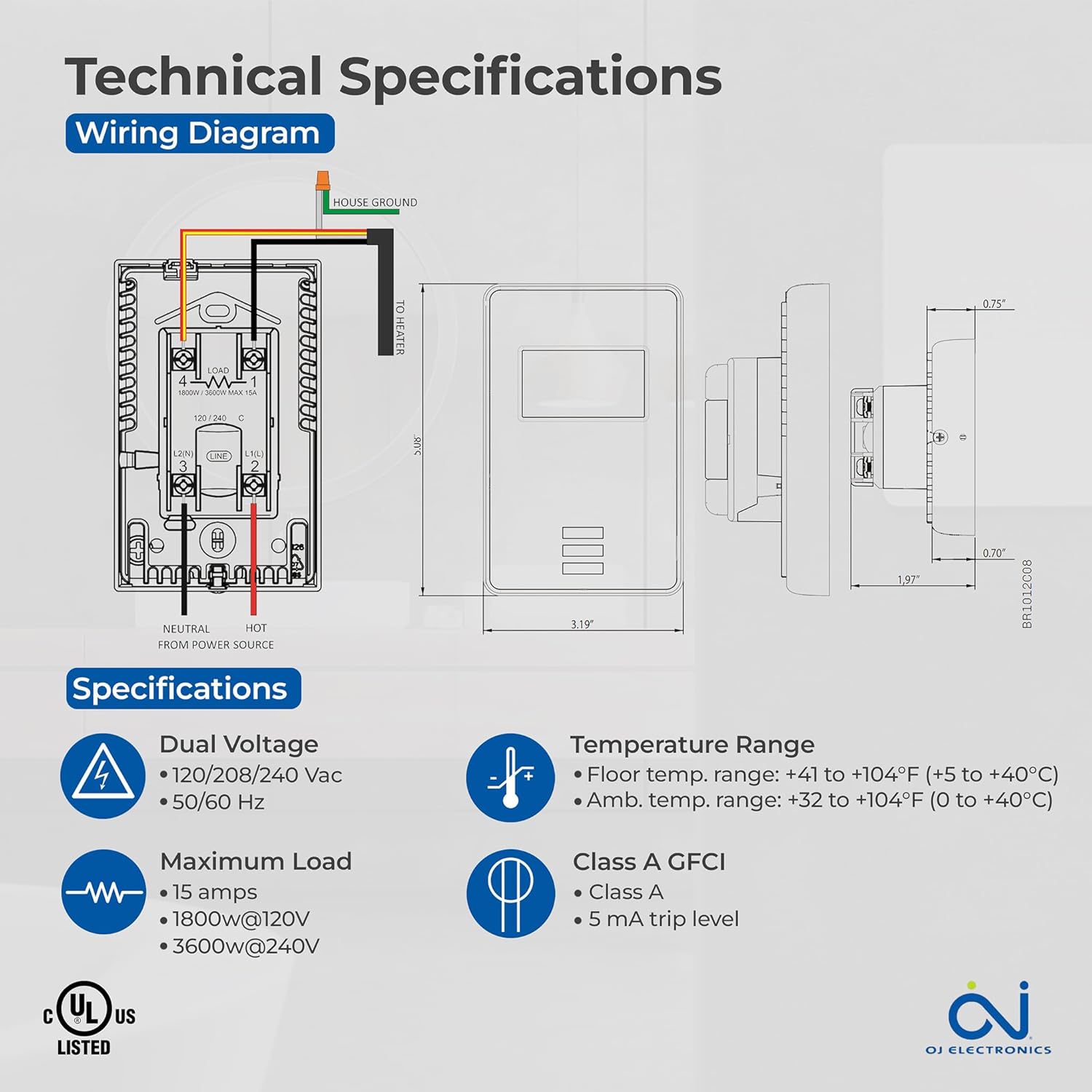
Figure 3: Detailed wiring diagram and technical specifications for the thermostat. Shows connections for House Ground, Neutral, Hot from Power Source, and To Heater.
3.3 Floor Sensor Installation
The 10Kohm floor sensor is included and essential for floor temperature control and protection. Install the sensor cable in a conduit or directly within the floor heating system, ensuring it is positioned centrally between heating elements for accurate readings. Do not cut or splice the sensor cable unless specifically instructed by the heating system manufacturer.

Figure 4: The included OJ Microline floor sensor, a black cable with a small probe at the end.
3.4 Mounting the Thermostat
- After wiring, carefully push the thermostat into the wall box.
- Secure the thermostat to the wall box using the provided screws.
- Attach the faceplate.
- Restore power at the circuit breaker.
4. Operation
The OJ Microline UTN4-4999 is a non-programmable thermostat designed for simple and direct temperature control.
4.1 Adjusting Temperature
To adjust the desired temperature (setpoint), use the Up and Down arrow buttons located below the display. The display will show the current temperature and the setpoint. The heating system will activate or deactivate to maintain the setpoint.

Figure 5: A hand interacting with the thermostat's buttons to adjust the temperature setting.
4.2 Control Modes
The thermostat offers three control modes, selectable based on your heating requirements and floor type:
- (A) Ambient temperature with Floor protection: The thermostat controls based on the room's air temperature, but will limit the floor temperature to prevent overheating, especially important for sensitive floor coverings like laminate or engineered wood.
- (B) Floor temperature with Floor protection: The thermostat controls directly based on the floor sensor reading, also with an upper limit for floor protection. This mode is ideal for maintaining a consistent floor surface temperature.
- (C) Ambient temperature without Floor protection: The thermostat controls solely based on the room's air temperature, without an upper limit on floor temperature. Use this mode only if your floor covering can withstand high temperatures.
Consult your heating system installer or the thermostat's advanced settings (if available, refer to the full technical manual for details) to select the appropriate control mode.
5. Maintenance
The OJ Microline UTN4-4999 thermostat is designed for minimal maintenance.
- Cleaning: Wipe the thermostat's surface with a soft, damp cloth. Do not use abrasive cleaners, solvents, or chemical sprays, as these can damage the display or casing.
- GFCI Test: Regularly test the built-in GFCI as per local electrical codes, typically monthly. Press the "TEST" button on the thermostat. The display should indicate a trip, and the heating will turn off. Press the "RESET" button to restore normal operation. If the GFCI does not trip or reset, contact a qualified electrician.
- Inspection: Periodically inspect the thermostat and wiring for any signs of damage or loose connections. If any issues are found, disconnect power and consult a qualified electrician.
6. Troubleshooting
If you experience issues with your thermostat, refer to the following common problems and solutions:
| Problem | Possible Cause | Solution |
|---|---|---|
| Thermostat display is blank. | No power to the thermostat. | Check the circuit breaker. Ensure all wiring connections are secure. |
| Heating system not turning on. | Setpoint is below ambient/floor temperature; GFCI tripped; wiring issue. | Increase setpoint. Check and reset GFCI. Verify wiring connections. |
| GFCI trips frequently. | Ground fault in heating cable or wiring. | Immediately disconnect power and consult a qualified electrician to diagnose the ground fault. |
| Inaccurate temperature reading. | Improper sensor placement; sensor damage; air drafts. | Ensure sensor is correctly placed. Inspect sensor for damage. Minimize drafts near the thermostat. |
If the problem persists after attempting these solutions, contact customer support or a qualified electrician.
7. Specifications
| Feature | Detail |
|---|---|
| Model Number | UDG-4999 |
| Brand | OJ Electronics |
| Controller Type | Thermostat |
| Style | Non Programmable |
| Voltage | 120V, 208V, 240V AC (Dual Voltage) |
| Maximum Load | 15A (1800W @ 120V, 3600W @ 240V) |
| Frequency | 50/60 Hz |
| GFCI | Built-in Class A (5 mA trip level) |
| Sensors | Built-in Air Sensor, 10Kohm Floor Sensor (included) |
| Floor Limit Range | +41 to +104°F (+5 to +40°C) |
| Ambient Temperature Range | +32 to +104°F (0 to +40°C) |
| Display Type | Digital with Backlight |
| Control Method | Button Control (Touch) |
| Mounting Type | Wall Mount |
| Compliance | c UL us Listed for USA and Canada |
| Dimensions | 6 x 3.5 x 2.75 inches (Package) |
| Item Weight | 16 ounces (1 pound) |

Figure 6: Key features of the thermostat including energy efficiency, simple operation, dual sensing, and built-in GFCI.
8. Warranty Information
The OJ Microline UTN4-4999 Thermostat comes with a manufacturer's limited 3-year warranty. This warranty covers defects in materials and workmanship under normal use and service. Please retain your proof of purchase for warranty claims.
For detailed warranty terms and conditions, please refer to the documentation included with your product or visit the OJ Electronics official website.
9. Customer Support
For technical assistance, troubleshooting beyond this manual, or warranty inquiries, please contact OJ Electronics customer support.
- Online Support: Visit the official OJ Electronics website for FAQs, additional resources, and contact forms.
- Email Support: Refer to your product packaging or the official website for specific email addresses.
- Phone Support: Refer to your product packaging or the official website for customer service phone numbers.
When contacting support, please have your product model number (UDG-4999) and purchase date available.
Related documentsUDG-4999


Ask a question about this manual
Ask about setup, troubleshooting, compatibility, parts, safety, or missing instructions. Manuals+ will review the question and use this page’s manual context to help answer it.