
Introduction
This manual provides essential information for the safe and efficient operation of your Whirlpool Max 49 Mo Microwave + Grill. Please read these instructions carefully before using the appliance and retain them for future reference.

Figure 1: Front view of the Whirlpool Max 49 Mo Microwave + Grill.
Important Safety Instructions
When using electrical appliances, basic safety precautions should be followed, including the following:
- Read all instructions before using the appliance.
- Do not operate the oven if it has a damaged cord or plug, if it is not working properly, or if it has been damaged or dropped.
- Do not heat sealed containers, as they may explode.
- Do not use corrosive chemicals or vapors in this appliance.
- Only use utensils that are suitable for use in microwave ovens.
- Always ensure proper ventilation around the appliance.
Setup
Before first use, follow these steps:
- Unpacking: Carefully remove the microwave oven and all packing materials. Check for any damage.
- Placement: Place the microwave on a flat, stable surface. Ensure there is adequate space around the unit for ventilation (at least 10 cm at the back and sides, and 20 cm above). Do not block air vents.
- Power Connection: Plug the power cord into a grounded electrical outlet. Ensure the voltage matches the appliance's requirements (230 Volts).
- Initial Cleaning: Wipe the interior and exterior with a soft, damp cloth.

Figure 2: Interior view showing the 28 cm turntable and oven cavity.
Operating Instructions
Your Whirlpool Max 49 Mo Microwave + Grill offers various cooking functions:
Control Panel Overview
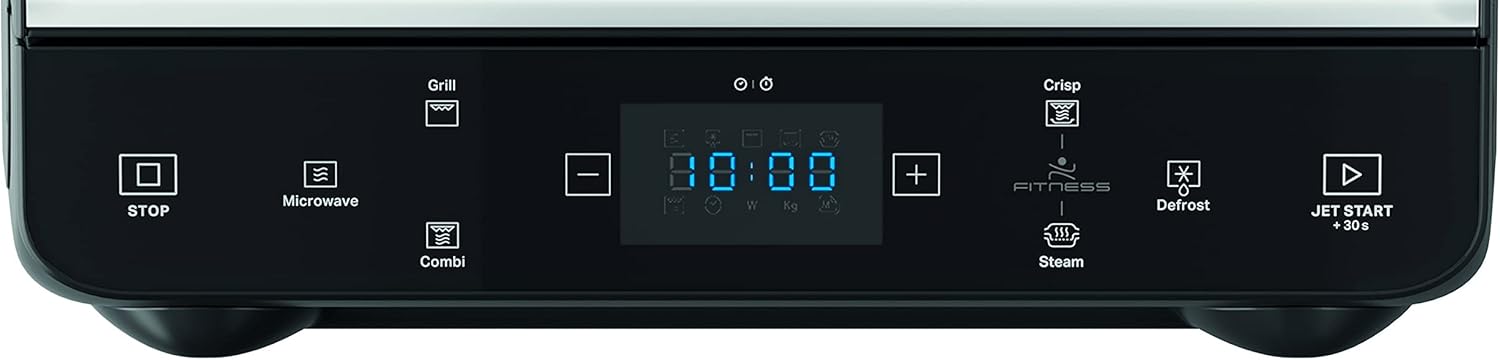
Figure 3: Detailed view of the control panel with various function buttons.
- STOP Button: Stops cooking or clears settings.
- Microwave Button: For standard microwave cooking.
- Grill Button: Activates the powerful quartz grill for browning and crisping.
- Combi Button: Combines microwave and grill functions for faster cooking with browning.
- Crisp Function: Utilizes Dual Crisp technology for perfect crispy browning on both top and bottom surfaces. Requires the Crisp plate.
- Steam Function: Allows for quick and healthy steam cooking using the specially designed steamer container.
- JetDefrost Function: Thaws food in record time.
- JET START +30s: Starts cooking immediately for 30 seconds at full power, or adds 30 seconds to current cooking time.
- +/- Buttons: Adjust cooking time or settings.
Using Specific Functions
- Dual Crisp Technology: Place food on the Crisp plate. Select the Crisp function and set the desired cooking time. This function is ideal for pizzas, quiches, and crispy fries.
- Steam Cooking: Fill the steamer container with water and place food in the basket. Select the Steam function and the pre-programmed setting for your food type.
- Quartz Grill: Use the high grill rack for optimal results. Select the Grill function and set the time. Monitor food closely to prevent over-browning.

Figure 4: Included accessories: steamer, high grill rack, crisp plate, and handle.
Maintenance and Cleaning
Regular cleaning helps maintain the performance and longevity of your microwave oven.
- Interior: Clean the interior cavity, turntable, and turntable support with a mild detergent and warm water after each use. For stubborn stains, place a bowl of water with lemon slices inside and microwave for a few minutes to loosen residue.
- Exterior: Wipe the exterior surfaces with a soft, damp cloth. Avoid abrasive cleaners.
- Accessories: Wash the Crisp plate, steamer, and grill rack with warm, soapy water.
- Always ensure the appliance is unplugged before cleaning.
Troubleshooting
If you encounter issues with your microwave, refer to the following common problems and solutions:
| Problem | Possible Cause | Solution |
|---|---|---|
| Oven does not start | Power cord not plugged in; Door not closed properly; Fuse blown or circuit breaker tripped. | Ensure plug is securely in outlet; Close door firmly; Check household fuse/circuit breaker. |
| Food not cooking evenly | Food not stirred or turned; Incorrect power level or cooking time. | Stir or turn food during cooking; Adjust power level and time as needed. |
| Light not working | Bulb needs replacement. | Contact qualified service personnel for bulb replacement. |
If the problem persists after trying these solutions, please contact customer support.
Specifications
| Feature | Detail |
|---|---|
| Brand | Whirlpool |
| Model Number | 8003437861901 |
| Product Dimensions (L x W x H) | 35.3 x 39.2 x 36 cm |
| Weight | 13.6 Kilograms |
| Capacity | 13 Liters |
| Installation Type | Freestanding |
| Special Features | Dual Crisp, Quartz Grill, Steam Function, Crisp Plate + Handle |
| Cooking Mode | Radiant Heat, Convection Heat |
| Color | Black |
| Voltage | 230 Volts |
| Power | 230 Watts |
| Defrost Type | Automatic Defrost |
| Material | Glass |
| Interior Coating | Metal, Glass |
| Included Components | Microwave, Steamer, High Grill Rack, Crisp Plate, Handle |
| Turntable Size | 28 cm |
Warranty and Support
For warranty information and customer support, please refer to the documentation provided with your purchase or visit the official Whirlpool website. Keep your proof of purchase for any warranty claims.
