
Introduction
Thank you for choosing the Xiaomi Air 2 S Bluetooth Earphones. This manual provides detailed instructions on how to set up, operate, maintain, and troubleshoot your new earphones. Please read this manual carefully before use and retain it for future reference.
Package Contents
Verify that all items are present in your package:
- Charging box x1
- Left and right headphones x1 (pre-installed in charging box)
- Type-C charging cable x1
- User Manual x1
Product Overview
The Xiaomi Air 2 S Bluetooth Earphones feature a sleek design with a compact charging case, offering wireless freedom and high-quality audio.

Figure 1: Xiaomi Air 2 S Earphones inside their open charging case. The earbuds are white, with the right earbud visible and the left earbud partially obscured, both resting in their respective slots within the white charging case. A small LED indicator is visible on the front of the case.
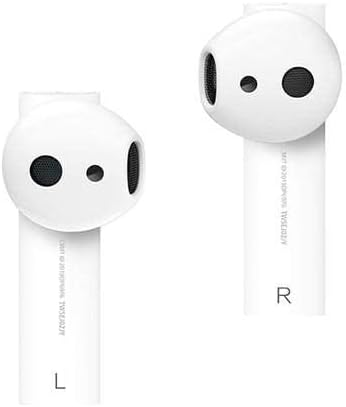
Figure 2: Close-up view of the left (L) and right (R) Xiaomi Air 2 S earphones. Each earbud is white with black speaker grilles and small sensor dots. The 'L' and 'R' markings are clearly visible on the stems of the respective earbuds.
Setup
Charging the Earphones and Case
Before first use, fully charge the earphones and the charging case. The charging case also serves as a portable power bank for the earphones.
- Insert the Type-C charging cable into the charging port on the case.
- Connect the other end of the cable to a compatible USB power adapter (5V == 1A recommended).
- The indicator light on the charging case will show charging status. A full charge takes approximately 1 hour via wired charging.
- The charging case supports wireless charging. Place the case on a compatible wireless charging pad to charge wirelessly.
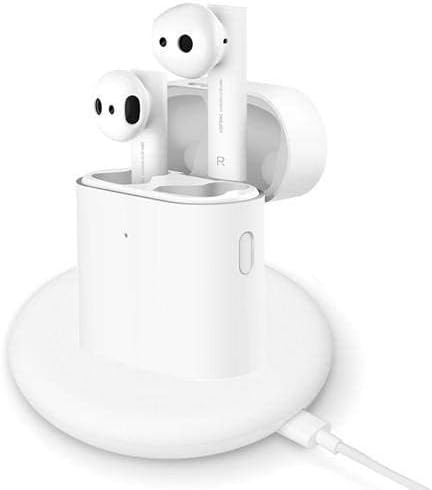
Figure 3: The Xiaomi Air 2 S charging case placed on a white circular wireless charging pad, with a USB-C cable connected to the pad. The case is closed, indicating it is being charged.
Pairing with a Bluetooth Device
The earphones can be paired with smartphones, tablets, and other Bluetooth-enabled devices.
- Ensure the earphones are in the charging case and the case has sufficient battery.
- Open the lid of the charging case. The indicator light on the case will start blinking, indicating the earphones are in pairing mode.
- On your device, go to Bluetooth settings and enable Bluetooth.
- Search for available devices. Select "Mi True Wireless Earphones 2" or "Xiaomi Air 2 S" from the list.
- Once connected, the indicator light on the charging case will turn off, and your device will confirm the connection.
- For subsequent use, the earphones will automatically connect to the last paired device when the case lid is opened.
Operating Instructions
Wearing the Earphones
Gently insert the left (L) and right (R) earphones into your respective ear canals. Adjust them slightly to ensure a comfortable and secure fit for optimal sound quality and noise cancellation.
Touch Controls
The earphones feature touch-sensitive areas for control. Specific functions may vary slightly depending on your device and app settings.
- Double-tap (Left/Right Earbud): Play/Pause music, Answer/End call.
- Triple-tap (Left/Right Earbud): Activate voice assistant.
- Long Press (Left/Right Earbud): Toggle Noise Cancellation (if applicable and supported by model).
- Removing an Earbud: Music playback may automatically pause when an earbud is removed and resume when re-inserted.
Maintenance
Proper maintenance ensures the longevity and performance of your earphones.
- Cleaning: Use a soft, dry, lint-free cloth to clean the earphones and charging case. Do not use harsh chemicals or abrasive materials. Regularly clean the speaker grilles and charging contacts to prevent debris buildup.
- Storage: When not in use, always store the earphones in their charging case to protect them and keep them charged. Store in a cool, dry place away from direct sunlight and extreme temperatures.
- Water Resistance: The earphones are waterproof (as per product description). However, avoid prolonged exposure to water and do not submerge them. Dry them thoroughly if they get wet before placing them back in the charging case.
- Battery Care: To preserve battery life, avoid fully discharging the battery frequently. Charge the case and earphones regularly, even if not in constant use.
Troubleshooting
If you encounter issues with your Xiaomi Air 2 S Earphones, refer to the following common problems and solutions:
| Problem | Solution |
|---|---|
| Earphones do not power on. | Ensure the charging case and earphones are fully charged. Place earphones in the case and close the lid, then open again. |
| Cannot pair with device. | Make sure Bluetooth is enabled on your device. Ensure earphones are in pairing mode (indicator blinking). Try forgetting the device on your phone and re-pairing. Move closer to the device. |
| Only one earphone is working. | Place both earphones back into the charging case, close the lid, wait a few seconds, then open the lid again. Check battery levels of both earphones. |
| Poor sound quality or disconnections. | Ensure earphones are clean and free of debris. Move closer to your device to avoid interference. Disconnect and reconnect Bluetooth. |
| Earphones not charging in case. | Clean the charging contacts on both the earphones and inside the case. Ensure the charging case itself is charged. |
Specifications
Key technical specifications for the Xiaomi Air 2 S Bluetooth Earphones (Model: Mi True Wireless Earphones 2):
| Product Model | TWSEJ05WM |
| Wireless Connection | Bluetooth 5.0 |
| Bluetooth Protocol | BLE / HSP / HFP / A2DP / AVRCP |
| Working Distance | 10m (open and barrier-free environment) |
| Headphones Single Battery Life | Approx. 5 hours |
| Total Battery Life (with charging box) | Approx. 24 hours |
| Charging Time | 1 hour (wired charging) |
| Charging Port | Type-C |
| Input Parameter | 5V == 1A |
| Speaker Impedance | 32Ω |
| Supported Codec | LHDC / SBC / AAC |
| Net Product Weight | 52g |
| Noise Control | Active Noise Cancellation |
| Color | White |
Safety Information
Please observe the following safety guidelines to prevent damage to the product or injury to yourself:
- Do not disassemble, repair, or modify the product.
- Keep the earphones and charging case away from extreme temperatures, direct sunlight, and open flames.
- Avoid exposing the product to excessive moisture or liquids, despite its waterproof rating.
- Do not use the earphones at high volume for extended periods to prevent hearing damage.
- Keep out of reach of children and pets.
- Dispose of the product and its battery responsibly according to local regulations.
Warranty and Support
For warranty information and technical support, please refer to the warranty card included in your package or visit the official Xiaomi website. Keep your purchase receipt as proof of purchase for warranty claims.


