
Product Overview
The SmartHeart Talking Blood Pressure Monitor is an automatic device designed for easy and accurate blood pressure measurement at home. It features one-touch operation, a wide-range arm cuff, and clear voice instructions in English, Spanish, or French. This monitor provides fast, accurate readings of systolic, diastolic, and pulse rates, displayed on a large digital screen with date and time. It supports up to four users, storing 99 readings per user, and calculates the average of the last three results. A color-coded Hypertension Indicator helps interpret readings according to WHO guidelines.

Image: The SmartHeart Blood Pressure Monitor with its wide-range arm cuff, showing the digital display and control buttons.
Safety Information
Please read and understand all safety information before using the SmartHeart Blood Pressure Monitor.
- Measurement results should be discussed with your physician or healthcare professional; never self-diagnose or attempt treatment as this may be dangerous.
- Intended for adult use only; this device is not approved for infant or child use.
- Keep out of reach of children.
- Do not use the unit if it has any damaged parts (including power cord or plug and cuff), if it has been submersed in water or dropped.
- If any abnormality occurs, discontinue use until the unit has been examined and repaired.
- Only use included attachments and parts; do not use attachments from other brands or models as these may not be properly calibrated for use with this device and may result in measurement error.
- Do not disassemble the unit or attempt to repair it; substitution of a component different from that supplied may result in measurement error and will void manufacturer warranty.
- Always follow local regulations for proper disposal of the monitor, cuff, and batteries.
Legal Disclaimer: Statements regarding dietary supplements have not been evaluated by the FDA and are not intended to diagnose, treat, cure, or prevent any disease or health condition. This device is for informational purposes only and should not replace professional medical advice.
Setup and Initial Use
- Positioning the Monitor: Place the monitor on a flat, stable surface where the digital display is clearly visible.
- Connecting the Cuff: Insert the cuff tubing connector firmly into the port located on the left side of your monitor.
- Arm Positioning: Rest your elbow on a solid surface with your palm facing upward. Elevate your arm so that the cuff is at the same level as your heart. Relax your hand.
- Power On: Press the START/STOP button to turn the unit on. The unit will briefly perform a self-test. A voice tone will indicate when the unit is ready for testing.
Note: The unit will not function if residual air from previous testing is present in the cuff. The LCD may flash until pressure is stabilized.
- Cuff Inflation: The cuff will automatically inflate to approximately 180mmHg. You will observe the numbers increasing on the display screen, and the heart icon may flash.
- Deflation and Reading: Once optimal inflation is reached, the display will show decreasing pressure as the cuff deflates. When the measurement is complete, your blood pressure (systolic and diastolic) and pulse rate will be displayed simultaneously on the screen, accompanied by a voice broadcast.
- Hypertension Indicator: The Hypertension Indicator on the left side of the display will show your reading range. Refer to the "Understanding Your Readings" section for interpretation.
- Irregular Heartbeat Detection: If an irregular heartbeat is detected during the reading, the Irregular Heartbeat Detector indicator will appear on the display.
- Memory Storage: The reading will automatically be stored in the selected memory bank, up to 99 readings per user.
- Power Off: Press START/STOP to turn the unit off and conserve energy. The unit will automatically shut off after 3 minutes of inactivity.
- Storage: Disconnect the cuff and tubing prior to storing the device.

Image: The SmartHeart Blood Pressure Monitor with its cuff connected, illustrating its compact design for home use.
Important: Avoid smoking, eating, taking medication, alcohol consumption, or physical activity 30 minutes prior to taking a reading to ensure accurate results.
Operating the Monitor
One-Touch Operation
The SmartHeart monitor is designed for simplicity. A single press of the START/STOP button initiates the measurement process, including automatic inflation and deflation. This ensures a fast, easy, and accurate reading every time.
Talking Trilingual Audio
The monitor provides clear voice instructions and result broadcasts in English, Spanish, or French. This feature enhances user experience, especially for those with visual impairments. Volume control and mute settings are available for personalized use.
- To change the language or adjust volume, refer to the detailed instructions in the included guidebook.
4-User Memory Bank
The device supports up to four individual users, storing up to 99 readings for each user (396 total readings). This allows multiple family members to track their blood pressure history independently. The memory bank also includes a date/time stamp for each reading and calculates the average of the last three readings for effective tracking.
- Press the M button to cycle through the readings history from newest to oldest for the currently selected user.
- To switch between users, consult the full instruction manual.
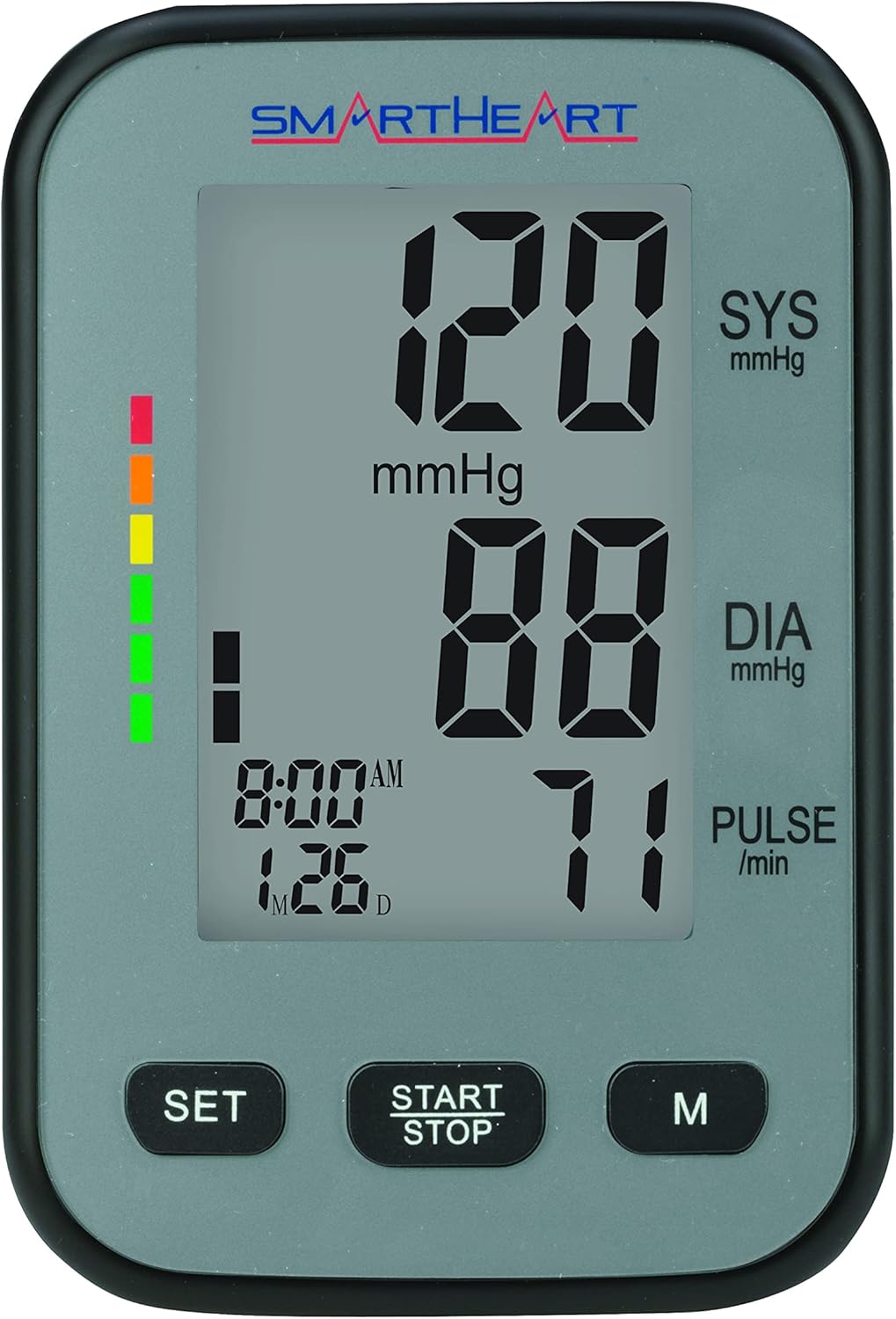
Image: Close-up of the SmartHeart monitor's digital display, showing systolic, diastolic, pulse readings, and the date/time stamp.
Hypertension Indicator
A color-coded bar on the display instantly indicates where your reading falls based on World Health Organization (WHO) guidelines. This visual aid helps users quickly understand their blood pressure status.
| Category | Systolic (mmHg) | Diastolic (mmHg) | Indicator Color |
|---|---|---|---|
| Optimal | Less than 120 | Less than 80 | Green |
| Normal | 120-129 | 80-84 | Green |
| High-Normal | 130-139 | 85-89 | Yellow |
| Grade 1 Hypertension | 140-159 | 90-99 | Orange |
| Grade 2 Hypertension | 160-179 | 100-109 | Red |
| Grade 3 Hypertension | 180 or higher | 110 or higher | Dark Red |
Note: This table provides a general example. Always consult your healthcare professional for personalized interpretation of your blood pressure readings.
Wide-Range Arm Cuff
The monitor includes a comfortable, adjustable wide-range arm cuff designed to fit most adult arm sizes (8.6 - 16.5 inches / 22 - 42 cm). This ensures a secure and accurate fit for a broad range of users. The cuff features a traditional D-ring style for easy application and soft fabric with a secure hook & loop closure. It is not made with natural rubber latex.
To determine the proper cuff size, measure the circumference of your left upper arm at the point halfway between the bend at your elbow and your shoulder. Choose a cuff with the range that best accommodates your arm size measurement. Using an incorrect cuff size can lead to inaccurate readings. Only approved SmartHeart brand cuffs will accurately work with this model.
Maintenance and Care
- Cleaning: Wipe the monitor and cuff with a soft, dry cloth. Do not use abrasive cleaners or immerse the unit in water.
- Storage: Store the monitor and cuff in the provided storage case in a cool, dry place, away from direct sunlight and extreme temperatures. Disconnect the cuff tubing before storage.
- Battery Replacement: When the low battery indicator appears on the display, replace all four AA batteries with new ones. Ensure correct polarity.
Troubleshooting
If you encounter issues with your SmartHeart Blood Pressure Monitor, please refer to the following common solutions:
- No Power/Display Off:
- Check if batteries are inserted correctly and are not depleted. Replace if necessary.
- Ensure the monitor is not in auto-shutoff mode (after 3 minutes of inactivity). Press START/STOP to reactivate.
- Inaccurate Readings:
- Ensure the cuff is applied correctly and is the appropriate size for your arm.
- Verify the cuff tubing is securely connected to the monitor.
- Avoid talking, moving, or consuming food/drink/alcohol/medication 30 minutes before measurement.
- Ensure your arm is positioned correctly at heart level and you are relaxed.
- If readings are consistently unusual, consult your physician.
- Cuff Not Inflating/Deflating Properly:
- Check for any kinks or blockages in the air tubing.
- Ensure the cuff is securely wrapped around the arm.
- If the cuff contains residual air from a previous test, the unit may not function until pressure stabilizes.
- Voice Prompts Not Working:
- Check the volume settings.
- Ensure the mute function is not activated.
- Refer to the full guidebook for language and volume adjustment instructions.
For further assistance, please refer to the comprehensive troubleshooting section in the full user manual or contact customer support.
Specifications
| Feature | Detail |
|---|---|
| Model Name | SmartHeart Premium Talking Blood Pressure Monitor |
| Item Model Number | 01-521 |
| Product Dimensions | 8"L x 6"W x 5"Th (Monitor) |
| Item Weight | 13.44 ounces |
| Power Source | Battery Powered (4 AA batteries included) |
| Display Type | LED |
| Cuff Type | Wide-Range Upper Arm Cuff |
| Cuff Circumference | 8.6 - 16.5 inches (22 - 42 cm) |
| Memory Capacity | 4 users, 99 readings per user (396 total) |
| Included Components | Monitor, wide-range adult arm cuff, four AA batteries, detailed English/Spanish/French guidebook, quick start guide, FAQ pamphlet, blood pressure reading log, storage case. |
| Age Range | Adult |
Warranty and Support
The SmartHeart Talking Blood Pressure Monitor comes with a 5-year limited warranty, ensuring peace of mind regarding its quality and performance.
For warranty claims, technical support, or any inquiries, please refer to the contact information provided in your product packaging or visit the official SmartHeart website. Keep your purchase receipt as proof of purchase for warranty purposes.
You can also visit the SmartHeart Store on Amazon for more information and product resources.


