
Introduction
Thank you for purchasing the Zokop V61 PLUS Food Vacuum Sealer Machine. This appliance is designed to remove air from specially designed bags, creating an airtight seal to preserve food freshness for longer periods. Please read this manual thoroughly before operating the machine to ensure safe and efficient use.

Image: The Zokop V61 PLUS Food Vacuum Sealer Machine, a compact silver and black appliance with control buttons on top.
Important Safety Instructions
- Read all instructions before use.
- Do not immerse the appliance, power cord, or plug in water or other liquids.
- Close supervision is necessary when the appliance is used by or near children.
- Unplug from outlet when not in use and before cleaning.
- Do not operate any appliance with a damaged cord or plug, or after the appliance malfunctions or has been damaged in any manner.
- Use only manufacturer-recommended attachments.
- Do not use outdoors.
- Do not let the cord hang over the edge of a table or counter, or touch hot surfaces.
- Always place the appliance on a stable, heat-resistant surface.
- This appliance is for household use only.
Product Overview
Familiarize yourself with the components and controls of your Zokop V61 PLUS vacuum sealer.
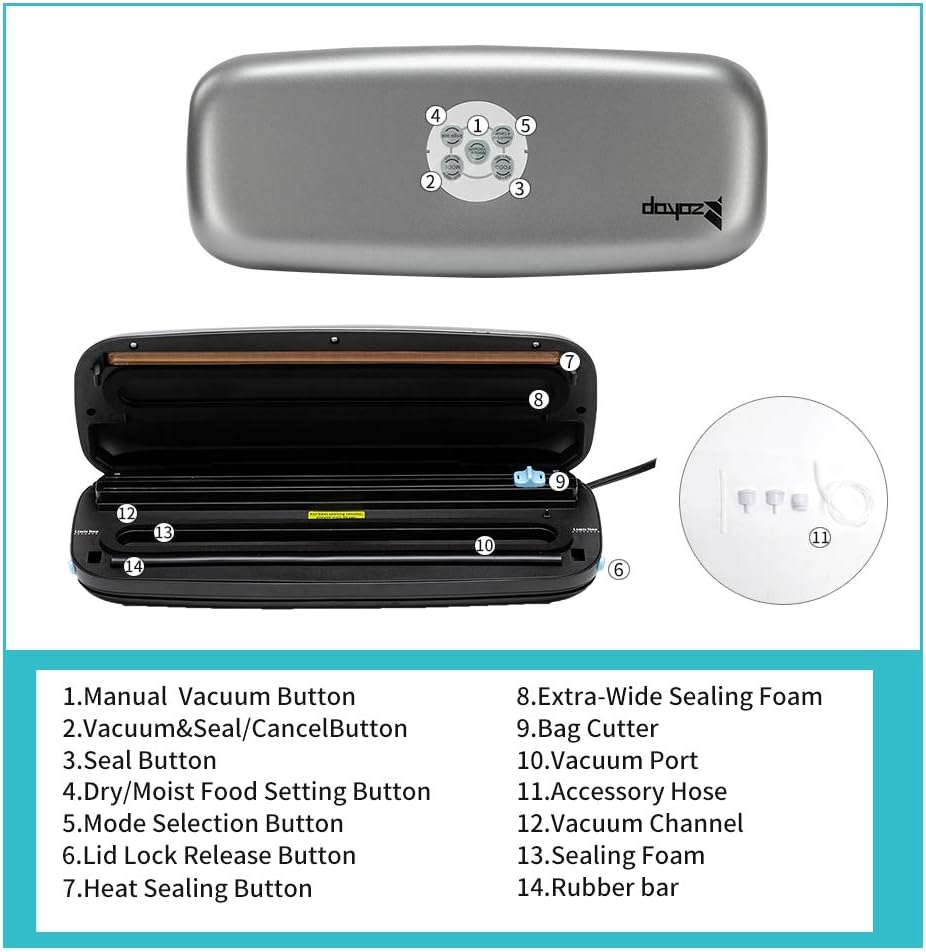
Image: A detailed diagram showing the various parts of the Zokop V61 PLUS vacuum sealer, including control buttons, vacuum channel, and sealing bar.
- Manual Vacuum Button: Allows for manual control of vacuum pressure, useful for delicate foods.
- Vacuum & Seal / Cancel Button: Initiates the automatic vacuuming and sealing process. Pressing it again during operation will cancel the process.
- Seal Button: Used to create a seal without vacuuming, ideal for making bags from a roll or sealing delicate items.
- Dry/Moist Food Setting Button: Toggles between 'Dry' and 'Moist' modes, adjusting the sealing time for optimal results based on food type.
- Mode Selection Button: Used to select different operational modes (e.g., normal vacuum, gentle vacuum, if available, or may be integrated with Dry/Moist setting).
- Lid Lock Release Button: Located on the sides, these buttons release the lid after a sealing cycle is complete.
- Heat Sealing Button: (Function integrated with Seal and Vacuum & Seal buttons, indicating the heating element is active).
- Extra-Wide Sealing Foam: A foam gasket that helps create a tight seal around the bag opening.
- Bag Cutter: An integrated sliding cutter for customizing bag lengths from a roll.
- Vacuum Port: An external port for connecting the accessory hose to vacuum canisters or other compatible containers.
- Accessory Hose: A hose provided for external vacuuming with compatible accessories.
- Vacuum Channel: The chamber where air is extracted from the bag during the vacuuming process.
- Sealing Foam: Another foam component ensuring a secure vacuum.
- Rubber Bar: Provides pressure against the sealing bar to ensure a strong, consistent seal.

Image: A collage of detailed views showing the internal mechanisms, sealing bar, vacuum channel, and control panel of the Zokop V61 PLUS vacuum sealer.

Image: The Zokop V61 PLUS vacuum sealer shown with various food items like meat, grains, fish, and vegetables, illustrating its use for food preservation.
Setup
- Unpack the vacuum sealer and all accessories.
- Place the appliance on a flat, dry, and stable surface.
- Ensure the power cord is easily accessible.
- Plug the power cord into a grounded electrical outlet.
- Before first use, wipe down the sealing bar and vacuum channel with a damp cloth.

Image: A close-up view of the side release button on the Zokop V61 PLUS, used to open the lid.
Operating Instructions
1. Vacuum Sealing Bags
This function removes air from the bag and then seals it, ideal for preserving most food types.

Image: A four-panel image demonstrating the steps for vacuum sealing food using the Zokop V61 PLUS machine, showing bag placement, lid closure, button selection, and bag release.
- Place the food item into a vacuum sealer bag, ensuring at least 3 inches of empty space at the top of the bag.
- Open the lid of the vacuum sealer. Place the open end of the bag into the vacuum channel, ensuring it lies flat and smooth.
- Close the lid firmly until both side lid lock release buttons click into place.
- Press the "Vacuum & Seal" button. The machine will automatically remove air and then seal the bag.
- Once the process is complete, press the side lid lock release buttons to open the lid and remove the sealed bag.
2. Sealing Only (Without Vacuum)
Use this function to seal bags without removing air, suitable for delicate items or creating custom-sized bags from a roll.
- Place the open end of the bag onto the sealing bar, ensuring it is flat.
- Close the lid firmly until both side lid lock release buttons click into place.
- Press the "Seal" button. The machine will heat and seal the bag.
- Once the sealing indicator light turns off, press the side lid lock release buttons to open the lid and remove the sealed bag.
3. Dry/Moist Food Settings
The machine offers different sealing times for dry and moist foods to ensure optimal results.
- Press the "Dry/Moist Food Setting" button to toggle between modes.
- Select the "Dry" mode for foods without liquid.
- Select the "Moist" mode for foods containing some moisture, which provides a longer sealing time.
4. Using the Integrated Bag Cutter
The integrated bag cutter allows you to create custom-sized bags from a roll or trim existing bags.
- Place the bag roll or bag edge into the cutter slot (refer to component 9 in the Product Overview diagram).
- Slide the cutter across the bag to achieve the desired length.
Maintenance and Cleaning
Regular cleaning ensures optimal performance and extends the life of your vacuum sealer.
- Always unplug the appliance before cleaning.
- Wipe the exterior of the machine with a damp cloth and mild soap. Do not use abrasive cleaners.
- Clean the vacuum channel and sealing bar with a damp cloth after each use, especially if any food residue or liquid has entered these areas.
- Ensure all parts are completely dry before storing or next use.
- Do not immerse the machine in water.

Image: The Zokop V61 PLUS vacuum sealer in action, sealing a bag containing raw meat, demonstrating its practical application.
Troubleshooting
| Problem | Possible Cause | Solution |
|---|---|---|
| Machine does not turn on. | Not plugged in; power outlet issue. | Ensure the power cord is securely plugged into a working outlet. |
| Bag does not vacuum properly. | Bag not placed correctly; lid not fully closed; vacuum channel or sealing foam dirty/damaged. | Ensure the open end of the bag is fully inside the vacuum channel. Close the lid firmly until it clicks. Check and clean the vacuum channel and sealing foam. |
| Bag does not seal. | Sealing bar not hot enough; bag material incompatible; food residue on sealing area. | Allow the machine to cool down if used continuously. Ensure you are using appropriate vacuum sealer bags. Clean the sealing area. |
| Air leaks into the bag after sealing. | Improper seal; puncture in bag; sharp food edges. | Re-seal the bag. Check the bag for punctures. Ensure sharp food edges are covered or padded. |
Specifications
- Model: V61 PLUS
- Brand: ZOKOP
- Power Source: Corded Electric
- Wattage: 85 watts
- Operation Mode: Automatic, Manual
- Item Weight: 3.74 pounds (1.7 Kilograms)
- Dimensions: Approximately 14.7" (L) x 5.9" (W) x 2.7" (H)
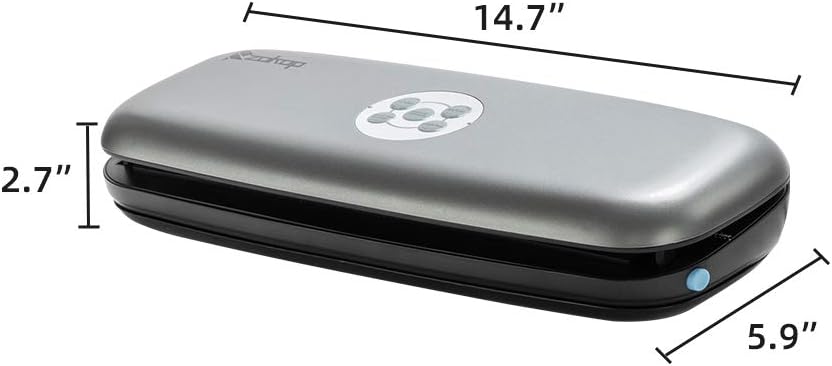
Image: The Zokop V61 PLUS vacuum sealer with its dimensions clearly labeled: 14.7 inches long, 5.9 inches wide, and 2.7 inches high.
Warranty and Support
For warranty information or technical support, please refer to the documentation included with your purchase or contact ZOKOP customer service. Keep your purchase receipt as proof of purchase.