
1. Introduction
This manual provides essential instructions for the proper setup, operation, and maintenance of your ZdalaMit replacement remote control for Insignia TVs. Please read this manual thoroughly before use to ensure optimal performance and longevity of your device.
2. Setup
2.1 Battery Installation
Your remote control requires two (2) AAA alkaline batteries (not included). Follow these steps to install the batteries:
- Locate the battery compartment cover on the back of the remote control.
- Press down on the tab and slide the cover off.
- Insert two AAA batteries, ensuring the positive (+) and negative (-) terminals align correctly with the markings inside the compartment.
- Slide the battery compartment cover back into place until it clicks securely.
Note: No programming or pairing is required. Once batteries are installed, the remote is ready for use with compatible Insignia TV models.

Figure 2.1: Front view of the ZdalaMit Replacement Remote Control. The battery compartment is located on the back.
3. Operating Instructions
This section details the functions of the buttons on your ZdalaMit replacement remote control.

Figure 3.1: Remote control in use, demonstrating its function with a television.
| Button | Function |
|---|---|
| POWER | Turns the TV on or off. |
| INPUT | Selects the input source (e.g., HDMI 1, AV, Component). |
| 0-9 (Number Buttons) | Directly selects TV channels. |
| MENU | Accesses the TV's main menu. |
| Navigation Arrows (Up/Down/Left/Right) | Navigates through menu options and adjusts settings. |
| ENTER | Confirms selections in menus. |
| EXIT | Exits the current menu or screen. |
| FAVORITE | Accesses favorite channels list. |
| INFO* | Displays program information. |
| ACC | Accesses accessibility options. |
| CC | Activates or deactivates Closed Captions. |
| VOL +/- | Adjusts the volume level. |
| MUTE | Mutes or unmutes the TV audio. |
| CH ^/v | Changes the TV channel up or down. |
| SLEEP | Sets the TV sleep timer. |
| ASPECT | Changes the screen aspect ratio. |
| GAME | Activates game mode (if supported by TV). |
| PICTURE | Accesses picture settings. |
| AUDIO | Accesses audio settings. |
| Playback Controls (Play, Pause, Stop, Rewind, Fast Forward, Skip) | Controls media playback on connected devices or TV features. |
4. Troubleshooting
If you encounter issues with your remote control, please refer to the following common solutions:
- Remote Not Responding:
- Ensure there is a clear line of sight between the remote control and the TV's infrared sensor.
- Check if the batteries are inserted correctly with the correct polarity (+/-).
- Replace the batteries with fresh AAA alkaline batteries. Weak batteries are a common cause of unresponsiveness.
- Buttons Not Working:
- Clean the remote control's surface and buttons with a soft, dry cloth to remove any dirt or debris that might be obstructing button presses.
- If only specific buttons are not working, and battery replacement does not help, the remote may require replacement.
5. Specifications
Key specifications for the ZdalaMit Replacement Remote Control:
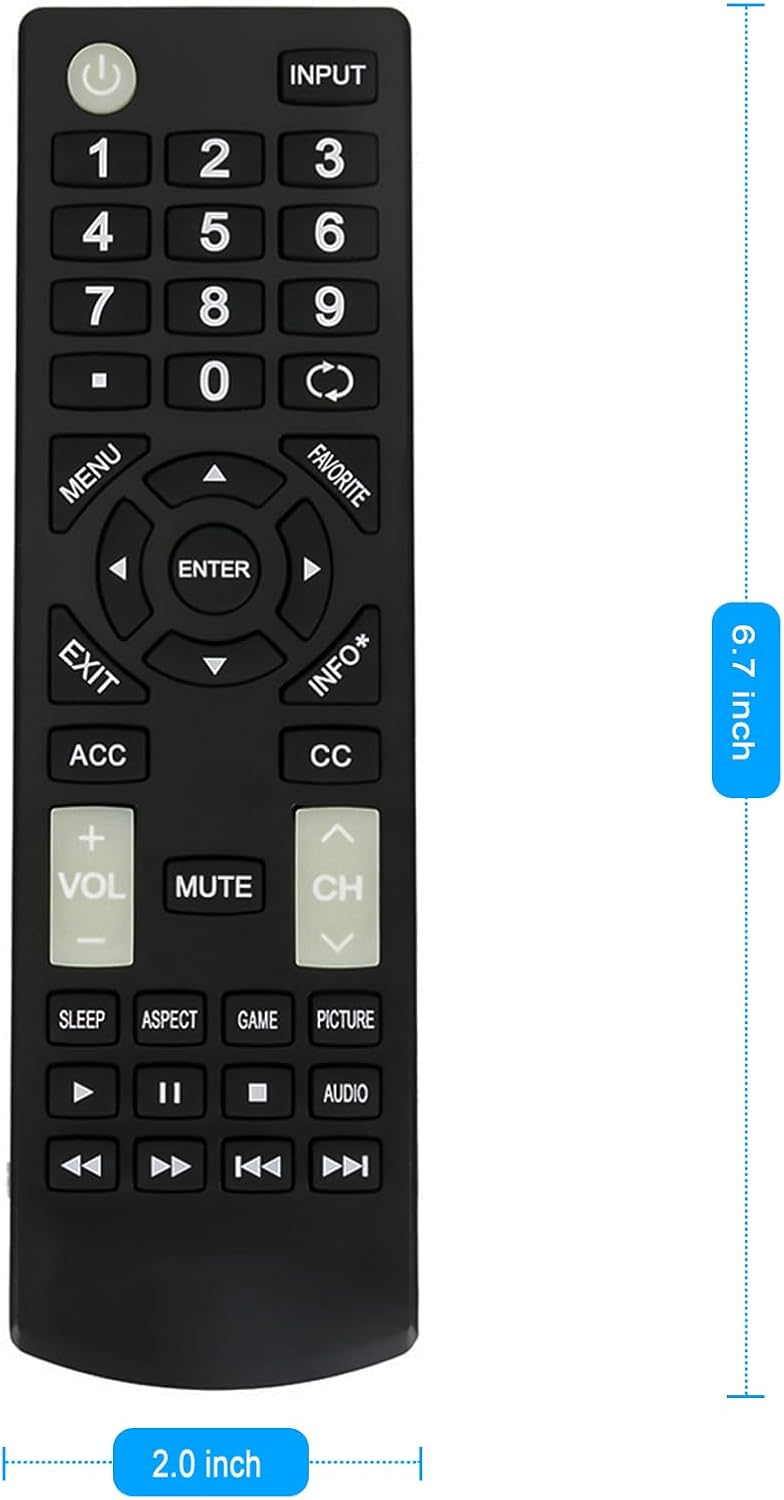
Figure 5.1: Dimensions of the ZdalaMit Replacement Remote Control.
- Product Dimensions: 5.7 x 1.6 x 0.56 inches (approximately 14.5 x 4.1 x 1.4 cm)
- Item Weight: 0.099 ounces (approximately 2.8 grams)
- Power Supply: 2 x 1.5V AAA Alkaline Batteries (not included)
- Color: Black
- Compatible Devices: Insignia Televisions (specific models listed in header)
6. Maintenance
To ensure the longevity and proper functioning of your remote control, follow these maintenance guidelines:
- Cleaning: Wipe the remote control regularly with a soft, dry cloth. Avoid using liquid cleaners or abrasive materials.
- Battery Care: Remove batteries if the remote control will not be used for an extended period to prevent leakage.
- Storage: Store the remote control in a cool, dry place away from direct sunlight and extreme temperatures.
- Avoid Drops: Protect the remote from physical impact, as drops can damage internal components.
7. Support
For any queries or assistance regarding your ZdalaMit replacement remote control, please contact your retailer or the manufacturer's customer support. Refer to your purchase documentation for specific contact information.