
DJI CP.MA.00000176
DJI Mavic Air 2 Instruction Manual
Mavic Air 2 takes power and portability to the next level, offering advanced features in a compact form factor. Intelligent shooting functions and excellent image quality put aerial masterpieces within reach. Safer, smarter flight enables you to up your game while fully enjoying the creative process.

Figure 1: Front view of the DJI Mavic Air 2 drone.
1. What's in the Box
The DJI Mavic Air 2 package includes the following components:
- Mavic Air 2 Aircraft
- Remote Controller
- Intelligent Flight Battery
- 3x Low-Noise Propellers (Pair)
- RC Cables (USB Type-C, Lightning, Standard Micro-USB)
- Control Stick
- Gimbal Protector
- Battery Charger
- Manuals
- AC Power Cable
- Type-C Cable

Figure 2: Contents of the DJI Mavic Air 2 Fly More Combo.
This video provides a detailed look at the contents of the DJI Mavic Air 2 Fly More Combo, including the drone, remote controller, batteries, and various accessories.
2. Setup
2.1 Unfolding the Aircraft
Carefully unfold the front arms first, then the rear arms. Ensure all propellers are free from obstruction.
Figure 3: DJI Mavic Air 2 in its folded state.
2.2 Battery Installation
Insert the Intelligent Flight Battery into the battery compartment on the top of the aircraft until it clicks into place. Ensure it is securely fastened.
2.3 Gimbal Protector Removal
Before flight, always remove the gimbal protector. Failure to do so may damage the gimbal.
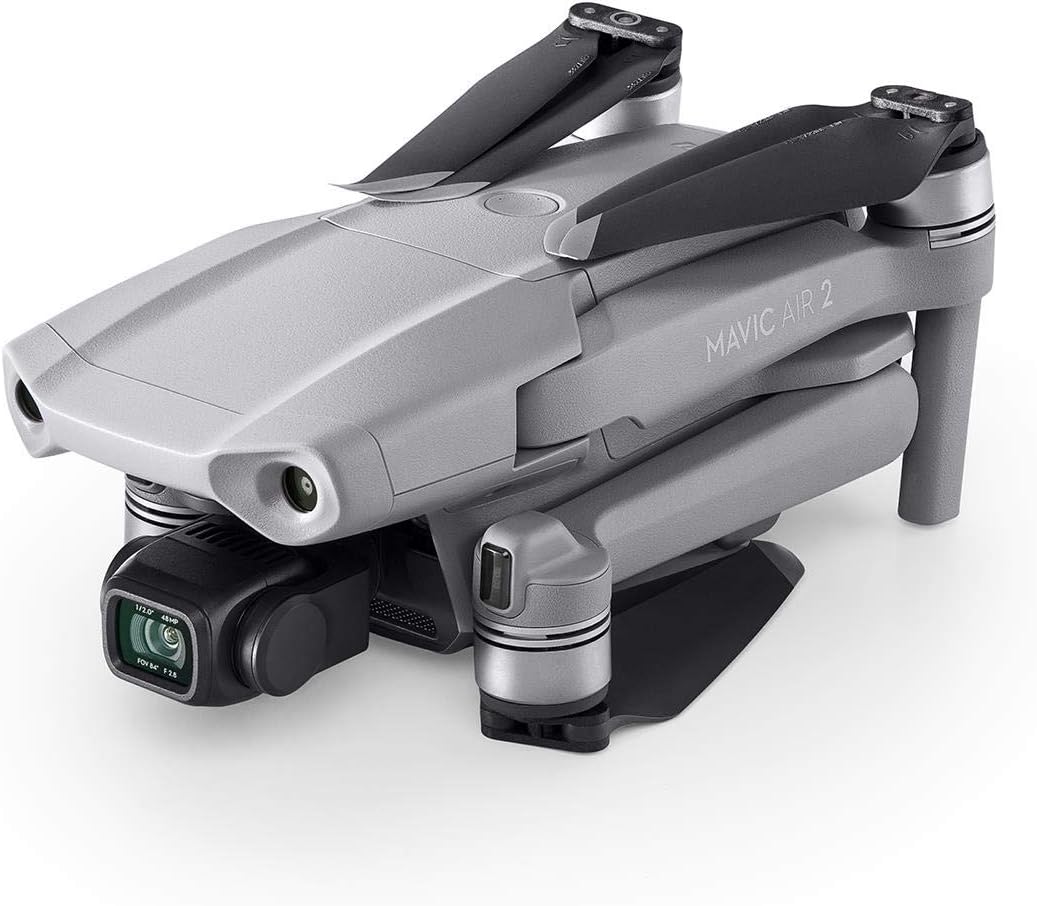
Figure 4: Side view of the DJI Mavic Air 2, highlighting the camera and gimbal.
3. Operating the Drone
3.1 Flight Modes and Features
The Mavic Air 2 offers various intelligent flight modes to enhance your aerial photography and videography experience.
- ActiveTrack 3.0: Keeps subjects centered in the frame.
- Spotlight 2.0: Locks the camera on a subject while you fly freely.
- POI 3.0: Tracks moving subjects like people and vehicles.
- Hyperlapse: Creates stunning time-lapse videos.
3.2 Hyperlapse Mode
Hyperlapse mode allows for the creation of dynamic time-lapse videos. For optimal results, consider the following:
- Battery Usage: Use one full battery for the entire hyperlapse sequence to ensure uninterrupted capture.
- Weather Conditions: Ideal conditions include no wind, clear skies, and good sunshine for vibrant results. Avoid windy conditions to prevent shaky footage.
- Waypoint Feature: Utilize the Waypoint feature for more dynamic and controlled hyperlapse paths compared to CourseLock. Be mindful of camera angle changes to avoid excessive dynamic range in the footage.
- ND Filters: For less choppy hyperlapse videos, especially in bright conditions, consider using ND (Neutral Density) filters.
- Resolution: While 8K hyperlapse is available, note that the minimum interval is 6 seconds, which can result in a choppier look. 1080p offers a 2-second interval for smoother results.
- Color Correction: Hyperlapse videos are not filmed in HDR. Use video editing software to adjust brightness and saturation for better color.
- Reverse Option: The reverse option can conserve battery life.
This video provides tips on maximizing 8K Hyperlapse with the DJI Mavic Air 2.
3.3 App Compatibility
The DJI Fly app is required for operating the Mavic Air 2. It requires iOS v10.0, Android v6.0, or above. Compatible devices include a wide range of iPhones, iPads, Samsung Galaxy phones, Huawei phones, and other Android devices.
4. Maintenance
4.1 Battery Care
Ensure batteries are fully charged before each flight. Store batteries in a cool, dry place away from direct sunlight.
4.2 Propeller Inspection
Regularly inspect propellers for any signs of damage (cracks, bends, chips). Replace damaged propellers immediately to ensure safe flight.
4.3 Gimbal and Camera Lens Cleaning
Keep the gimbal and camera lens clean using a soft, dry cloth. Avoid harsh chemicals that could damage the lens coating.
5. Troubleshooting
5.1 Loss of Signal
If the drone loses signal, it is programmed to automatically return to its home point. Ensure your home point is accurately set before flight.
This video discusses signal loss and other issues with the DJI Mavic Air 2.
5.2 Strong Wind Warning
The drone may issue a "Strong wind warning" if wind speeds exceed its resistance capabilities (approx. 23-25 mph). In such cases, manual control is still possible, but automatic return-to-home may be affected. It is recommended to land the drone as soon as safely possible.
5.3 Battery Temperature Warnings
Avoid operating the drone in extreme temperatures. The battery may not allow flight below 35°F or above 95°F to prevent damage.
6. Specifications
| Feature | Detail |
|---|---|
| Brand | DJI |
| Model Name | DJI Mavic Air 2 |
| Video Capture Resolution | 4K HD |
| Effective Still Resolution | 48 MP |
| Max Flight Time | 34 minutes |
| Max Range | 18.5 Kilometers |
| Item Weight | 1.26 pounds |
| Product Dimensions | 7.09"L x 3.82"W x 3.31"H |
7. Warranty and Support
For detailed warranty information and technical support, please refer to the official DJI website or contact DJI customer service.
User Manual (PDF): Download Here
User Guide (PDF): Download Here
Safety Information (PDF): Download Here
Related documentsCP.MA.00000176


Ask a question about this manual
Ask about setup, troubleshooting, compatibility, parts, safety, or missing instructions. Manuals+ will review the question and use this page’s manual context to help answer it.