
1. Introduction
This manual provides detailed instructions for the installation and use of the Panasonic CN-E300D Vehicle Interface Code. This genuine Panasonic accessory is designed to facilitate the connection of a backup camera and other compatible devices to your Panasonic navigation system, ensuring optimal performance and integration.
The interface code, model PZ30, is a standard component for expanding the multimedia capabilities of your vehicle's navigation unit.
2. Product Features
- Standard vehicle interface code for connecting backup camera video and other signals.
- Genuine Panasonic vehicle AV interface code (genuine accessory for Panasonic NAVI systems).
- Ensures reliable performance and high quality when used with compatible Panasonic navigation systems.
3. Important Installation Notes
The rear camera outputs NTSC (CVBS, default) and AHD 720P 30FPS video signals. To switch between these modes, you may need to cut the orange loop wire and restart the device. Most navigation systems and monitors in the Japanese market primarily support NTSC (CVBS) video signal input for broad compatibility. Only Android navigation systems typically support AHD 720P 30FPS video signal input.
This rear camera is an accessory, not a standalone product. Most issues arise from incorrect installation or setup. Please review the following information carefully.
The interface must be connected to the monitor or navigation system via an RCA connector. Connection to other monitors or navigation systems using a 4-pin connector is not supported.
Automotive electrical knowledge is required for proper rear camera installation. We strongly recommend entrusting the installation to a qualified professional.

Image 1: Overview of the Panasonic CN-E300D Vehicle Interface Code, showing various wiring connections.

Image 2: The P-Z30 model of the Panasonic Vehicle Interface Code, highlighting its genuine product status and standard features.
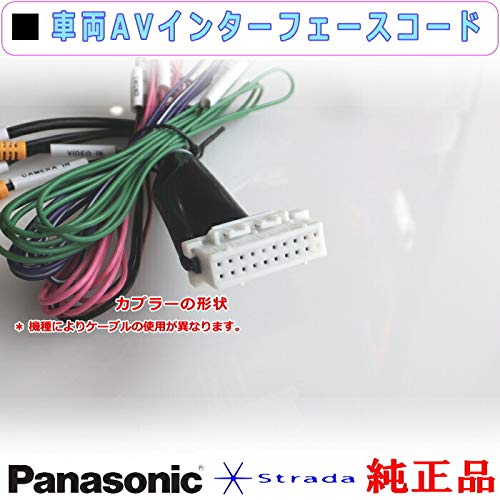
Image 3: A close-up view of the coupler (connector) shape. Note that cable usage may vary depending on the specific device model.

Image 4: Detailed product content and wiring information. Includes CAMERA IN (video input, 20cm for rear-view camera), SIDE BRAKE (2m), REVERSE (2m), SPEED (2m), STSW1 (steering switch 1, 45cm), STSW2 (steering switch 2, 45cm), and SWGRD (steering switch 3, 45cm). If external video output for rear monitors or flip-down monitors is required, use genuine Panasonic products from the specified link.
4. Troubleshooting
This section addresses common issues encountered during installation and operation of the vehicle interface code.
4.1. Image Not Displayed Correctly
- Initial Display Issues: If the image displays correctly upon initial installation but fails after some use, or if abnormal displays such as splash screens, flickering, inverted images, or blurriness occur, this may indicate a product quality issue. Please contact customer support for assistance.
- No Image on Initial Installation (Monitor Unchanged, Vehicle in Reverse): If the image does not display during initial installation, and the monitor remains unchanged while the vehicle is in reverse mode, or if the display automatically switches to a black screen in reverse mode, consider the following:
Possible Causes for No Image / Black Screen in Reverse:
- Unstable Power Connection: The power cord connection may be unstable. Ensure all power connections are secure.
- Damaged or Improperly Connected Cables: The connection cable may be broken, or the interface may not be fully connected. To ensure good contact, it is recommended to use appropriate size terminals (sold separately) and crimp the core wire after folding it.
- Trigger Line Error: If a reverse trigger monitor is present, the navigation system must be connected. The reverse mode should automatically switch to the rear camera screen.
- Incorrect Trigger Wire Connection:
- The rear camera's trigger wire (C) may not be correctly connected to the positive terminal of the reverse light power.
- The trigger wire (B) may not be correctly connected to the monitor trigger wire (A).
- Incorrect RCA Interface Connection: Some navigation systems have multiple RCA interfaces (e.g., video input and AUX video input for front or side cameras). These operate independently. To support the reverse trigger function, ensure the camera is connected to the correct RCA interface that automatically switches to the rear camera screen in reverse mode.
- Video Signal Incompatibility: Most monitors and navigation systems in the Japanese market support NTSC (CVBS) video signals. If your system only supports PAL (CVBS) or other video signals, the camera's signal may not be compatible. Contact customer support for a compatible rear camera if needed.
- Other Adapter Requirements: In some cases, additional adapters may be required for proper functionality.
Video 1: This video provides general solutions to common problems encountered with vehicle camera systems, including wiring diagrams and troubleshooting steps for display issues.
5. Specifications
| Attribute | Value |
|---|---|
| Brand Name | Panasonic |
| Manufacturer Name | Panasonic |
| ASIN | B086VL4T34 |
| Recommended Rating | 5.0 out of 5 stars (3 ratings) |
6. Warranty and Support
For warranty information, technical support, or if you encounter persistent issues not resolved by the troubleshooting steps, please contact Panasonic customer support or the retailer where the product was purchased. Providing your product model (CN-E300D) and ASIN (B086VL4T34) will help expedite your request.