
1. Introduction
This document serves as an instruction manual for the Panasonic Vehicle AV Interface Cord, model PZ30-RA03WD, designed for use with Panasonic navigation systems CN-RA03D and CN-RA03WD. It provides essential information regarding the product's features, installation, and connection procedures to ensure proper functionality and integration with your vehicle's audio-visual system, particularly for backup camera input.
2. Product Overview
The Panasonic PZ30-RA03WD is a genuine accessory interface cord designed to expand the connectivity options of your compatible Panasonic navigation system. It facilitates the input of video signals from a backup camera and provides connections for various vehicle signals, enhancing the functionality of your in-car entertainment and safety systems.

Image 2.1: Overview of the Panasonic Vehicle AV Interface Cord PZ30-RA03WD.
2.1 Compatible Models
- Panasonic CN-RA03D
- Panasonic CN-RA03WD

Image 2.2: The interface cord is compatible with Panasonic CN-RA03D and CN-RA03WD navigation systems.
2.2 Included Components
The package includes the PZ30-RA03WD vehicle AV interface cord. Please verify all components are present upon unboxing.

Image 2.3: The PZ30-RA03WD interface cord showing various labeled connections.
3. Setup and Installation
Before beginning installation, ensure the vehicle's ignition is off and the battery is disconnected to prevent electrical damage or injury. Professional installation is recommended.
3.1 Connection Points
The interface cord connects to the main unit of your Panasonic navigation system. The specific connector shape is designed for a secure fit.
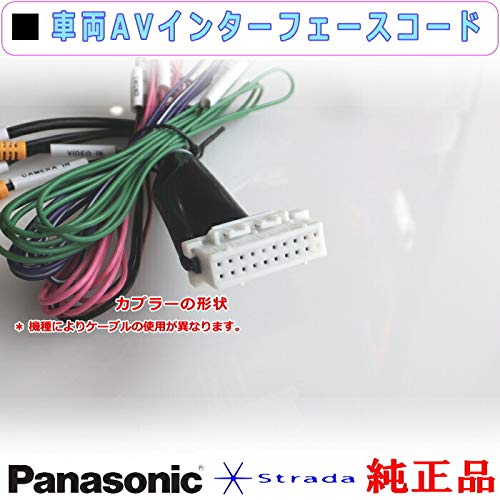
Image 3.1: Detail of the interface cord's connector, designed for specific Panasonic navigation units.
3.2 Wiring Diagram and Functions
Refer to the following table and image for detailed wiring connections and their respective functions:

Image 3.2: Detailed view of the interface cord's connections and their labels.
| Connection | Function | Length (Approx.) |
|---|---|---|
| CAMERA IN | Video input for rearview/backup camera. Connects a separately sold rearview camera. | 20 cm |
| SIDE BRAKE | Side brake signal input. | 2 m |
| REVERSE | Reverse gear signal input. | 2 m |
| SPEED | Vehicle speed signal input. | 2 m |
| STSW1 | Steering switch 1 input (Brown wire). | 45 cm |
| STSW2 | Steering switch 2 input (Blue/Yellow wire). | 45 cm |
| SWGRD | Steering switch 3 input (Black wire). | 45 cm |
| Ground | Vehicle ground connection. | (Integrated) |
| Power Input | Vehicle power signal input. | (Integrated) |
| Speaker Output | Speaker output signal. | (Integrated) |
| Remote Signal Output | Remote control signal output. | (Integrated) |
Note: The standard accessories for this interface cord do not include external video output cables. If you intend to connect a rear monitor or a flip-down monitor, please use genuine Panasonic external video output products, which are sold separately.
4. Operating Instructions
Once the interface cord is correctly installed, the connected devices will integrate with your Panasonic navigation system. For specific operational details of connected devices (e.g., backup camera display), refer to the respective device's instruction manual and your Panasonic navigation system's user guide.
4.1 Backup Camera Functionality
When a backup camera is connected to the "CAMERA IN" input and the "REVERSE" signal is received, your navigation system should automatically display the camera's video feed. Consult your navigation system's manual for settings related to backup camera display and guidelines.
4.2 Steering Wheel Control Integration
If your vehicle's steering wheel controls are connected to the STSW1, STSW2, and SWGRD inputs, they can be configured to control functions on your Panasonic navigation system. Refer to your navigation system's settings menu for steering wheel control mapping and customization.
5. Maintenance
The interface cord requires minimal maintenance. Ensure all connections remain secure and free from corrosion. Avoid exposing the cord to extreme temperatures, moisture, or physical stress. Periodically check for any signs of wear or damage to the wiring.
6. Troubleshooting
- No Backup Camera Display: Verify the backup camera is powered on and functioning. Check the "CAMERA IN" connection for security. Ensure the "REVERSE" signal wire is correctly connected to the vehicle's reverse light circuit. Consult your navigation system's manual for camera input settings.
- Steering Wheel Controls Not Working: Confirm the STSW1, STSW2, and SWGRD wires are correctly connected to your vehicle's steering wheel control wires. Check the navigation system's settings for proper configuration and mapping of steering wheel controls.
- Intermittent Functionality: Inspect all connections for looseness or corrosion. Ensure the interface cord is not pinched or damaged.
If issues persist after checking these points, it is recommended to consult a professional installer or contact Panasonic customer support.
7. Specifications
| Feature | Detail |
|---|---|
| Brand | Panasonic |
| Model Number | PZ30-RA03WD |
| Compatible Navigation Systems | Panasonic CN-RA03D, CN-RA03WD |
| Function | Vehicle AV Interface Cord for backup camera input and various signal connections. |
| ASIN | B086VJQML6 |
| First Available Date | April 7, 2020 |
8. Warranty Information
Specific warranty details for this product are typically provided at the point of purchase or within the packaging. As a genuine Panasonic product, it is generally covered by Panasonic's standard accessory warranty. Please retain your proof of purchase for warranty claims. For detailed warranty terms and conditions, refer to the official Panasonic website or contact their customer service.
9. Support
For technical assistance, installation queries, or warranty support, please contact Panasonic customer service. You can find contact information on the official Panasonic website or through the documentation included with your Panasonic navigation system.
Panasonic Official Website: www.panasonic.com


