
1. Safety Instructions
Please read all safety instructions carefully before using this appliance. Failure to follow these instructions may result in electric shock, fire, or serious injury.
- This appliance is for indoor use only. Do not use outdoors or on wet surfaces.
- Do not allow children to operate the robot vacuum. Supervise children and pets when the robot is operating.
- Do not use the robot vacuum to pick up large debris, liquids, burning or smoking materials, or sharp objects.
- Ensure the charging base is placed against a wall on a level surface and that there are no obstacles within 1 meter (3 feet) in front of it and 0.5 meters (1.5 feet) on either side.
- Turn off the robot vacuum and unplug the charging base before cleaning or performing maintenance.
- Do not use the robot vacuum in areas with exposed electrical outlets or damaged power cords.
- Keep hair, loose clothing, fingers, and all parts of the body away from openings and moving parts.
2. Package Contents
Verify that all components are present and in good condition upon unpacking.
- Lefant M200 Robot Vacuum Cleaner
- Charging Base
- Power Adapter
- Side Brushes (2 pairs)
- HEPA Filter (1 installed, 1 spare)
- Cleaning Tool
- User Manual

Text Description: A person unboxes the Lefant M200 robot vacuum, revealing the main unit, charging base, power adapter, and user manual.
3. Product Overview
Components
- Main Unit (Robot Vacuum)
- Dustbin with HEPA Filter
- Side Brushes
- Charging Contacts
- Power Button/Indicator Light
- Infrared Sensors
Features
- Ultra-Thin Design: Allows the robot to clean under furniture.
- 2000Pa Suction: Powerful suction for pet hair, dust, and debris on hard floors and low-pile carpets.
- FreeMove Technology 2.0: Enhanced 360° detection to prevent getting stuck.
- Brushless Motor: Energy-efficient with long lifespan.
- Automatic Charging: Robot returns to the charging base when battery is low.
- HEPA Double Filtration: Effectively blocks secondary pollution.
- App Control: Manage cleaning modes, schedule, and monitor the robot via the Lefant Life app.
- Voice Control: Compatible with Amazon Alexa.

Text Description: An illustration showing the Lefant M200 robot vacuum cleaning under furniture, highlighting its 360° detection and FreeMove Technology 2.0 to prevent it from getting stuck.

Text Description: Two robot vacuums are shown, one larger and one smaller (Lefant M200). The smaller body of the Lefant M200 allows for better passability and high coverage cleaning in tight spaces.
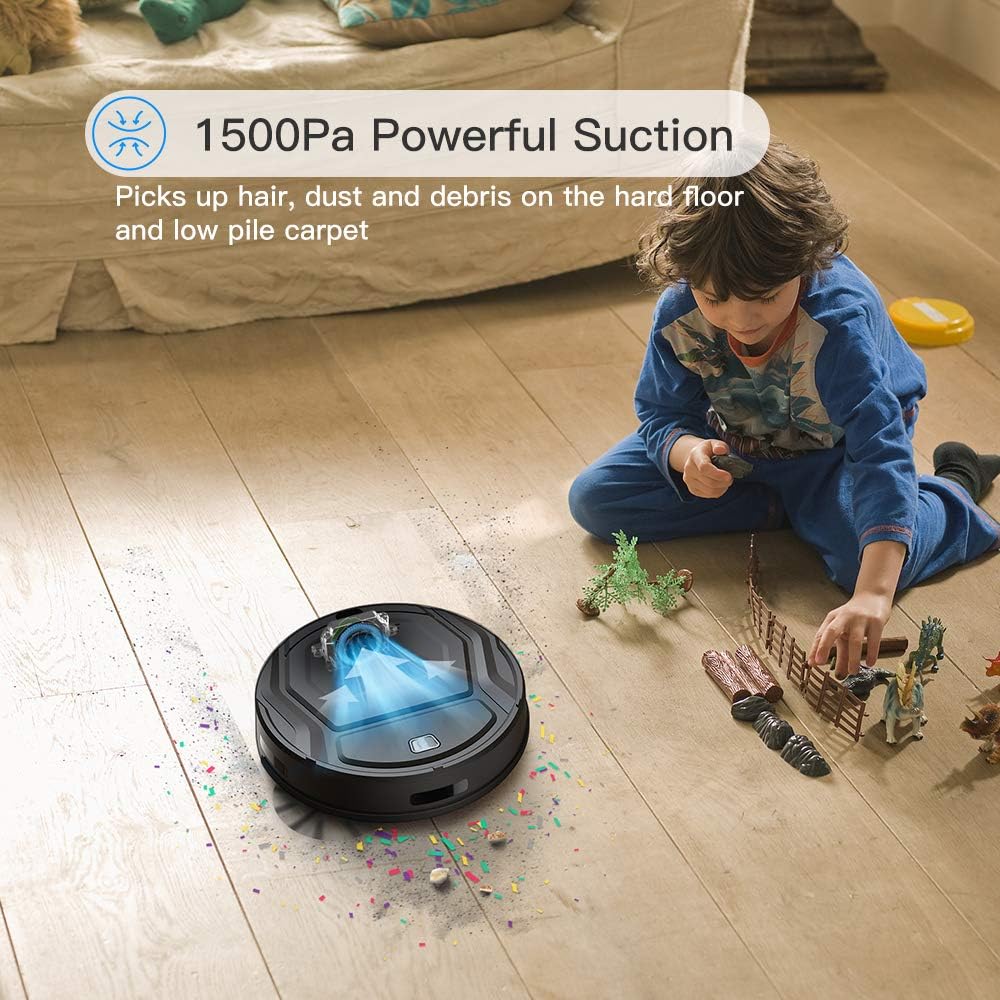
Text Description: The Lefant M200 robot vacuum is shown actively cleaning a floor with visible debris being sucked into its powerful suction port, demonstrating its 1500Pa suction capability.

Text Description: A split image showing the brushless motor on one side, emphasizing its energy efficiency and long life, and a graph illustrating the safety and long life of the M200's battery compared to other models.

Text Description: The Lefant M200 robot vacuum is shown automatically returning to its charging base, indicating its auto-charging feature when the battery is low.

Text Description: An image illustrating the suction advantages of the Lefant M200, specifically its direct suction port design that prevents hair tangling, unlike traditional roller brushes. It is suitable for all floor types.

Text Description: A cutaway diagram of the Lefant M200 showing its 500ML large dust box and HEPA double filter system, designed to effectively block secondary pollution.
4. Setup
4.1 Initial Charging
- Place the charging base against a wall in an open area.
- Connect the power adapter to the charging base and a wall outlet.
- Place the robot vacuum on the charging base, ensuring the charging contacts align. The indicator light will show charging status.
- Fully charge the robot before first use (approximately 4-5 hours).
4.2 Installing Side Brushes
- Turn the robot vacuum upside down.
- Align the side brushes with the corresponding posts (L for left, R for right) on the bottom of the robot.
- Press down firmly until they click into place.
Text Description: An official video from Lefant Home Robot demonstrating the correct procedure for installing and uninstalling the side brushes on the robot vacuum.
4.3 Connecting to Wi-Fi and App
- Download the 'Lefant Life' app from your smartphone's app store.
- Register or log in to your account.
- Follow the in-app instructions to add your M200 robot vacuum. Ensure your phone is connected to a 2.4GHz Wi-Fi network.
- Press and hold the power button on the robot until the Wi-Fi indicator light flashes rapidly, indicating pairing mode.
4.4 Alexa Integration
- Ensure your M200 is successfully connected to the 'Lefant Life' app.
- Open the Amazon Alexa app on your smartphone.
- Navigate to 'Skills & Games' and search for 'Smart Life'.
- Enable the 'Smart Life' skill and link your 'Lefant Life' account.
- Discover devices in the Alexa app. Your M200 robot vacuum should appear.
- You can now control your robot vacuum using voice commands (e.g., "Alexa, turn on [robot name]").
Text Description: An official video from Lefant Home Robot providing a step-by-step guide on how to connect the robot vacuum to Amazon Alexa for voice control.
5. Operating Instructions
5.1 Cleaning Modes
The Lefant M200 offers various cleaning modes to suit different needs:
- Auto Cleaning: The robot automatically navigates and cleans your home.
- Spot Cleaning: Focuses on a specific area for intensive cleaning.
- Edge Cleaning: Cleans along walls and furniture edges.
- Scheduled Cleaning: Set a cleaning schedule via the Lefant Life app.
5.2 Using the Remote Control
The remote control allows for convenient operation of your robot vacuum.
- Start/Pause: Press the play/pause button to start or pause cleaning.
- Directional Buttons: Manually steer the robot.
- Mode Selection: Select desired cleaning modes.
- Home Button: Send the robot back to its charging base.
- Schedule Button: Set or cancel cleaning schedules.
Text Description: An official video from Lefant Home Robot demonstrating how to cancel scheduled cleaning using the remote control.
6. Maintenance
Regular maintenance ensures optimal performance and extends the lifespan of your robot vacuum.
6.1 Emptying the Dustbin
- Press the dustbin release button and pull out the dustbin.
- Open the dustbin cover and empty the contents into a trash bin.
- Clean the HEPA filter and dustbin with the provided cleaning tool or a soft brush. Do not wash the HEPA filter with water.
- Reinstall the filter and dustbin.
6.2 Cleaning the Roller Brush
The Lefant M200 features a direct suction port, minimizing hair tangles. If your model includes a roller brush, follow these steps:
- Turn the robot vacuum upside down.
- Remove the red cover over the roller brush.
- Lift out the roller brush.
- Use the cleaning tool to remove any hair or debris tangled around the brush.
- Reinstall the roller brush and its cover.
Text Description: An official video from Lefant Home Robot demonstrating how to clean and install the roller brush of the robot vacuum.
6.3 Cleaning Side Brushes
- Gently pull the side brushes upwards to remove them.
- Remove any hair or debris from the brushes and their posts.
- Reinstall the side brushes, ensuring they click into place.
6.4 Cleaning Sensors and Charging Contacts
Wipe the anti-drop sensors, infrared sensors, and charging contacts on both the robot and the charging base with a clean, dry cloth to ensure proper function.
7. Troubleshooting
| Problem | Possible Cause | Solution |
|---|---|---|
| Robot does not turn on | Low battery; Power switch off | Charge the robot; Ensure power switch is on. |
| Robot gets stuck frequently | Obstacles (cables, rugs); Narrow spaces | Clear obstacles; Use boundary strips if available. |
| Poor cleaning performance | Full dustbin; Clogged filter; Worn brushes | Empty dustbin; Clean/replace filter; Clean/replace brushes. |
| Cannot connect to Wi-Fi/App | Incorrect Wi-Fi password; 5GHz Wi-Fi network; Robot not in pairing mode | Verify password; Connect to 2.4GHz Wi-Fi; Reset robot to pairing mode. |
| Robot does not return to charging base | Charging base obstructed; Robot too far from base | Clear area around base; Manually place robot closer to base. |
8. Specifications
- Brand: Lefant
- Model: M200
- Special Feature: HEPA filtration
- Color: Black
- Power Source: Battery Powered
- Control Method: Voice, App, Remote
- Compatible Devices: Amazon Echo (Alexa)
- Form Factor: Robotic
- Package Dimensions: 15.07 x 13.35 x 4.69 inches
- Item Weight: 5.57 pounds
- Surface Recommendation: Hard Floor
9. Warranty and Support
Lefant products come with a standard manufacturer's warranty. For specific warranty details, please refer to the warranty card included in your package or visit the official Lefant website.
For technical support, troubleshooting assistance, or to order replacement parts, please contact Lefant Customer Service:
- Website: Lefant Official Store
- Email: Refer to your product documentation for the most current support email address.
- Phone: Refer to your product documentation for the most current support phone number.
Please have your model number (M200) and purchase date ready when contacting support.


