1. Introduction
This manual provides essential information for the safe and efficient operation of your Midea Portable 1-Burner Induction Cooktop. Please read it thoroughly before use and retain it for future reference. This appliance is designed for domestic use to cook food using induction heating technology.
2. Important Safety Instructions
When using electrical appliances, basic safety precautions should always be followed to reduce the risk of fire, electric shock, and injury to persons, including the following:
- Read all instructions before using the appliance.
- Do not touch hot surfaces. Use handles or knobs.
- To protect against electrical shock, do not immerse cord, plugs, or the appliance in water or other liquid.
- Close supervision is necessary when any appliance is used by or near children.
- Unplug from outlet when not in use and before cleaning. Allow to cool before putting on or taking off parts.
- Do not operate any appliance with a damaged cord or plug or after the appliance malfunctions or has been damaged in any manner.
- The use of accessory attachments not recommended by the appliance manufacturer may cause injuries.
- Do not use outdoors.
- Do not let cord hang over edge of table or counter, or touch hot surfaces.
- Do not place on or near a hot gas or electric burner, or in a heated oven.
- Extreme caution must be used when moving an appliance containing hot oil or other hot liquids.
- Always attach plug to appliance first, then plug cord into the wall outlet. To disconnect, turn any control to “off”, then remove plug from wall outlet.
- Do not use appliance for other than intended use.
- This appliance generates heat during use. Proper precautions must be taken to prevent the risk of burns, fires, or other damage to persons or property.
- Ensure the appliance is placed on a stable, flat, heat-resistant surface.
- Only use cookware suitable for induction cooking.
3. Product Overview
The Midea Portable 1-Burner Induction Cooktop offers a sleek design and efficient cooking. It features a durable vitroceramic surface and an intuitive touch control panel.

Image 1: Angled view of the Midea Portable 1-Burner Induction Cooktop, showcasing its compact design and control panel.
Control Panel Features
The cooktop's control panel is designed for ease of use, featuring a digital display and touch-sensitive buttons for various functions and power adjustments.

Image 2: Close-up view of the control panel, highlighting the digital timer display, power slider, and function icons.
- Power On/Off: Activates or deactivates the cooktop.
- Timer: Sets a cooking duration.
- Power Control: A slider to adjust heating intensity with up to 9 selections.
- Pre-defined Functions: Dedicated buttons for Fry, Sauté, Slow Cook, Boil, Rice, Keep Warm, Fondue, and Soup.
- Safety Lock (Child Lock): Locks the control panel to prevent accidental operation.
4. Setup
- Unpacking: Carefully remove the cooktop from its packaging. Retain packaging for future transport or storage.
- Placement: Place the cooktop on a dry, stable, and heat-resistant surface. Ensure there is adequate ventilation around the unit (at least 10 cm clearance from walls or other objects). Do not place it near heat sources or on metallic surfaces that could interfere with induction.
- Power Connection: Ensure your electrical outlet matches the cooktop's voltage (127V). Plug the power cord into a grounded electrical outlet.
- Initial Cleaning: Before first use, wipe the vitroceramic surface with a damp cloth to remove any dust or residue from manufacturing.
5. Operating Instructions
5.1 Compatible Cookware
Induction cooktops require specific types of cookware. Only use pots and pans made of ferromagnetic materials, such as cast iron, enameled iron, or stainless steel with a magnetic base. Cookware should have a flat bottom and a diameter between 12 cm and 26 cm. To test if your cookware is compatible, hold a magnet to the bottom; if it sticks, it is suitable for induction.
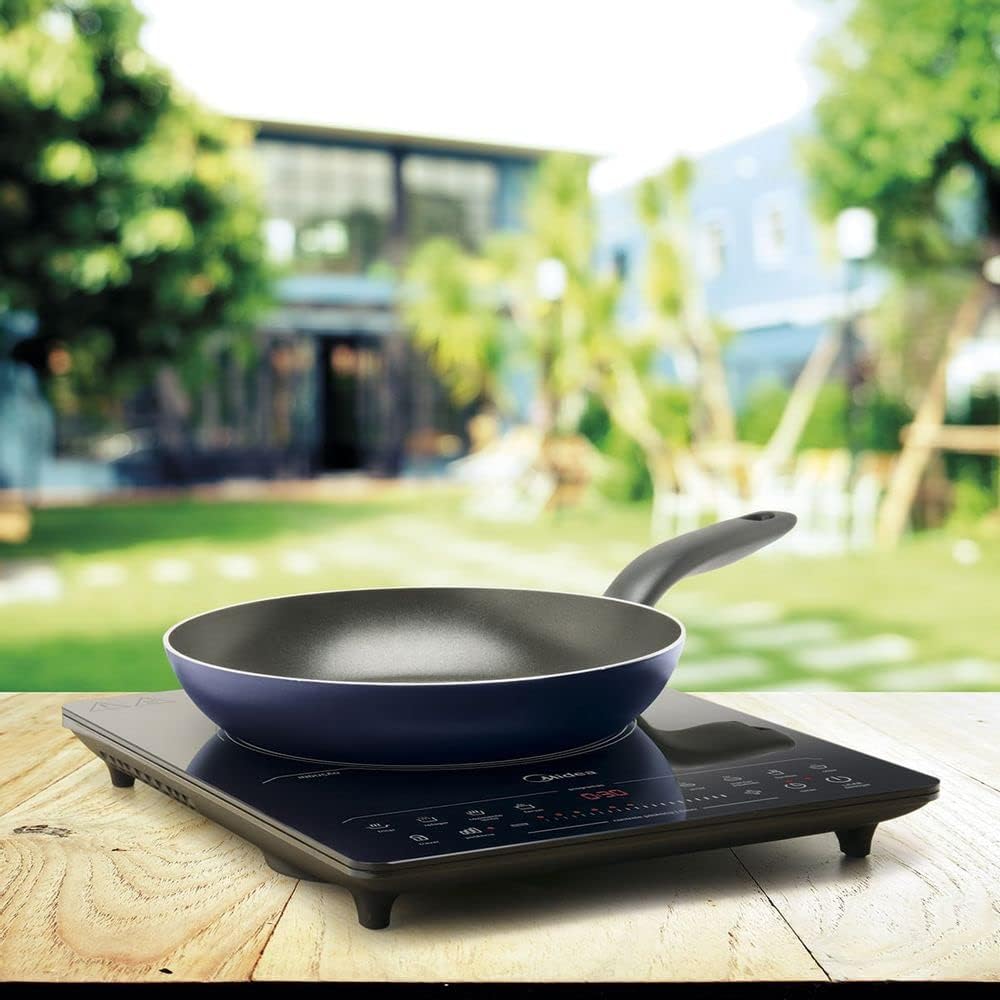
Image 3: The cooktop with an empty pan, demonstrating proper placement of cookware on the induction zone.
5.2 Basic Operation
- Place compatible cookware containing food or liquid on the center of the induction zone.
- Press the Power On/Off button to turn on the cooktop. The display will illuminate.
- Select your desired cooking method:
- Manual Power Selection: Slide your finger along the power control bar to choose one of the 9 power levels. The indicator lights will show the selected level.
- Pre-defined Functions: Press one of the 8 function buttons (Fry, Sauté, Slow Cook, Boil, Rice, Keep Warm, Fondue, Soup). The cooktop will automatically set the appropriate power and temperature for that function.
- To adjust the power during a pre-defined function, you may be able to use the power slider, depending on the specific function.
- To turn off the cooktop, press the Power On/Off button again.
5.3 Timer Function
The timer allows you to set a specific cooking duration, after which the cooktop will automatically turn off.
- While the cooktop is operating, press the Timer button.
- Use the + and - buttons (or the power slider, if applicable) to set the desired cooking time. The display will show the remaining time.
- Once the set time expires, the cooktop will beep and turn off automatically.
5.4 Safety Lock (Child Lock)
The safety lock prevents accidental changes to settings or unintended operation, especially useful around children.
- To activate the safety lock, press and hold the Lock button for a few seconds until an indicator light or symbol appears on the display.
- When locked, all control panel functions are disabled except for the Power On/Off button.
- To deactivate the safety lock, press and hold the Lock button again for a few seconds until the indicator light disappears.
6. Maintenance and Cleaning
Regular cleaning ensures optimal performance and extends the life of your cooktop.
- Always unplug the cooktop from the power outlet and allow it to cool completely before cleaning.
- Vitroceramic Surface: Wipe the surface with a soft, damp cloth and a mild detergent. For stubborn stains, use a specialized ceramic cooktop cleaner. Avoid abrasive cleaners, scouring pads, or harsh chemicals, as these can scratch or damage the surface.
- Control Panel: Wipe gently with a soft, damp cloth. Ensure no liquid enters the control panel area.
- Exterior: Clean the exterior housing with a soft, damp cloth.
- Do not immerse the cooktop in water or any other liquid.
- Ensure the cooktop is completely dry before plugging it back in and using it.
7. Troubleshooting
If you encounter issues with your cooktop, refer to the following common problems and solutions:
| Problem | Possible Cause | Solution |
|---|---|---|
| Cooktop does not turn on. | No power supply; Power cord not properly plugged in; Circuit breaker tripped. | Check if the cooktop is plugged in correctly. Verify the power outlet is working. Check your household circuit breaker. |
| Cooktop turns on but does not heat. | Incompatible cookware; No cookware on the induction zone; Cookware not centered. | Ensure cookware is induction-compatible. Place cookware on the induction zone. Center the cookware properly. |
| Display shows an error code (e.g., 'E0', 'E1'). | Specific malfunction or sensor error. | Refer to the specific error code in a more detailed manual (if available) or contact customer support. Try unplugging and re-plugging the unit after a few minutes. |
| Cooktop makes a humming or buzzing noise. | Normal operation of induction technology; Cookware material or construction. | This is often normal. Some cookware types may amplify the sound. Ensure cookware is flat-bottomed and suitable for induction. |
| Safety lock cannot be deactivated. | Incorrect procedure for deactivation. | Press and hold the Lock button for several seconds until the indicator light disappears. |
If the problem persists after attempting these solutions, please contact Midea customer support.
8. Specifications
Detailed technical specifications for the Midea Portable 1-Burner Induction Cooktop (Model CYAD11).

Image 4: Product label showing technical specifications for Midea Induction Cooktop Models CYAD11 (127V) and CYAD12 (220V).
| Feature | Specification |
|---|---|
| Brand | Midea |
| Model | CYAD11 |
| Color | Black |
| Voltage | 127 Volts |
| Frequency | 60 Hz |
| Power (Electrical) | 1500 Watts |
| Number of Heating Elements | 1 |
| Material Type | Vitroceramic |
| Special Features | Touch Panel, Timer |
| Product Dimensions (L x W x H) | 38 x 29.5 x 4 cm |
| Product Weight | 3.18 kg |
| EAN | 7898554872234, 7908198000334 |
9. Warranty and Support
Midea products are manufactured to high-quality standards. For specific warranty information, please refer to the warranty card included with your product or visit the official Midea website.
For technical assistance, spare parts, or any inquiries regarding your Midea Portable 1-Burner Induction Cooktop, please contact Midea customer support. You can find more information and contact details on the Midea Brand Store on Amazon.


