
1. Introduction
This manual provides comprehensive instructions for the installation, configuration, operation, and maintenance of the Mellanox ConnectX-6 VPI Network Adapter, model MCX653106A-HDAT-SP. It is intended for system administrators, IT professionals, and users responsible for deploying and managing high-performance networking solutions. Please read this manual thoroughly before installing or operating the device.
2. Product Overview
The Mellanox ConnectX-6 VPI (Virtual Protocol Interconnect) adapter card is designed to deliver high-performance InfiniBand and Ethernet connectivity for data center applications. This adapter provides two QSFP56 ports, supporting up to 200Gb/s per port, with sub-600ns latency and a throughput of up to 215 million messages per second. It is compatible with PCIe 4.0 x16 slots and supports a wide range of InfiniBand and Ethernet speeds.
Key Features:
- Up to 200Gb/s connectivity per port.
- Maximum bandwidth of 200Gb/s.
- Up to 215 million messages per second.
- Sub 0.6 microsecond latency.
- Block-level XTS-AES mode hardware encryption.
- FIPS capable.
- Advanced storage capabilities including block-level encryption and checksum offloads.
- Supports both 50G SerDes (PAM4) and 25G SerDes (NRZ) based ports.
- Best-in-class packet pacing with sub-nanosecond accuracy.
- PCIe Gen 3.0 and Gen 4.0 support.
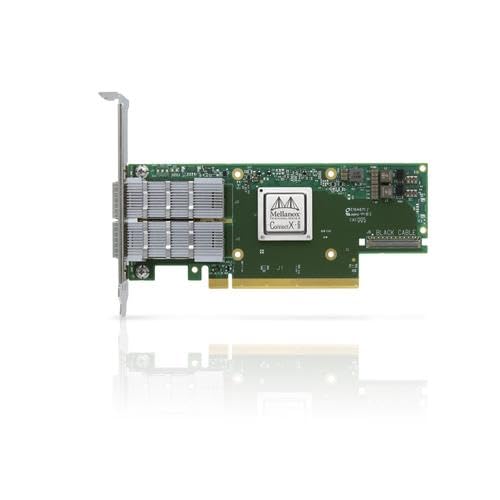
Figure 2.1: Mellanox ConnectX-6 VPI Network Adapter (MCX653106A-HDAT-SP). This image displays the physical appearance of the dual-port QSFP56 PCIe adapter card.
3. Safety Information
Observe the following safety precautions during installation and operation:
- Electrostatic Discharge (ESD) Protection: Always use an anti-static wrist strap and work on an anti-static mat when handling the adapter card to prevent damage from static electricity.
- Power Off: Ensure the host system is powered off and disconnected from the power source before installing or removing the adapter card.
- Ventilation: Ensure adequate airflow within the host system chassis to prevent overheating of the adapter card.
- Professional Installation: If you are not familiar with computer hardware installation, seek assistance from a qualified technician.
- Environmental Conditions: Operate the device within specified temperature and humidity ranges to ensure optimal performance and longevity.
4. Package Contents
Verify that your package contains the following items:
- Mellanox ConnectX-6 VPI Network Adapter (MCX653106A-HDAT-SP) with tall bracket.
Note: Additional accessories such as cables or documentation may be included depending on the specific product bundle.
5. Setup and Installation
5.1. Pre-installation Checklist
- Ensure your host system has an available PCIe 4.0 x16 slot. The adapter is also compatible with PCIe 3.0 x16 slots, though performance may be limited.
- Verify that your operating system supports the ConnectX-6 VPI adapter.
- Download the latest drivers and firmware from the official Mellanox (NVIDIA) support website.
- Gather necessary tools: Phillips head screwdriver, anti-static wrist strap.
5.2. Hardware Installation
- Power down the host system completely and disconnect all power cables.
- Open the computer chassis according to the manufacturer's instructions.
- Locate an available PCIe 4.0 x16 slot. Remove the corresponding expansion slot cover from the chassis.
- Carefully align the adapter card with the PCIe slot. Apply even pressure to both ends of the card until it is fully seated in the slot.
- Secure the adapter card to the chassis using the screw or retention clip provided by the chassis manufacturer.
- Close the computer chassis and reconnect all power cables.
- Power on the host system.
5.3. Driver Installation
After hardware installation, the operating system may detect new hardware. Install the appropriate drivers:
- For Windows operating systems, run the downloaded driver installer package and follow the on-screen prompts.
- For Linux operating systems, refer to the installation instructions provided with the driver package, typically involving command-line utilities.
- Reboot the system if prompted after driver installation.
6. Operating and Configuration
6.1. Basic Network Configuration
Once drivers are installed, the adapter will appear as a network interface in your operating system. Configure its IP address, subnet mask, and gateway settings as required for your network environment. For InfiniBand, specific subnet manager configuration may be necessary.
6.2. Supported Speeds and Protocols
The ConnectX-6 VPI adapter supports the following data rates and protocols:
- InfiniBand Speeds: HDR (200Gb/s), HDR100 (100Gb/s), EDR (100Gb/s), FDR (56Gb/s), QDR (40Gb/s), DDR (20Gb/s), SDR (10Gb/s).
- Ethernet Speeds: 200Gb/s, 100Gb/s, 50Gb/s, 40Gb/s, 25Gb/s, 10Gb/s.
Ensure that connected cables and switches are compatible with the desired speed and protocol settings.
7. Maintenance
The Mellanox ConnectX-6 VPI adapter requires minimal maintenance. Adhere to the following guidelines:
- Keep Clean: Periodically inspect the adapter for dust accumulation. If necessary, gently clean with compressed air while the system is powered off.
- Firmware Updates: Regularly check the Mellanox (NVIDIA) support website for firmware updates to ensure optimal performance, compatibility, and security.
- Environmental Control: Maintain a stable operating environment with appropriate temperature and humidity to prevent component degradation.
8. Troubleshooting
This section addresses common issues you may encounter:
- Adapter Not Detected:
- Ensure the adapter is fully seated in the PCIe slot.
- Verify the PCIe slot is functional by testing with another known-good card if possible.
- Check BIOS/UEFI settings to ensure PCIe slots are enabled.
- No Link Light/Connectivity:
- Verify that the network cable (InfiniBand or Ethernet) is securely connected to both the adapter and the switch/device.
- Ensure the cable type and length are appropriate for the desired speed and protocol.
- Check the status of the connected switch port.
- Confirm that the correct drivers are installed and functioning.
- Poor Performance:
- Ensure the adapter is installed in a PCIe 4.0 x16 slot for optimal performance.
- Verify that the operating system and application are configured to utilize the high-speed network interface.
- Check for network congestion or issues with other network devices.
- Update drivers and firmware to the latest versions.
For further assistance, refer to the Mellanox (NVIDIA) support website or contact technical support.
9. Specifications
| Feature | Description |
|---|---|
| Brand | Mellanox (NVIDIA) |
| Model Number | MCX653106A-HDAT-SP |
| Series | ConnectX-6 VPI |
| Hardware Interface | PCIe 4.0 x16 (backward compatible with PCIe 3.0) |
| Ports | 2 x QSFP56 |
| Data Link Protocols | InfiniBand (VPI), Ethernet |
| Max Data Transfer Rate | 200 Gigabits Per Second (per port) |
| InfiniBand Speeds | HDR, HDR100, EDR, FDR, QDR, DDR, SDR |
| Ethernet Speeds | 200Gb/s, 100Gb/s, 50Gb/s, 40Gb/s, 25Gb/s, 10Gb/s |
| Latency | Sub 0.6 microseconds |
| Messages Per Second | Up to 215 million |
| Dimensions (LxWxH) | 8.8 x 6.9 x 2.15 inches |
| Item Weight | 0.6 ounces |
| Compatible Devices | Computer systems with a PCIe 4.0 x16 slot and support for Ethernet or InfiniBand protocols |
10. Warranty and Support
The Mellanox ConnectX-6 VPI Network Adapter is covered by a manufacturer's warranty. For detailed warranty terms and conditions, please refer to the documentation included with your product or visit the official Mellanox (NVIDIA) website.
For technical support, driver downloads, firmware updates, and additional resources, please visit the Mellanox (NVIDIA) support portal. You may also contact their customer service for assistance with product-related inquiries.


