
Murata 810026280016
Murata LR41 Battery Instruction Manual
Model: 810026280016
Product Overview
The Murata LR41 is a 1.5V alkaline manganese coin cell battery, designed for reliable and high-performance power in various small electronic devices. This battery offers a capacity of 45mAh and is manufactured by Murata, a company known for its long tradition of creating quality micro batteries.
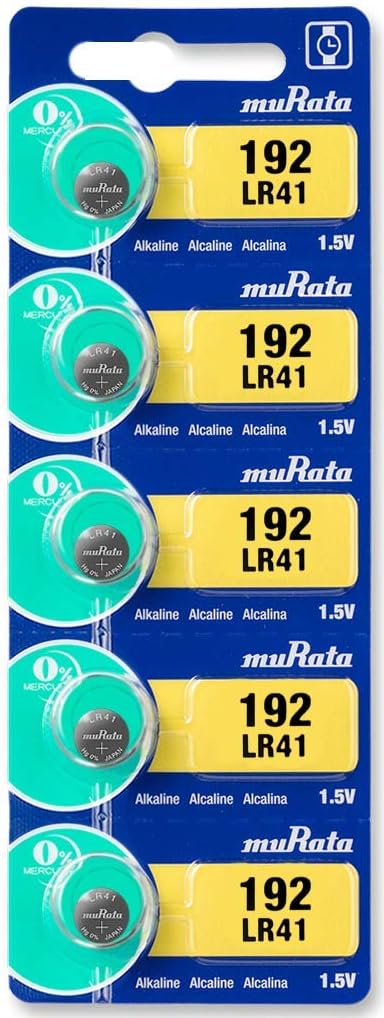
Image: A blister pack containing five Murata LR41 1.5V alkaline button cell batteries, clearly showing the product packaging and individual cells.
Key Features
- Type: LR41 Alkaline Manganese Coin Cell
- Voltage: 1.5V
- Capacity: 45mAh
- Reliability: Engineered for consistent performance in micro-electronic applications.
- Composition: Alkaline, 0% Mercury.

Image: A close-up of an insulin pump, illustrating the use of Murata batteries in medical devices. The image highlights the ISO certifications and the 0% mercury composition of the batteries.
Setup and Installation
Murata LR41 batteries are designed for easy installation in compatible devices. Always refer to your device's specific instruction manual for precise battery replacement procedures.
- Identify Battery Compartment: Locate the battery compartment on your electronic device. This is often secured with a small screw or a latch.
- Open Compartment: Carefully open the battery compartment. Use appropriate tools if necessary, such as a small screwdriver.
- Remove Old Battery (if applicable): If replacing an old battery, gently remove it, noting its orientation (positive and negative terminals).
- Insert New Battery: Insert the new Murata LR41 battery, ensuring the positive (+) and negative (-) terminals align correctly with the markings in the compartment. The positive side is typically marked with a plus sign and is the flatter side of the coin cell.
- Close Compartment: Securely close the battery compartment. Ensure it is properly sealed to prevent dust or moisture ingress.
Important: Always handle batteries with clean, dry hands. Avoid touching the battery terminals with bare fingers to prevent short-circuiting or contamination.
Operating Guidelines
Once installed, the Murata LR41 battery will provide power to your device. No specific operational steps are required for the battery itself, as its function is to supply consistent voltage to the electronic device it powers.
- Ensure the device is turned off before battery installation or removal.
- If the device does not power on after battery installation, double-check the battery orientation and ensure the compartment is fully closed.
- The battery is designed for single use and is not rechargeable.

Image: A collage of common devices that utilize coin cell batteries, including a digital thermometer, an insulin pump, a remote control, a calculator, a small light, and a tire pressure gauge, demonstrating the wide range of applications for Murata batteries.
Maintenance and Storage
Proper maintenance and storage ensure the longevity and safety of your Murata LR41 batteries.
- Storage: Store unused batteries in their original packaging in a cool, dry place, away from direct sunlight and extreme temperatures.
- Temperature: Avoid storing batteries in areas with high humidity or temperatures above 45°C (113°F) or below -10°C (14°F).
- Handling: Do not store batteries loosely or with metallic objects (e.g., coins, keys) to prevent short-circuiting.
- Disposal: Dispose of used batteries according to local regulations. Do not incinerate or mutilate batteries.
- Child Safety: Keep batteries out of reach of children. If swallowed, seek immediate medical attention.

Image: A graphic promoting Murata's commitment to environmental responsibility, highlighting that their batteries are 0% mercury, cadmium-free, and lead-free.
Troubleshooting
| Problem | Possible Cause | Solution |
|---|---|---|
| Device not powering on. | Incorrect battery orientation, depleted battery, poor contact. | Check battery polarity (+/-). Replace with a new battery. Clean battery contacts in the device. |
| Short battery life. | High power consumption by device, battery nearing end of life, improper storage. | Ensure device is not continuously drawing power. Replace battery. Store batteries in a cool, dry place. |
| Battery leakage. | Over-discharge, extreme temperatures, physical damage. | Immediately remove the leaking battery (wear gloves). Clean the compartment. Dispose of the battery safely. Avoid extreme conditions. |
Specifications
| Attribute | Detail |
|---|---|
| Model Number | 810026280016 |
| Battery Type | LR41 Alkaline Manganese Coin Cell |
| Voltage | 1.5V |
| Capacity | 45 mAh |
| Product Dimensions | 0.28 x 0.28 x 0.12 inches |
| Item Weight | 0.1 ounces |
| Manufacturer | Murata |
| Recommended Uses | Small electronic devices, medical devices, watches, calculators, toys, key fobs, etc. |
Safety Information
- Choking Hazard: Small batteries can be swallowed. Keep out of reach of children and pets.
- Chemical Burn Hazard: If swallowed, coin cell batteries can cause severe internal chemical burns in as little as 2 hours and lead to death.
- Do Not Recharge: These batteries are not rechargeable. Attempting to recharge them may cause leakage, fire, or explosion.
- Do Not Disassemble: Do not disassemble, crush, puncture, or short-circuit the battery.
- Avoid Heat: Do not expose batteries to excessive heat or fire.
- Proper Disposal: Dispose of used batteries promptly and responsibly.
Warranty and Support
For information regarding product warranty or technical support, please refer to the official Murata website or contact their customer service directly. Specific warranty terms may vary by region and retailer.
Manufacturer: Murata
Website: www.murata.com (General Murata website for support information)
Related documents810026280016


Ask a question about this manual
Ask about setup, troubleshooting, compatibility, parts, safety, or missing instructions. Manuals+ will review the question and use this page’s manual context to help answer it.