
1. Introduction
Thank you for purchasing the NEEWER 10-inch LED Ring Light with Tripod Stand. This product is designed to provide optimal lighting for various applications such as live streaming, makeup tutorials, vlogging, and video shooting. This manual provides detailed instructions for assembly, operation, and maintenance to ensure safe and efficient use of your device.
2. Safety Information
Please read all safety instructions carefully before using the product. Keep this manual for future reference.
- Do not expose the product to water or excessive humidity.
- Avoid direct eye exposure to the LED light.
- Ensure the tripod is stable on a flat surface before attaching the ring light or any devices.
- Use only the provided USB cable for power. Do not use damaged cables or adapters.
- Keep out of reach of children.
- Do not attempt to disassemble or repair the product yourself. Contact qualified service personnel.
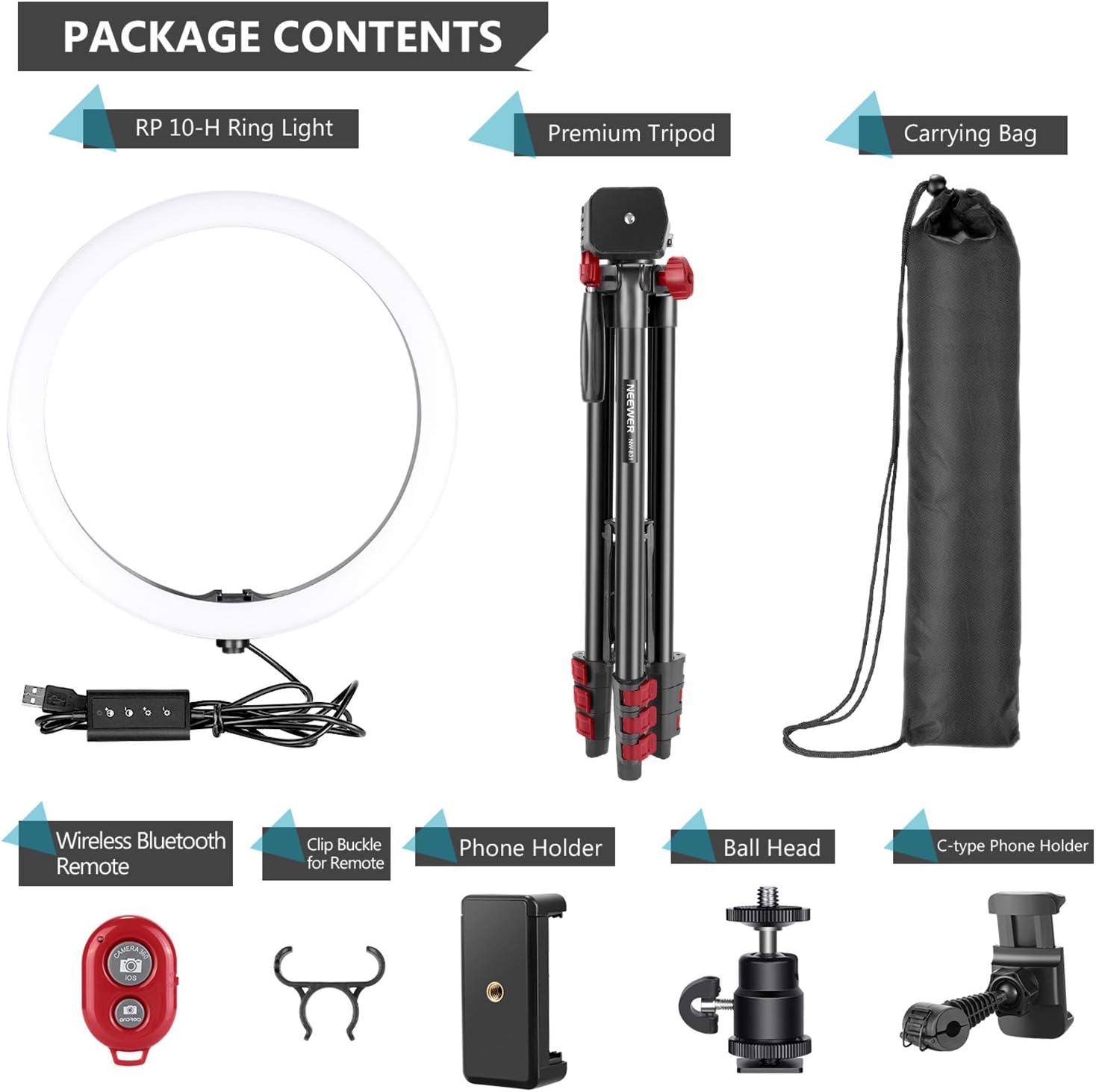
3. Package Contents
Verify that all items listed below are included in your package:
- 1 x NEEWER 10-inch LED Ring Light
- 1 x Tripod Stand
- 1 x Phone Holder
- 1 x Ball Head
- 1 x Wireless Bluetooth Remote
- 1 x Clip Buckle for Remote
- 1 x C-type Phone Holder
- 1 x Carrying Bag
4. Product Overview
Familiarize yourself with the main components of your NEEWER Ring Light system.

5. Setup
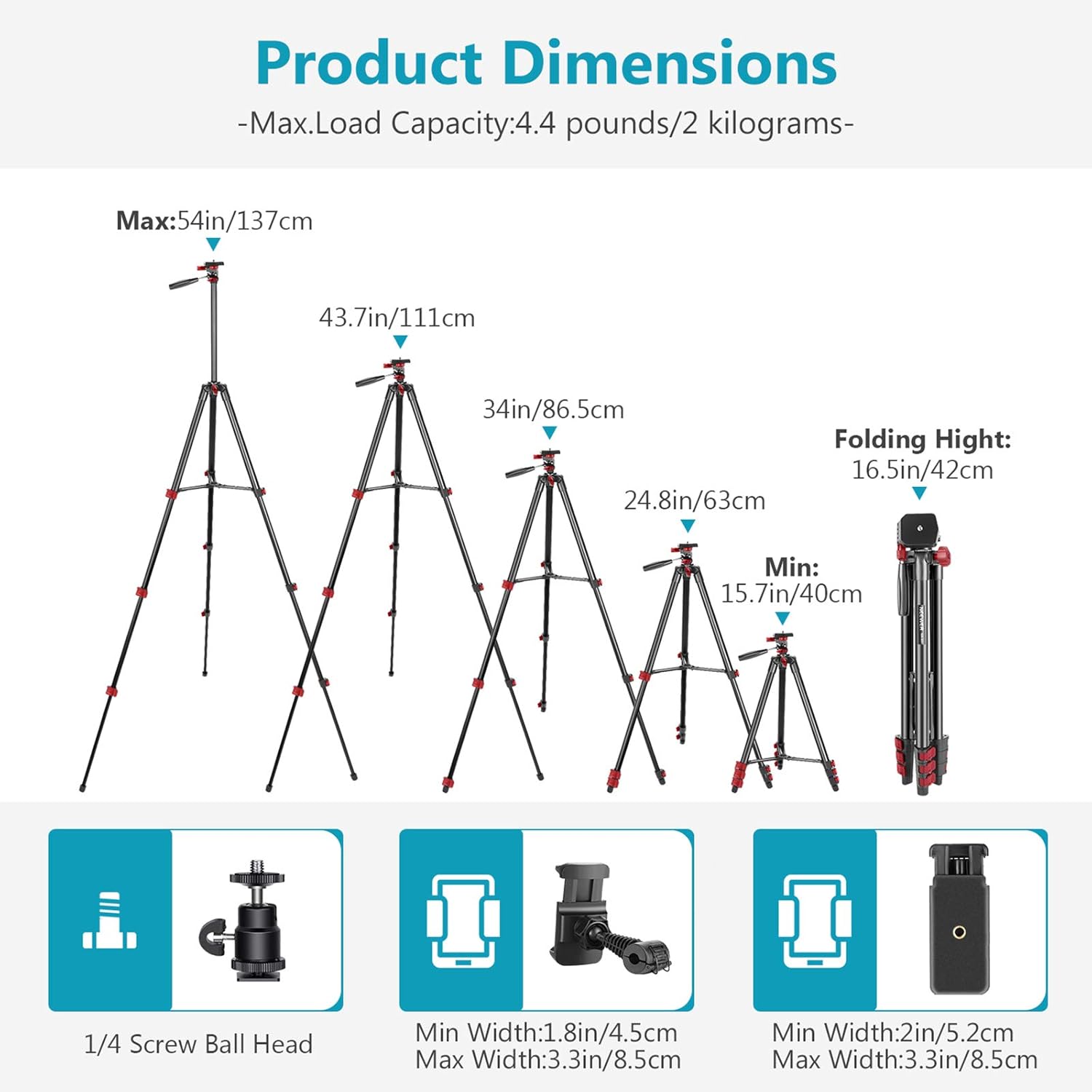
- Assemble the Tripod: Extend the tripod legs by releasing the flip locks. Adjust the height of the center column and secure it with the center column lock. Ensure the tripod is stable on a flat surface.
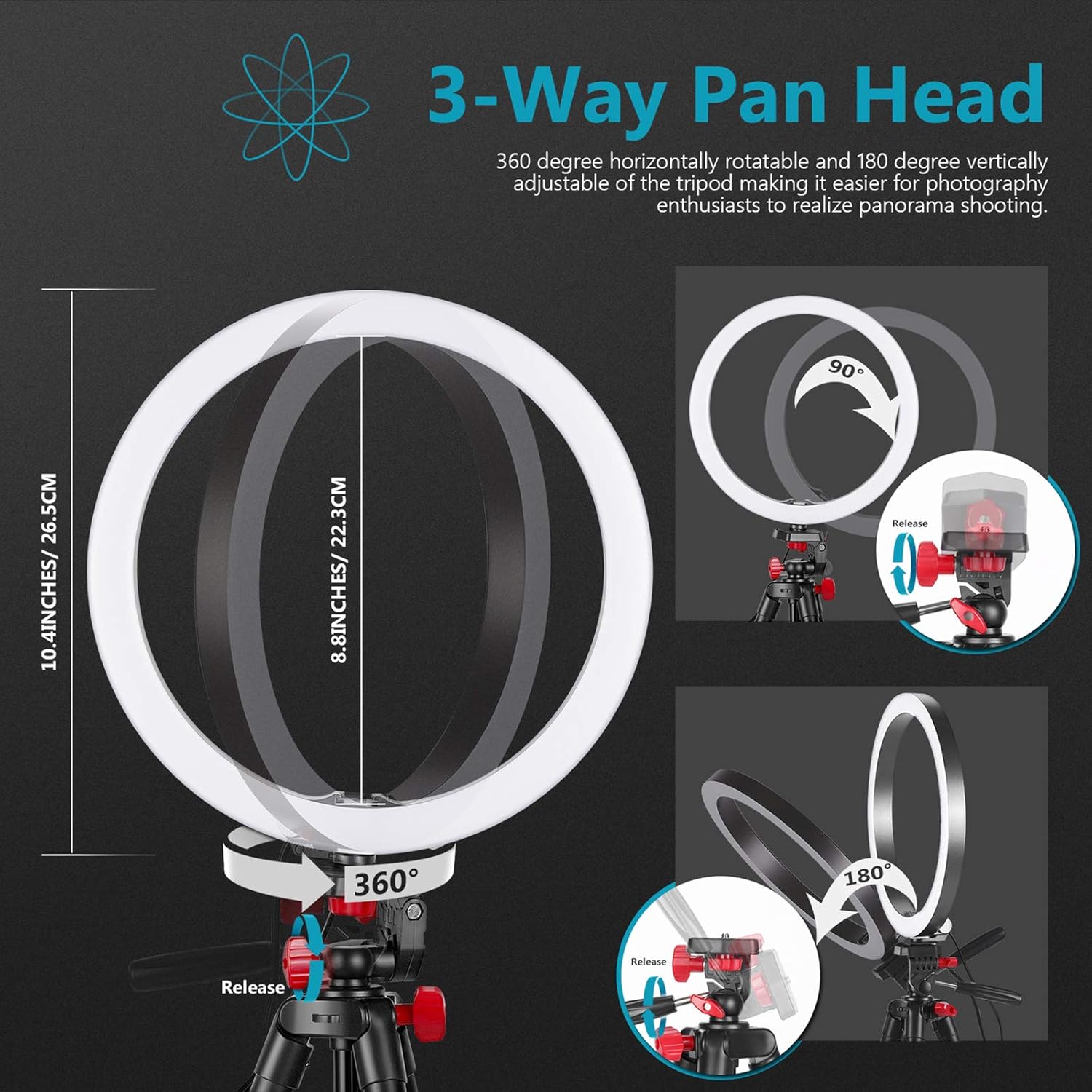
- Attach the Ring Light: Mount the 10-inch LED Ring Light onto the 1/4-inch screw ball head of the tripod. Tighten the locking knob to secure it.
- Attach Phone Holder: Insert the phone holder into the cold shoe mount on the ring light or directly onto the tripod's 1/4-inch screw. Adjust the angle as needed.
- Connect Power: Plug the USB cable from the ring light into a compatible USB power source (e.g., USB wall charger, power bank, computer USB port). Note: Laptops or power banks may draw too much power. A wall plug (not included) is recommended for optimal performance.

6. Operating Instructions
The ring light features an in-line controller for easy adjustments.

- Power On/Off: Press the power button on the in-line controller to turn the ring light on or off.
- Adjust Brightness: Use the '+' and '-' buttons on the controller to increase or decrease the brightness (dimming range 20%-100%).
- Adjust Color Temperature: Use the color temperature adjustment button to cycle through 3 light modes: Warm Light (3200K), Cool White (6000K), and Daylight (4500K).
- Bluetooth Remote Control: The included wireless Bluetooth remote allows you to trigger your phone's camera from a distance. Pair it with your smartphone via Bluetooth settings.

7. Maintenance
- Clean the ring light and tripod with a soft, dry cloth. Do not use abrasive cleaners or solvents.
- Store the product in its carrying bag in a cool, dry place when not in use.
- Regularly check all screws and connections to ensure they are tight and secure.
8. Troubleshooting
| Problem | Possible Cause | Solution |
|---|---|---|
| Ring light does not turn on. | No power, loose connection, or faulty USB adapter. | Check USB connection. Try a different USB port or wall adapter. Ensure the power button is pressed. |
| Light is too dim or too bright. | Brightness setting is incorrect. | Adjust brightness using the '+' and '-' buttons on the in-line controller. |
| Color temperature is not as desired. | Incorrect color mode selected. | Press the color temperature adjustment button to cycle through available modes. |
| Bluetooth remote not connecting. | Remote not paired, out of range, or battery low. | Ensure remote is on and within range. Check smartphone Bluetooth settings for pairing. Replace remote battery if necessary. |
| Tripod is unstable. | Legs not fully extended or locked, uneven surface. | Ensure all flip locks are secured and the tripod is on a flat, stable surface. |
9. Specifications
- Brand: NEEWER
- Model Number: 10097134
- Connectivity Technology: USB
- Product Dimensions: 10.4"L x 10.4"W x 54"H (26.4cm L x 26.4cm W x 137cm H)
- Item Weight: 1.3 Kilograms
- Screen Size (Ring Light Diameter): 10 Inches
- Max. Load Capacity: 4.4 pounds / 2 kilograms
- Light Modes: 3 (Warm, Cool White, Daylight)
- Dimming Range: 20%-100%
- Color Temperature: 3200K-6000K
- UPC: 191073050365
10. Usage Scenarios
The NEEWER 10-inch LED Ring Light is versatile and suitable for a wide range of applications:
- Live Streaming: Enhance your appearance and video quality for platforms like Twitch, YouTube Live, and Facebook Live.
- Makeup Tutorials: Achieve perfect lighting for detailed makeup application and recording.
- Vlogging & Video Shooting: Improve the visual quality of your vlogs, interviews, and product reviews.
- Photography: Ideal for portrait photography, product photography, and close-up shots.
- Online Meetings & Remote Work: Ensure you look professional and well-lit during video conferences.

11. Warranty and Support
For warranty information or technical support, please refer to the official NEEWER website or contact their customer service directly. Keep your purchase receipt as proof of purchase.