
Introduction
Thank you for purchasing the HoMedics Non-Contact Infrared Forehead Thermometer. This device is designed for accurate and convenient temperature measurement for all ages, including infants, children, and adults. Its non-contact design ensures hygienic use, and the infrared technology provides instant readings. Please read this manual thoroughly before use to ensure proper operation and to maintain the device's accuracy and longevity.
Important Safety Information
- This thermometer is intended for household use only. Consult a physician for interpretation of temperature readings.
- Do not immerse the thermometer in water or other liquids.
- Keep the device away from direct sunlight, dust, and extreme temperatures.
- Do not drop the thermometer or subject it to strong impact.
- Ensure the sensor lens is clean before each use for accurate readings.
- Keep batteries out of reach of children.
- If the device is not used for a long period, remove the batteries to prevent leakage.
Product Overview
Components
- HoMedics Non-Contact Infrared Forehead Thermometer (Model TE-200-EU)
- 2 x AAA Batteries (included)
- User Manual
Key Features
- Non-Contact Measurement: Measures temperature from a distance of 0.5-3cm.
- Instant Reading: Provides quick and accurate temperature results.
- Backlit LCD Display: Large, easy-to-read screen for clear visibility, even in low light.
- Fever Alarm: Audible alert when temperature exceeds 38°C (100.4°F).
- 30 Memory Records: Stores previous readings for tracking temperature changes.
- Night Mode: Silences audible alerts for undisturbed measurements during sleep.
- Object & Liquid Mode: Capable of measuring surface temperatures of objects and liquids.

Figure 1: HoMedics Non-Contact Infrared Forehead Thermometer (Model TE-200-EU). This image shows the overall design of the thermometer, featuring its ergonomic shape, LCD display, and control buttons.
Setup
Battery Installation
- Locate the battery compartment cover on the back of the thermometer.
- Slide the cover open.
- Insert two AAA batteries, ensuring correct polarity (+ and -).
- Close the battery compartment cover until it clicks into place.
The thermometer will perform a self-test and display all segments on the LCD screen briefly before entering standby mode.
Operating Instructions
Measuring Body Temperature
- Ensure the thermometer is in Body Mode (indicated by a human icon on the display). If not, press the "MODE" button to switch.
- Hold the thermometer approximately 0.5-3cm from the center of the forehead.
- Press the "SCAN" button once.
- The temperature reading will appear on the backlit LCD display instantly. A short beep will confirm the measurement.
- If the temperature exceeds 38°C (100.4°F), the fever alarm will sound.

Figure 2: Demonstrating non-contact temperature measurement. The image shows the thermometer being held near a person's forehead, illustrating the recommended distance for accurate readings.

Figure 3: Close-up of the thermometer's easy-to-read backlit LCD display. The image highlights the large digits and clear icons, making temperature readings easily visible.

Figure 4: The thermometer display showing a fever alarm. The image illustrates a high temperature reading (38.2°C) and a sad face icon, indicating a fever.
Measuring Object/Liquid Temperature
- Press the "MODE" button to switch to Object/Liquid Mode (indicated by a bottle icon on the display).
- Hold the thermometer approximately 0.5-3cm from the surface of the object or liquid.
- Press the "SCAN" button once.
- The surface temperature reading will appear on the display.

Figure 5: Thermometer in Object & Liquid Mode. The image shows the thermometer measuring the temperature of a baby bottle, demonstrating its versatility for various surface temperature measurements.
Memory Function
- The thermometer automatically stores up to 30 previous temperature readings.
- To recall stored readings, press the "MEM" button. Each press will cycle through the stored measurements.
Night Mode
- To activate Night Mode, press and hold the "MODE" button for a few seconds until a crescent moon icon appears on the display. In this mode, all audible alerts, including the fever alarm, are silenced.
- To deactivate Night Mode, press and hold the "MODE" button again until the crescent moon icon disappears.
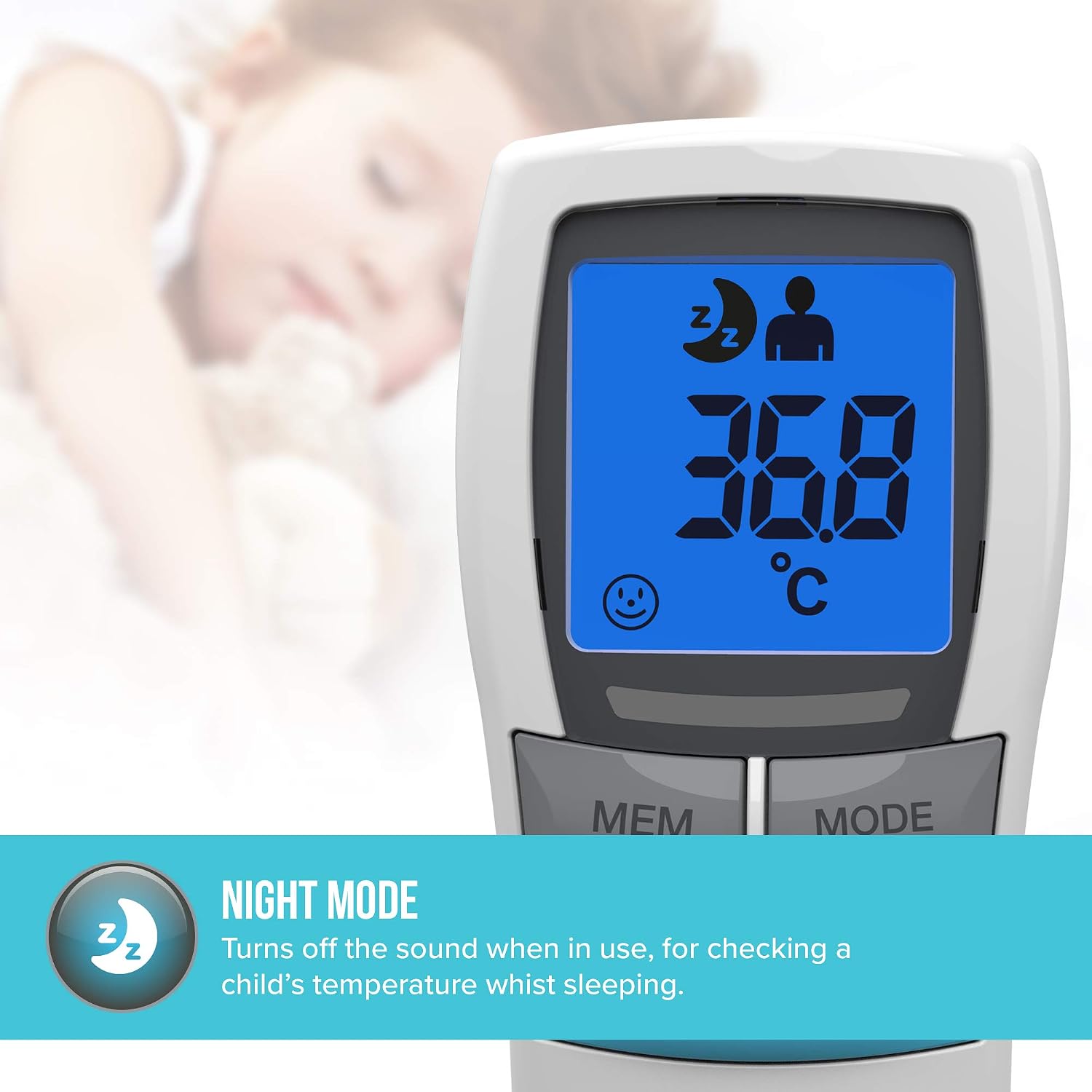
Figure 6: Thermometer display in Night Mode. The image shows a crescent moon and 'Zz' icons, indicating that the sound is turned off, ideal for checking a sleeping child's temperature.
Changing Temperature Unit (°C/°F)
- While the thermometer is in standby mode, press and hold both the "MEM" and "MODE" buttons simultaneously for a few seconds.
- The display will switch between Celsius (°C) and Fahrenheit (°F). Release the buttons when your desired unit is shown.
Maintenance and Care
- Cleaning: Use a soft, dry cloth to clean the thermometer body. For the sensor lens, gently wipe with a cotton swab lightly moistened with 70% alcohol. Allow to dry completely before use.
- Storage: Store the thermometer in a cool, dry place, away from direct sunlight and extreme temperatures.
- Battery Replacement: Replace batteries when the low battery indicator appears on the display.
- Do not use abrasive cleaners or immerse the device in water.
Troubleshooting
| Problem | Possible Cause | Solution |
|---|---|---|
| No display/Device won't turn on. | Batteries are dead or incorrectly inserted. | Check battery polarity or replace with new AAA batteries. |
| Inaccurate readings. | Sensor lens is dirty; incorrect measurement distance; device not acclimated to room temperature. | Clean the sensor lens. Ensure correct distance (0.5-3cm). Allow thermometer to acclimate to room temperature for 30 minutes before use. |
| "Lo" or "Hi" displayed. | Temperature is outside the measurable range or sensor error. | Ensure measurement is within range. If error persists, contact customer support. |
| No sound/Fever alarm not working. | Night Mode is activated. | Deactivate Night Mode by pressing and holding the "MODE" button. |
Specifications
- Model: TE-200-EU
- Measurement Method: Non-Contact Infrared
- Measurement Distance: 0.5 - 3 cm
- Power Source: 2 x AAA Batteries (included)
- Memory: Up to 30 readings
- Display: Backlit LCD
- Units: Celsius (°C) / Fahrenheit (°F)
- Fever Alarm: Yes (at 38°C / 100.4°F and above)
- Dimensions: 5.45 x 14.6 x 6.6 cm
- Weight: 80 grams (without batteries)
- Manufacturer: FKA Brands
- Country of Origin: China

Figure 7: Dimensions of the HoMedics TE-200-EU thermometer. The image provides a visual representation of the device's length (12.3cm) and width (4.9cm).
Warranty and Support
For warranty information or technical support, please refer to the warranty card included with your product or visit the official HoMedics website. Keep your purchase receipt as proof of purchase.
Manufacturer: FKA Brands
Website: www.homedics.com (Please note: This is a generic placeholder. Refer to your product packaging for the exact support website for your region.)


