
1. Introduction and Overview
The TELE System YM101 Portable Pulse Oximeter is a non-invasive device designed for spot-checking arterial hemoglobin oxygen saturation (SpO2) and pulse rate (PR) in adults and pediatric patients at home or in clinical settings. It also indicates the Perfusion Index (PI). This device is simple to operate and provides quick, reliable measurements.
The YM101 is particularly useful for individuals with conditions such as asthma, chronic bronchitis, COPD, or pneumonia, or simply for monitoring blood oxygen levels in patients experiencing fever, cough, or shortness of breath. This pulse oximeter is a certified medical device.
2. Safety Information
- Read all instructions carefully before use.
- This device is intended for non-invasive spot-checking of SpO2 and pulse rate. It is not intended for continuous monitoring.
- Consult a medical professional for interpretation of results. Self-diagnosis and self-treatment based on measurements can be dangerous.
- Do not use the device in an MRI or CT environment.
- Keep the device away from water and moisture.
- Do not use the device on the same finger for more than 5 minutes to avoid discomfort or injury due to prolonged pressure.
- Keep out of reach of children.
3. Product Components
The TELE System YM101 Pulse Oximeter consists of several key components:
- 1.5" LED Display: Shows SpO2, pulse rate, perfusion index, and bar graph.
- Button: For power on/off and display mode changes.
- Sensor: Integrated infrared sensor for measurement.
- MCU (Microcontroller Unit): Processes data.
- Battery Cover: Protects the battery compartment.

Figure 3.1: Exploded view of the YM101 Pulse Oximeter components.
4. Setup
Before first use, install the batteries:
- Open the battery cover located at the back of the device.
- Insert two (2) AAAA batteries according to the polarity indicators (+/-) inside the compartment. Note: Batteries are not included with the device.
- Close the battery cover securely.

Figure 4.1: Side view of the YM101 Pulse Oximeter.
5. Operating Instructions
Follow these steps to take a measurement:
- Ensure the device has batteries installed.
- Open the clamp of the pulse oximeter.
- Insert one of your fingers (preferably the index finger) into the rubber opening of the oximeter, ensuring the nail is facing upwards towards the display.
- Release the clamp. The device will automatically power on and begin measurement.
- Keep your hand still during the measurement. The display will show your SpO2 percentage, pulse rate (BPM/PR), and Perfusion Index (PI). A bar graph will also indicate pulse intensity.
- To change the display orientation or brightness, briefly press the power button while the device is on. The 1.5" LED display offers 3 levels of brightness.
- The device can be set to alarm if SpO2 or bpmPR limits are exceeded. Refer to the full manual for alarm setting details.
- Remove your finger from the device. The oximeter will automatically power off after a few seconds of inactivity.

Figure 5.1: YM101 Pulse Oximeter in use, displaying readings.
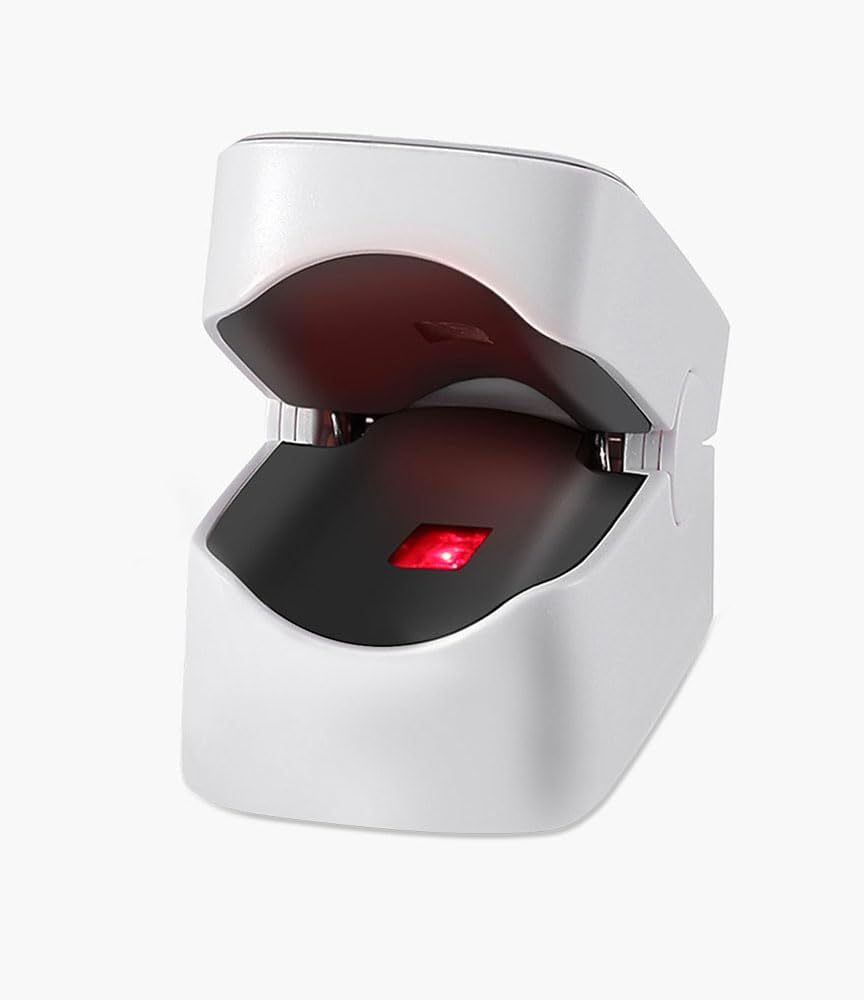
Figure 5.2: Internal view of the YM101 Pulse Oximeter sensor.
6. Maintenance
- Cleaning: Wipe the device with a soft cloth dampened with alcohol (70% ethanol or isopropanol) before and after each use. Do not immerse the device in liquid.
- Storage: Store the oximeter in a cool, dry place, away from direct sunlight and extreme temperatures.
- Battery Replacement: Replace batteries when the low battery indicator appears on the display. Remove batteries if the device will not be used for an extended period.
- Disposal: Dispose of the device and batteries according to local environmental regulations.
7. Troubleshooting
| Problem | Possible Cause | Solution |
|---|---|---|
| No display after pressing power button | Batteries are dead or incorrectly inserted. | Replace batteries or reinsert them with correct polarity. |
| Inaccurate or unstable readings | Finger not inserted properly; patient movement; cold finger; nail polish. | Reinsert finger correctly; remain still; warm the finger; remove nail polish. |
| "Finger Out" message | Finger not detected or removed. | Insert finger fully into the device. |
8. Specifications
- Brand: TELE System
- Model: YM101
- Display: 1.5" LED, 3 brightness levels
- Measurement Range: SpO2: 70-100%
- Accuracy: SpO2: ±1% / Pulse Rate: ±1 bpm
- Indications/Measurements: SpO2%, Heart Rate (BPM/PR), Perfusion Index (PI), Bar Graph
- Power Source: 2 x AAAA batteries (not included)
- Color: White
- Dimensions: Approximately 57mm (Length) x 31mm (Width)
- Manufacturer Reference: 96010001
- Country of Origin: China

Figure 8.1: Dimensions of the YM101 Pulse Oximeter.
9. Warranty and Support
For warranty information, technical support, or service inquiries regarding your TELE System YM101 Pulse Oximeter, please refer to the warranty card included in your product packaging or visit the official TELE System website. You may also contact TELE System customer service directly for assistance.
Manufacturer: TELE System
Brand: TELE System
Contact: Please refer to the contact information provided in your product packaging or on the official TELE System website.