
Introduction
This manual provides instructions for the Amazon Basics Effortless Handheld Plier Stapler, designed for efficient stapling in various environments. This heavy-duty stapler can bind up to 25 sheets of standard paper at once and features a comfortable grip for ease of use.

Image: The Amazon Basics Effortless Handheld Plier Stapler, a black, ergonomic stapler.
Setup: Loading Staples
Follow these steps to properly load staples into your plier stapler:
- Hold the stapler firmly in one hand.
- Locate the staple loading mechanism, typically at the rear of the stapler.
- Gently pull the bottom handle away from the top body of the stapler to open the staple channel.
- Insert a strip of standard 24/6 or 26/6 (1/4 inch) staples into the channel, ensuring they are facing the correct direction.
- Push the bottom handle back into place until it clicks, securing the staples.
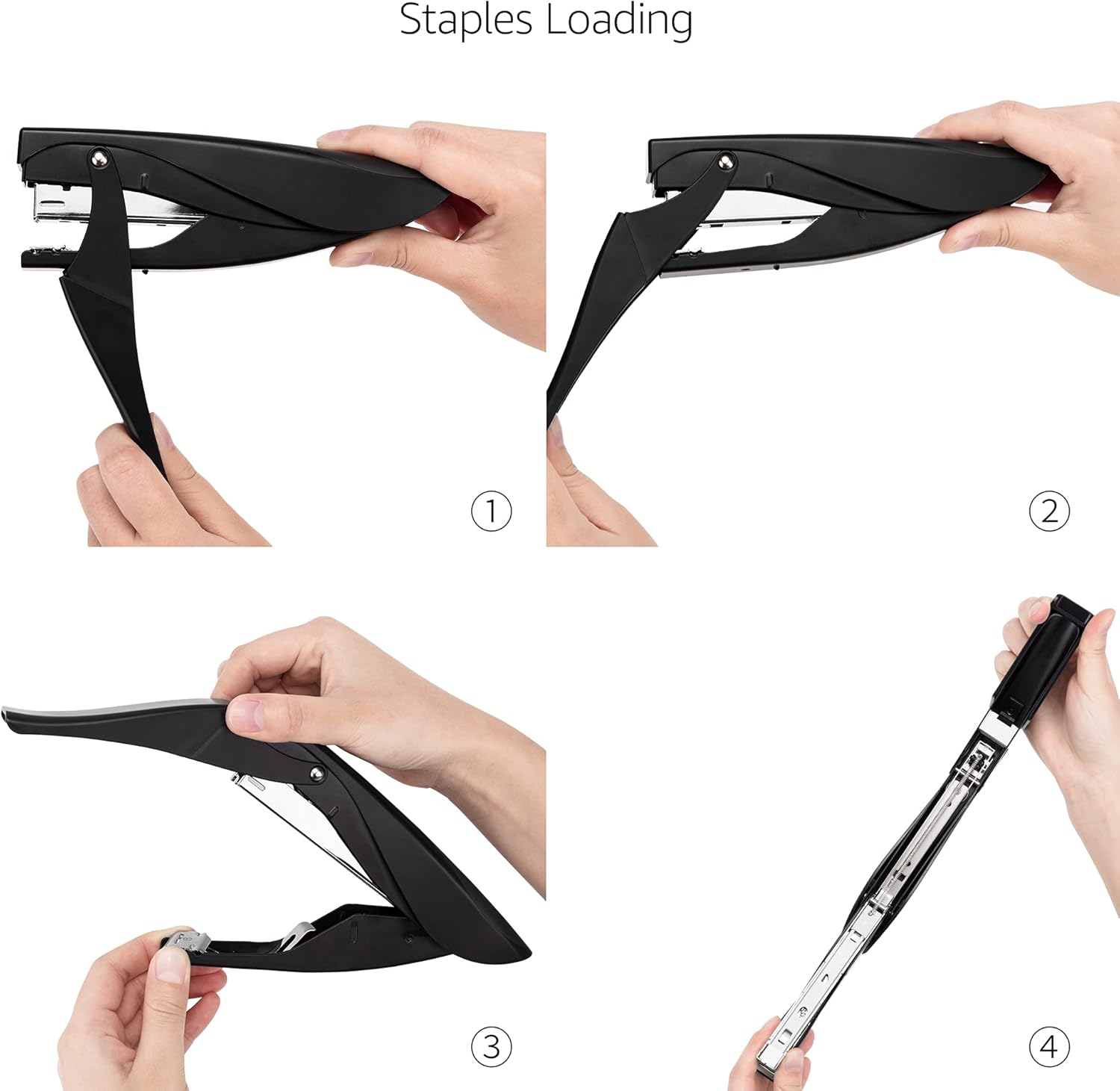
Image: A four-step visual guide demonstrating how to open the stapler, insert a strip of staples, and close the stapler for loading.
Operating Instructions
Stapling Documents
- Gather the papers you wish to staple, ensuring they are aligned. The stapler can handle up to 25 sheets of standard paper.
- Position the stapler over the desired stapling location on the papers.
- Press the handles together firmly and smoothly to drive the staple through the paper. The effort-saving mechanism assists in reducing the force required.
- Release the handles to complete the stapling action.

Image: A hand demonstrating the stapler's effort-saving mechanism by easily stapling a stack of papers.
Adjusting the Rotatable Anvil
The stapler features a rotatable anvil, allowing for two different stapling styles: permanent and temporary pinning.
- To switch between modes, locate the small metal plate (anvil) at the base of the stapler's jaw.
- Rotate the anvil 180 degrees to change the staple bend pattern. One position creates a permanent, inward bend, while the other creates an outward bend for temporary pinning, allowing staples to be easily removed.

Image: A close-up view of the stapler's rotatable anvil, showing how it can be adjusted for different stapling types.
Maintenance
To ensure the longevity and optimal performance of your stapler, consider the following maintenance tips:
- Cleaning: Periodically wipe the stapler with a dry, soft cloth to remove dust and debris. Avoid using harsh chemicals or abrasive cleaners.
- Storage: Store the stapler in a dry environment. The integrated hanging hole on the back allows for easy storage on a hook or pegboard.
- Staple Type: Always use standard 24/6 or 26/6 (1/4 inch) staples to prevent jamming and ensure proper function.
Troubleshooting
If you encounter issues with your stapler, refer to the table below for common problems and solutions:
| Problem | Possible Cause | Solution |
|---|---|---|
| Stapler jams frequently. | Incorrect staple size; too many sheets; bent staples. | Ensure you are using standard 24/6 or 26/6 staples. Do not exceed 25 sheets. Remove any bent staples and reload a fresh strip. |
| Staples do not penetrate paper. | Insufficient force; worn staples; incorrect staple size. | Apply firm, even pressure. Check staple quality and size. Ensure the anvil is correctly positioned for permanent stapling. |
| Stapler feels loose or wobbly. | Loose components. | Inspect the stapler for any loose screws or parts. If issues persist, contact customer support. |
Specifications
| Feature | Detail |
|---|---|
| Brand | Amazon Basics |
| Model Number | E0349 |
| Color | Black |
| Material | Metal |
| Product Dimensions (L x W) | 7.1 inches x 3.5 inches (18 cm x 8.9 cm) |
| Staple Capacity | Up to 25 sheets of standard paper |
| Staple Type | Standard 24/6 or 26/6 (1/4 inch) |
| Operation Mode | Manual |
| Item Weight | 0.16 kg |

Image: A visual representation of the stapler's dimensions, showing its length of 7.1 inches and width of 3.5 inches.
Warranty & Support
For detailed warranty information and customer support, please refer to the official warranty document:
For additional assistance, please visit the Amazon Basics Store.
