
1. Introduction and Overview
The Amplim AMP-CA2 Non-Contact Infrared Forehead Thermometer is designed for fast, accurate, and hygienic temperature measurement. It provides 1-second readings and features a color LCD display with a fever alarm. This multi-mode thermometer is suitable for measuring body temperature in adults, children, and infants, as well as object and room temperatures.
This device utilizes advanced infrared sensor technology to ensure reliable accuracy without physical contact, promoting hygiene and ease of use for the entire family.

Image: The Amplim AMP-CA2 thermometer in use, showing its non-contact functionality for various users.
2. Safety Information
Use of this thermometer is not intended as a substitute for consultation with your physician. Always consult a healthcare professional for any health concerns. Ensure the thermometer is clean before and after each use. Keep the device out of reach of children.
Note: It is clinically verified that forehead temperature is approximately 0.5-1.0°F lower than oral temperature. Average normal forehead temperature is around 97.6 - 98.6°F.
3. Product Features
- Fast & Accurate Reading: Advanced infrared sensor provides fast 1-second temperature readings with reliable accuracy.
- No Touch Design: Measures temperature without contact, ensuring safety and hygiene.
- Multi-Mode Thermometer: Easily switch between forehead, object, and room temperature modes.
- Color LCD + Fever Alarm: Large backlit LCD screen with color fever indicator for easy reading. An audible alarm sounds for elevated temperatures.
- Memory Recall: Stores up to 32 readings for tracking temperature trends.
- Unit Switch: Supports both Celsius (°C) and Fahrenheit (°F) temperature units.
- Compact & Portable: Lightweight and easy to operate for convenient use anywhere.

Image: Visual representation of the thermometer's key features, including different measurement modes and display indicators.
4. Product Components and Details
The Amplim AMP-CA2 thermometer includes the following components:
- Infrared Thermometer (Model: AMP-CA2)
- 2 AAA Batteries
- User Manual (this document)
- 1-year Warranty Card
- Certificate
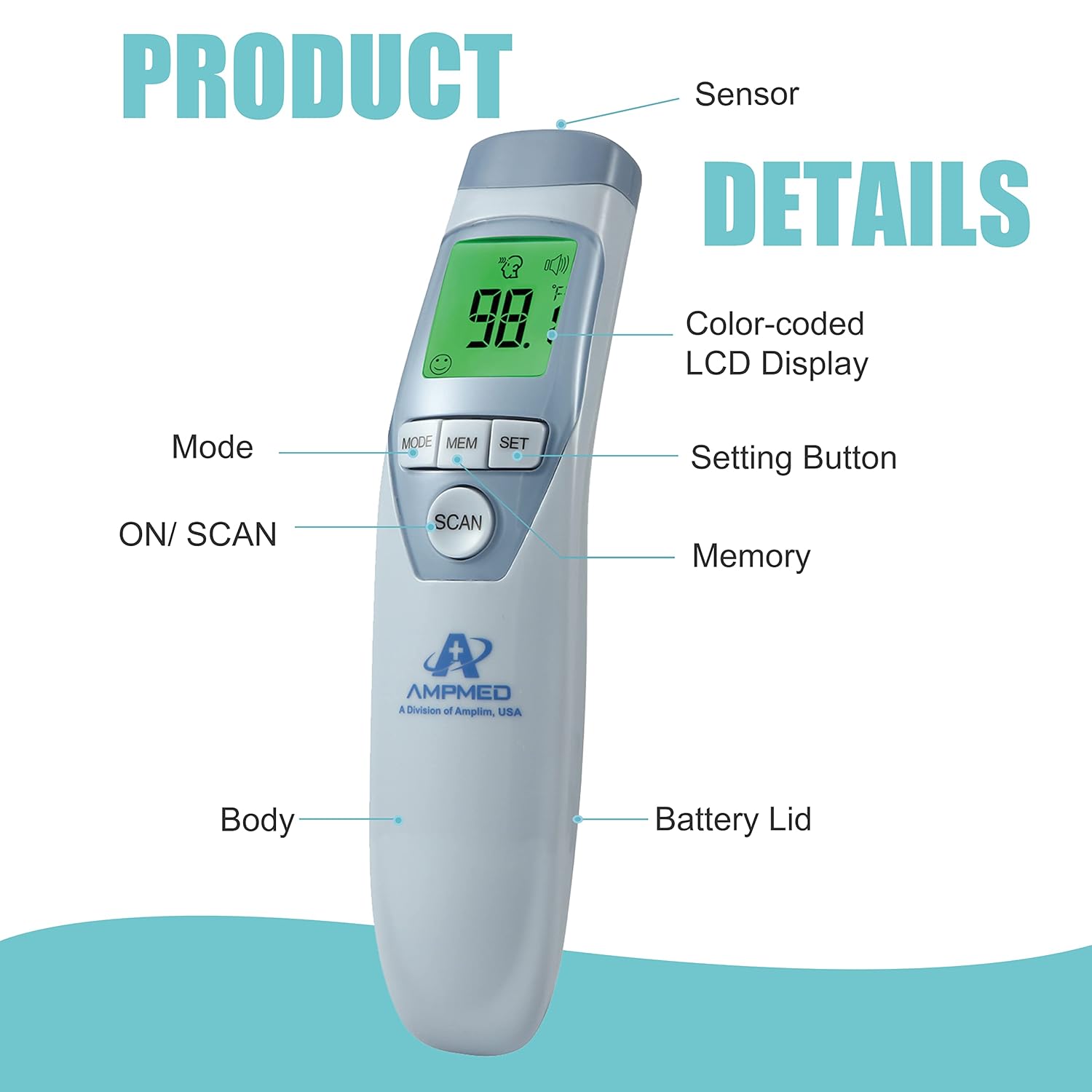
Image: Detailed diagram of the thermometer, labeling its various parts and controls.
5. Setup
5.1 Battery Installation
- Slide open the battery lid located at the bottom of the thermometer.
- Insert two AAA batteries, ensuring correct polarity (+/-).
- Close the battery lid securely.

Image: Illustration of how to open the battery compartment and insert the AAA batteries.
5.2 Initial Power On and Unit Selection
- Press the 'PWR/SET' button to turn on the thermometer.
- To switch between Fahrenheit (°F) and Celsius (°C), press and hold the 'MEM/ENTR' button for 3 seconds while the device is on. The unit will change on the display.
6. Operating Instructions
6.1 Taking a Forehead Temperature
- Ensure there is no hair or perspiration on the forehead.
- Turn on the thermometer by pressing the 'PWR/SET' button. The display will show 'Body', 'rdy', '°F' or '°C'.
- Aim the thermometer at the center of the forehead, between 1.2" - 2" (3-5 cm) from the skin.
- Press the 'SCAN/OPT' button to take the measurement.
- The display will show the measurement result in 1 second.

Image: Step-by-step visual instructions for accurate forehead temperature measurement.
6.2 Interpreting Display Colors and Fever Alarm
- Green Display: Normal temperature.
- Orange Display: Elevated temperature (e.g., 99.5°F - 100.3°F).
- Red Display: High temperature (fever alarm is set at 100.4°F / 38°C). The device will beep to indicate a fever.

Image: Examples of the color-coded LCD display for normal and high temperatures.
6.3 Multi-Mode Functionality (Body, Object, Room)
The thermometer can measure body, object, and room temperatures. To switch modes, press the 'MODE' button while the device is on. The icon on the display will change to indicate the selected mode (e.g., a person icon for body, a house icon for room, a liquid icon for object).

Image: The thermometer's versatility in measuring different types of temperatures.
6.4 Memory Function
The thermometer automatically stores up to 32 previous readings. To access memory, press the 'MEM/ENTR' button. Use the 'SCAN/OPT' button to scroll through the stored readings. This feature is useful for tracking temperature changes over time.
6.5 Buzzer ON/OFF
The thermometer features an audible buzzer for measurement completion and fever alerts. You can toggle the buzzer sound on or off. Refer to the video below for a demonstration.
Video: This video demonstrates how to turn the buzzer sound on and off on the Amplim thermometer.
7. Maintenance
To ensure the longevity and accuracy of your thermometer, follow these maintenance guidelines:
- Cleaning: Wipe clean the thermometer with a soft, dry cloth. For disinfection, use an alcohol swab (70% isopropyl alcohol) on the probe and body. Do not immerse the thermometer in water or any cleaning solution.
- Storage: Store the thermometer in a cool, dry place, away from direct sunlight and extreme temperatures.
- Battery Replacement: Replace batteries when the low battery indicator appears on the display.
8. Troubleshooting
If you encounter issues with your Amplim AMP-CA2 thermometer, consider the following:
- Inaccurate Readings: Ensure the thermometer is aimed correctly (1.2" - 2" from the forehead) and that there is no hair or perspiration interfering with the measurement. Allow 3-5 seconds between measurements for optimal accuracy.
- 'Lo' or 'Hi' Message: 'Lo' indicates a temperature lower than 89.6°F (32°C). 'Hi' indicates a temperature higher than 109.4°F (43°C). If the thermometer is aimed in the air instead of the forehead, it may display 'Lo'. Retake the temperature by aiming the thermometer at the center of the forehead, between 1.2" - 2" from the skin.
- No Power: Check if the batteries are correctly installed and have sufficient charge. Replace batteries if necessary.
- Display Errors: If the display shows an error message, try removing and reinserting the batteries. If the issue persists, contact customer support.
9. Specifications
| Brand | Amplim |
| Model Name | AMP-CA2 |
| Display Type | Digital |
| Connectivity Technology | Infrared |
| Response Time | 1 second |
| Power Source | Battery Powered (2 AAA batteries, included) |
| Age Range (Description) | Newborn, Infant, Toddler, Kid, Youth, Adult, All ages |
| Material | Acrylonitrile Butadiene Styrene |
| Item Weight | 5 ounces |
| Specification Met | CE, FDA |
| Reusability | Reusable |
| Indoor/Outdoor Usage | Indoor |
10. Warranty and Support
The Amplim AMP-CA2 Non-Contact Infrared Forehead Thermometer comes with a 1-year warranty. For any product issues, questions, or support, please contact Amplim customer support.
Customer Support Email: customersupport@amplim.com