
Introduction
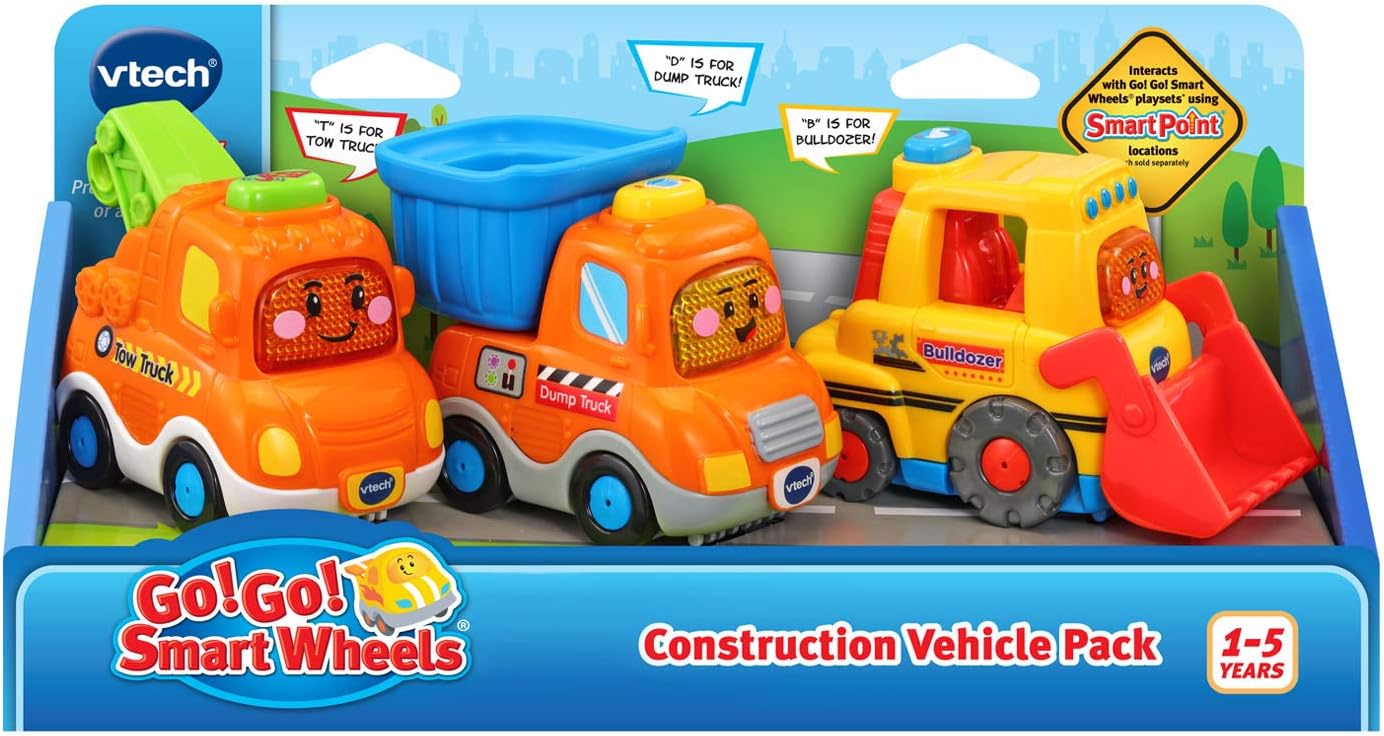
Get to work playing with the Go! Go! Smart Wheels Construction Vehicle Pack. This pack includes three interactive construction vehicles: Ben the Bulldozer, Doug the Dump Truck, and Tony the Tow Truck. Designed for ages 1-5 years, these vehicles introduce new words, songs, and phrases through engaging play.

Image: The VTech Go! Go! Smart Wheels Construction Vehicle Pack, featuring a yellow bulldozer, an orange dump truck, and an orange tow truck, all with friendly faces.
Key Features:
- Toddlers will love hearing new words as they make friends with Ben the Bulldozer, Doug the Dump Truck and Tony the Tow Truck.
- Each vehicle has a mechanical part that moves for fine-motor development.
- Press the light-up windshield on each vehicle to hear phrases, songs, melodies, and the letters “B”, “D” and “T”.
- Drive these vehicles on Go! Go! Smart Wheels playsets (sold separately) with SmartPoint technology and they will respond with unique phrases and sounds.
Package Contents
The VTech Go! Go! Smart Wheels Construction Vehicle Pack includes:
- Go! Go! Smart Wheels Bulldozer
- Go! Go! Smart Wheels Dump Truck
- Go! Go! Smart Wheels Tow Truck
- Parent's Guide
Battery Installation
Each vehicle requires 2 AAA batteries. Batteries are included for demo purposes only; new batteries are recommended for regular use.
- Locate the battery compartment on the underside of each vehicle.
- Using a screwdriver, open the battery compartment cover.
- Insert 2 new AAA batteries, ensuring correct polarity (+/-).
- Replace the battery compartment cover and secure with the screw.
Operating Instructions
Basic Play:
- Remove each vehicle from its packaging.
- Press the light-up windshield on each vehicle to hear phrases, songs, melodies, and the letters 'B', 'D', and 'T'.
- Drive the vehicles around to trigger fun role-play sound effects.

Image: A child's hand pressing the light-up windshield button on a VTech Go! Go! Smart Wheels vehicle, which activates sounds and lights.
SmartPoint Interaction:
- Take the vehicles to a Go! Go! Smart Wheels playset (sold separately) and discover more phrases, songs, sounds, and lights as they race over the SmartPoint locations.

Image: A VTech Go! Go! Smart Wheels vehicle positioned on a playset, interacting with a SmartPoint location.
Mechanical Parts:
- Ben the Bulldozer: The front scoop can be manually moved up and down.
- Doug the Dump Truck: The dump bed can be manually tilted to unload.
- Tony the Tow Truck: The tow hook can be manually raised and lowered.


Official Product Video:
Video: An official VTech video showcasing the features and interactive play of the Go! Go! Smart Wheels Construction Vehicle Pack.
Product Specifications
| Feature | Detail |
|---|---|
| Product Dimensions | 2.24 x 4.17 x 3.1 inches (each vehicle) |
| Item Weight | 14.4 ounces (total pack) |
| Model Number | 80-242170 |
| Manufacturer Recommended Age | 12 months - 5 years |
| Batteries | 6 AAA batteries required (2 per vehicle, included for demo) |
| Release Date | March 30, 2020 |
| Manufacturer | VTech |
Maintenance
To ensure the longevity of your VTech Go! Go! Smart Wheels Construction Vehicle Pack, please follow these guidelines:
- Wipe the vehicles with a damp cloth to clean. Do not immerse in water.
- Avoid exposing the toys to extreme temperatures or direct sunlight for extended periods.
- Remove batteries if the toys will not be used for a long time to prevent leakage.
Troubleshooting
If your VTech Go! Go! Smart Wheels vehicles are not functioning as expected, please try the following:
- No sound or lights: Check if the batteries are correctly installed and replace them with new ones if necessary. Ensure the on/off switch is in the 'on' position.
- Intermittent function: This may indicate low battery power. Replace the batteries.
- SmartPoint interaction issues: Ensure the vehicles are placed correctly on SmartPoint locations on compatible playsets. Clean the SmartPoint sensors on the vehicles and playset if they appear dirty.
Warranty and Support
Specific warranty information is typically provided with the product packaging or can be found on the manufacturer's official website. For product support, replacement parts, or further inquiries, please visit the official VTech website or contact their customer service department.
You can visit the VTech Store for more information: VTech Store on Amazon


