Introduction
This manual provides instructions for the Lexibook iParty BTP585Z Portable Bluetooth Light Speaker. This device is designed to provide portable audio entertainment with integrated light effects and karaoke functionality. Please read this manual thoroughly before operating the device to ensure proper use and to maintain its functionality.
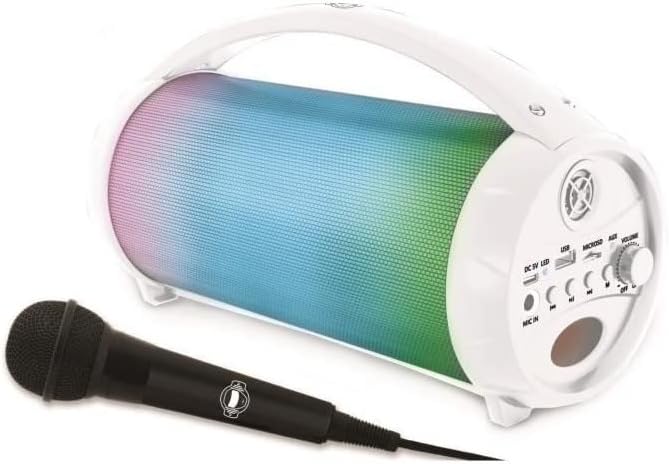
Image: The Lexibook iParty BTP585Z speaker in white, shown with its included microphone.
What's in the Box
Verify that all components are present upon unpacking:
- 1 x Lexibook iParty BTP585Z Speaker
- 1 x Microphone
- 1 x Charging Cable (Micro USB)
- 1 x User Manual (this document)
Product Features
- Portable Design: Equipped with a handle for easy transport.
- Bluetooth Connectivity: Wireless connection to smartphones, tablets, and other Bluetooth-enabled audio devices.
- Karaoke Function: Includes a microphone for vocal performances.
- Multiple Audio Inputs: USB port, micro SD/TF card slot (up to 32 GB), and Aux-in port for various audio sources.
- Light Effects: Integrated light effects enhance the audio experience.
- True Wireless Stereo (TWS): Ability to synchronize two iParty speakers for stereo sound.
- Rechargeable Battery: Built-in 1,200 mAh battery provides up to 3 hours of continuous use.

Image: The speaker highlighting its various connectivity options including Bluetooth, USB, Micro SD/TF card, and AUX-IN.
Setup Instructions
1. Charging the Speaker
Before first use, fully charge the speaker. Connect the supplied micro USB charging cable to the DC5V port on the speaker and the other end to a USB power adapter (not included) or a computer's USB port. The charging indicator light will illuminate during charging and turn off when fully charged.
2. Powering On/Off
Locate the power switch, usually integrated with the volume knob. Turn the knob clockwise to power on the speaker. Turn it counter-clockwise until it clicks to power off.
3. Bluetooth Connection
- Power on the speaker. It will automatically enter Bluetooth pairing mode, indicated by a flashing light.
- On your smartphone, tablet, or other Bluetooth device, enable Bluetooth and search for available devices.
- Select "iParty" from the list of devices.
- Once connected, the speaker will emit an audible confirmation, and the light indicator will become solid.
4. Using USB/SD Card
Insert a USB flash drive or a micro SD/TF card (up to 32 GB) containing MP3 audio files into the respective port. The speaker will automatically detect the storage device and begin playing music.
5. Using Aux-in
Connect an external audio device (e.g., MP3 player, computer) to the AUX-IN port using a 3.5mm audio cable (not included). The speaker will switch to Aux-in mode, and audio from the connected device will play.
6. Microphone Connection
Plug the included microphone into the MIC input port on the speaker. The microphone is now ready for use with the karaoke function.
7. True Wireless Stereo (TWS) Function
To use TWS, you need two Lexibook iParty BTP585Z speakers. Power on both speakers. Ensure neither is connected to a Bluetooth device. Press and hold the TWS button on one speaker until you hear a pairing sound. The two speakers will then connect to each other, and you can connect your Bluetooth device to one of them to enjoy stereo sound.
Video: An overview of the Lexibook iParty speaker's features, including Bluetooth connectivity, portability, karaoke function, and True Wireless Stereo (TWS) system. This video demonstrates the product in use and highlights its key functionalities.
Operating Instructions
1. Volume Control
Adjust the master volume using the VOL knob on the speaker. For microphone volume, use the MIC VOL knob.
2. Playback Controls
Use the buttons on the speaker to control playback:
- Play/Pause: Press the Play/Pause button to start or pause audio playback.
- Next Track: Press the Next Track button to skip to the next song.
- Previous Track: Press the Previous Track button to go to the beginning of the current song or to the previous song.
3. Light Effects
The speaker features integrated light effects. Press the MLED button to cycle through different light modes or to turn the lights off.
4. Karaoke Function
With the microphone connected, you can sing along to your music. Adjust the microphone volume and echo effect using the dedicated knobs for a customized experience.

Image: Individuals enjoying the karaoke feature of the Lexibook iParty speaker, demonstrating its use in a social setting.
Maintenance
To ensure the longevity and optimal performance of your Lexibook iParty speaker, follow these maintenance guidelines:
- Cleaning: Use a soft, dry cloth to clean the exterior of the speaker. Do not use abrasive cleaners, waxes, or solvents.
- Storage: Store the speaker in a cool, dry place away from direct sunlight and extreme temperatures when not in use for extended periods.
- Battery Care: To preserve battery life, avoid fully discharging the battery frequently. Recharge the speaker regularly, even if not in constant use.
- Water Exposure: This device is not waterproof. Avoid exposure to water or excessive moisture.
Troubleshooting
| Problem | Possible Cause | Solution |
|---|---|---|
| Speaker does not power on. | Low battery or power switch off. | Charge the speaker fully. Ensure the power switch/volume knob is turned to the ON position. |
| No sound from the speaker. | Volume too low, incorrect input mode, or device not connected. | Increase the speaker volume. Check if the correct input mode (Bluetooth, USB, AUX) is selected. Ensure your device is properly connected. |
| Bluetooth pairing fails. | Speaker not in pairing mode, device too far, or interference. | Ensure the speaker is in pairing mode (flashing light). Move your device closer to the speaker. Turn off other Bluetooth devices to reduce interference. |
| Microphone not working. | Microphone not plugged in correctly or MIC VOL is low. | Ensure the microphone is securely plugged into the MIC port. Increase the MIC VOL knob. |
| TWS connection issues. | Speakers not in TWS pairing mode or already connected to another device. | Ensure both speakers are powered on and not connected to any Bluetooth device. Follow the TWS setup instructions carefully. |
Specifications
- Model: BTP585Z
- Brand: LEXiBOOK
- Product Dimensions: 10.87 x 4.61 x 6.1 inches
- Item Weight: 1.91 pounds
- Power Source: Battery Powered
- Battery Type: 1,200 mAh built-in rechargeable battery
- Battery Life: Up to 3 hours of continuous use
- Connectivity: Bluetooth, USB, Micro SD/TF Card, AUX-IN
- Recommended Age: 3 years and up
- Color: White
Safety Information
Please observe the following safety precautions:
- Do not expose the device to extreme temperatures, direct sunlight, or high humidity.
- Keep the device away from water and other liquids.
- Do not attempt to disassemble or modify the device. This will void the warranty.
- Use only the provided charging cable.
- Supervise children during use, especially with the microphone and charging cable.
Warranty and Support
This product comes with a 2-year warranty from the date of purchase. For warranty claims or technical support, please contact Lexibook customer service through their official website or the retailer where the product was purchased. Please retain your proof of purchase for warranty validation.