
1. Introduction
Thank you for choosing the TVON Swivel TV Stand. This manual provides essential information for the safe and correct assembly, operation, and maintenance of your new TV stand. Please read these instructions thoroughly before installation and retain them for future reference.
This TV stand is designed to support 27 to 55-inch televisions with a maximum load capacity of 40 kg (88 lbs). It features VESA compatibility ranging from 100x100mm to 400x400mm, adjustable height, and a swivel function for optimal viewing angles. A cable management system is integrated to help maintain a tidy setup.
2. Safety Information
- Weight Capacity: Do not exceed the maximum load capacity of 40 kg (88 lbs). Overloading can result in serious injury or product damage.
- VESA Compatibility: Ensure your TV's VESA mounting pattern is within the supported range of 100x100mm to 400x400mm.
- Reinforced Base: The stand features a reinforced glass base for enhanced stability. Avoid placing excessive weight on the edges of the base.
- Anti-Slip Mats: Anti-slip mats are provided on the base to prevent accidental movement and ensure stability. Ensure they are properly positioned.
- Safety Lock: A safety lock mechanism is included to prevent the TV from accidentally falling. Always engage the safety lock after mounting the TV.
- Assembly: Follow all assembly instructions carefully. If you encounter any difficulties, contact customer support.
- Children: Keep children away from the assembly area. Small parts may be a choking hazard.
3. Package Contents
Before assembly, verify that all components are present and undamaged. If any parts are missing or damaged, do not proceed with assembly and contact customer support.
- Main Support Column
- Reinforced Glass Base
- TV Mounting Brackets (Left and Right)
- VESA Adapter Plates (if applicable)
- Cable Management Clips/Ties
- Hardware Kit (various screws, washers, spacers for TV and stand assembly)
- Hex Key / Wrench
- Instruction Manual
4. Setup and Assembly
Follow these steps carefully for proper assembly. It is recommended to have two people for certain steps, especially when handling the television.
4.1. Assemble the Stand Base
Attach the main support column to the reinforced glass base using the provided screws and tools. Ensure all connections are secure.

Image: Step 1 of assembly, showing the main support column securely attached to the reinforced glass base.
4.2. Attach Mounting Brackets to TV
Carefully place your TV face down on a soft, clean surface. Identify the VESA mounting holes on the back of your TV. Attach the TV mounting brackets to these holes using the appropriate screws, washers, and spacers from the hardware kit. Ensure the brackets are level and securely fastened.

Image: Step 2 of assembly, illustrating how to attach the mounting brackets to the back of the television.
4.3. Mount TV to Stand
With assistance, carefully lift the TV and hook the attached mounting brackets onto the main support column of the stand. Ensure the TV is centered and level. Engage the safety lock mechanism to prevent the TV from dislodging.

Image: Step 3 of assembly, demonstrating the process of mounting the television onto the stand.
4.4. VESA Compatibility and Screw Selection
The stand supports VESA patterns from 100x100mm to 400x400mm. Refer to the diagram below to confirm your TV's VESA pattern and select the correct screws from the hardware kit. The kit includes various common screws to fit most TV models.
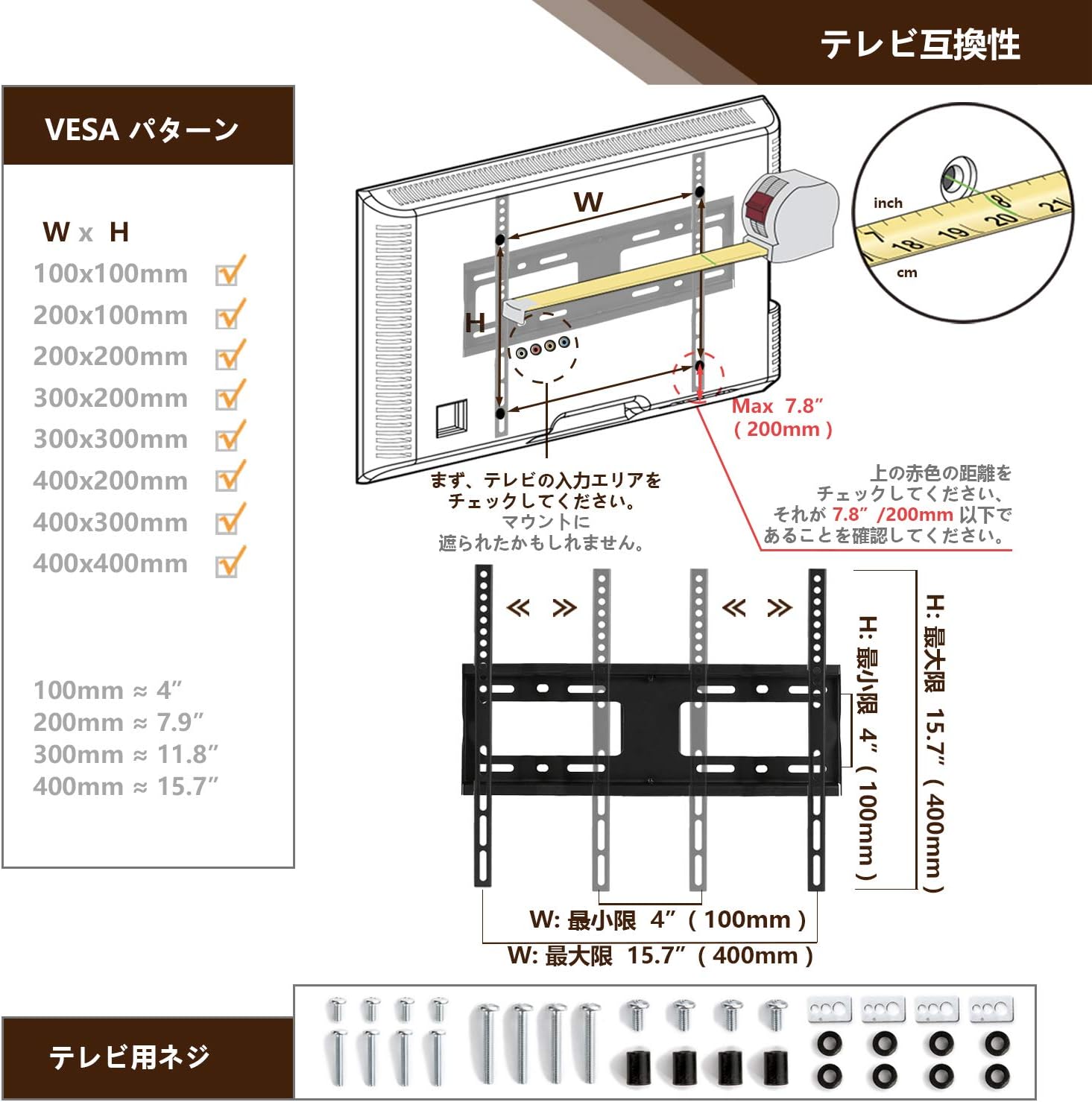
Image: VESA compatibility chart and included TV screws. This helps identify the correct screw size and type for your television's mounting holes.
4.5. Height Adjustment
The TV stand offers 6 levels of height adjustment, ranging from 470mm to 620mm. To adjust the height, loosen the securing bolts on the main support column, slide the TV mounting plate to the desired height, and then securely tighten the bolts. Ensure the TV is stable after adjustment.

Image: Diagram showing the 6-level height adjustment mechanism, allowing the TV to be positioned between 470mm and 620mm from the base.
5. Operating Instructions
5.1. Swivel Function
The TV stand allows for a 30-degree swivel to the left and right. Gently push the sides of the TV to rotate it to your desired viewing angle. Avoid forcing the TV beyond its rotational limits.

Image: Illustration of the TV stand's swivel function, demonstrating a 30-degree rotation range to the left and right for flexible viewing.
5.2. Cable Management
Utilize the integrated cable management system to organize and conceal TV and AV equipment cables. Route cables along the main support column and secure them with the provided clips or ties for a neat and safe setup.

Image: Detailed view of the stand's features, highlighting the cable management system on the central column.
6. Maintenance
- Cleaning: Wipe the stand with a soft, dry cloth. For stubborn marks, use a slightly damp cloth with mild detergent, then dry thoroughly. Avoid abrasive cleaners or solvents.
- Inspection: Periodically check all screws and connections to ensure they remain tight and secure. Retighten if necessary.
- Glass Care: The reinforced glass base is durable, but avoid dropping heavy objects on it or subjecting it to sharp impacts.
7. Troubleshooting
- Stand is unstable:
- Ensure all screws are tightened securely, especially those connecting the column to the base and the TV to the brackets.
- Verify that the anti-slip mats are correctly placed under the base.
- Ensure the TV weight does not exceed 40 kg and the VESA pattern is compatible.
- TV is not level:
- Check that the TV mounting brackets are attached evenly to the TV.
- Adjust the height settings to ensure the TV is balanced on the stand.
- Difficulty swiveling:
- Ensure no cables are obstructing the swivel mechanism.
- Do not force the swivel; it has a limited range of 30 degrees left/right.
- Missing parts or damaged components:
- Do not proceed with assembly. Contact customer support immediately for assistance.
8. Specifications
| Feature | Specification |
|---|---|
| Brand | TVON |
| Model Number | B086KQXDCH |
| Compatible TV Sizes | 27-55 inches |
| Maximum Load Capacity | 40 kg (88 lbs) |
| VESA Compatibility | 100x100mm to 400x400mm |
| Swivel Angle | ±30 degrees (Left/Right) |
| Height Adjustment | 6 levels, from 470mm to 620mm |
| Base Material | Reinforced Glass |
| Product Dimensions | 43 x 27 x 66 cm (approximate, adjustable height) |
| Product Weight | 4.67 kg |
| Color | Black |

Image: Detailed product dimensions, including the base size and height range.
9. Warranty and Support
This TVON product comes with a 5-year quality guarantee from the date of purchase. If you encounter any product issues during use, please do not hesitate to contact us. We aim to respond to all inquiries within 12 hours.
For support, please refer to the contact information provided with your purchase or visit the official TVON website.