
Introduction
The DEWIN Adjustable Power Adapter (Model DEWINqy3vf6g8xh) is a versatile AC/DC power supply designed to provide a stable and adjustable voltage output for various electronic devices. This manual provides essential information for the safe and effective use of your adapter, covering its features, setup, operation, maintenance, and troubleshooting.
Safety Information
Please read all safety instructions before using the adapter to prevent injury or damage to the device. Keep this manual for future reference.
- The adapter is constructed from high-quality ABS and flame-retardant PC materials for durability and safety.
- It features built-in protections against overload, overvoltage, and short-circuits to ensure stable and safe power delivery.
- Risk of Electric Shock: Do not open the adapter casing. There are no user-serviceable parts inside.
- Ensure the adapter is used in a dry environment and avoid exposure to water or excessive humidity.
- Do not use the adapter if the cables or casing are damaged.
- Keep out of reach of children.

Product Overview
The DEWIN Adjustable Power Adapter provides a flexible power solution with its adjustable voltage output and real-time voltage display.
Key Features:
- Adjustable Voltage: Output voltage can be adjusted from 3V to 36V.
- LED Digital Display: Integrated LED screen shows the real-time output voltage.
- High Power Output: Delivers up to 60W of power with a maximum current of 1.7A.
- Safety Protections: Includes overload, overvoltage, and short-circuit protection.
- Durable Construction: Made from high-quality ABS and flame-retardant PC materials.
Components:
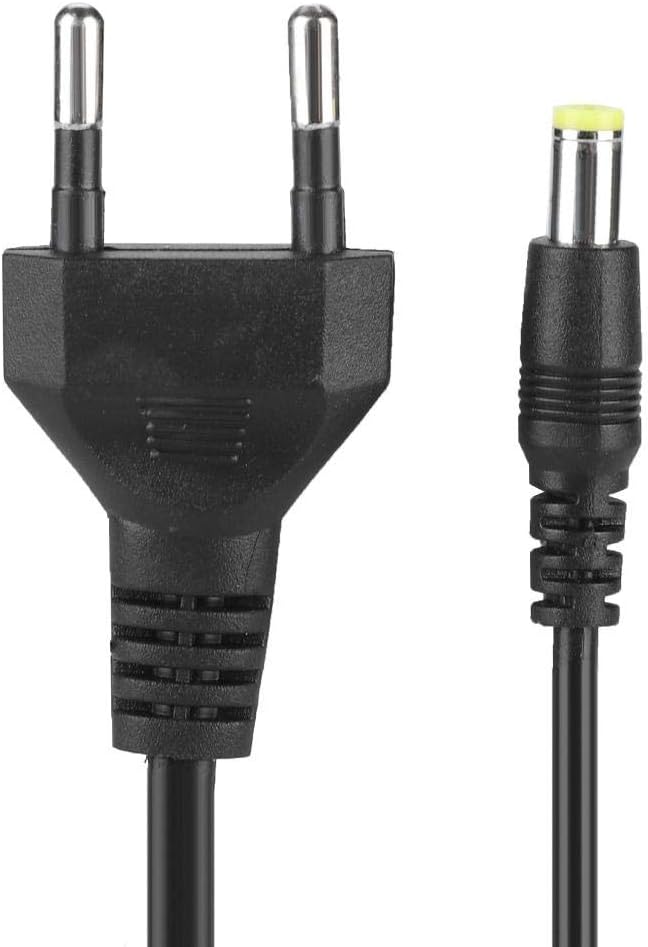
- 1 x DEWIN Adjustable Power Adapter with integrated input cable (EU plug) and output cable (DC connector).


Setup
Follow these steps to set up your adjustable power adapter:
- Inspect the Adapter: Before use, check the adapter and its cables for any visible damage. Do not use if damaged.
- Connect to Device: Plug the DC output connector of the adapter into the power input port of your electronic device. Ensure the connector fits securely.
- Connect to Power Outlet: Insert the EU plug of the adapter into a standard 100V-240VAC 50/60Hz wall outlet.
- Verify Power: Once connected, the LED display on the adapter will illuminate, showing the current output voltage.
Operating Instructions
The adapter allows for easy voltage adjustment to suit various devices.
- Power On: Connect the adapter to both the device and the wall outlet as described in the Setup section. The LED display will show the current voltage.
- Adjust Voltage: Rotate the 'VOLTAGE' knob on the adapter to increase or decrease the output voltage. Turn clockwise to increase voltage and counter-clockwise to decrease it.
- Monitor Display: Observe the LED digital display to set the precise voltage required for your device. The display provides real-time voltage readings.
- Compatibility: This adapter is widely compatible with electronic products such as LCD screens, LED light strips, motors, routers, game consoles, and cameras that require a DC input within the 3-36V range and up to 1.7A current.
- Power Off: To turn off the adapter, disconnect it from the wall outlet first, then from your electronic device.

Maintenance
Proper care ensures the longevity and safe operation of your adapter.
- Cleaning: Disconnect the adapter from all power sources before cleaning. Use a soft, dry cloth to wipe the surface. Do not use liquid cleaners or abrasive materials.
- Storage: Store the adapter in a cool, dry place away from direct sunlight and extreme temperatures when not in use. Avoid wrapping cables too tightly.
- Inspection: Periodically inspect the cables and connectors for any signs of wear or damage. Replace the adapter if any damage is found.
- No User Serviceable Parts: Do not attempt to open or repair the adapter. This can lead to electric shock and voids any potential warranty.
Troubleshooting
If you encounter issues with your DEWIN Adjustable Power Adapter, refer to the following common problems and solutions:
- No Power/LED Display Off:
- Ensure the adapter is securely plugged into a working wall outlet.
- Check if the wall outlet is functional by plugging in another device.
- Inspect the adapter's input cable for any damage.
- Incorrect Voltage Reading:
- Ensure the voltage adjustment knob is set correctly.
- If the reading seems consistently off, verify with a multimeter if possible. Note that minor discrepancies (e.g., up to 0.4V) might occur as per user feedback, but the adapter should still function within acceptable parameters for most devices.
- Device Not Powering On:
- Confirm that the output voltage is set to the correct requirement for your device.
- Check if your device's current draw exceeds the adapter's maximum output of 1.7A.
- Ensure the DC output connector is fully inserted into your device.
- Verify that your device itself is functional.
- Adapter Overheating:
- Ensure the adapter is not covered and has adequate ventilation.
- Reduce the load on the adapter if possible, as overheating can indicate excessive current draw.
- If overheating persists, discontinue use and contact support.
If these steps do not resolve the issue, please contact the seller or manufacturer for further assistance.
Specifications
| Feature | Specification |
|---|---|
| Model Number | DEWINqy3vf6g8xh |
| Input Voltage | 100V-240VAC, 50/60Hz, 1.5A |
| Output Voltage | 3V-36V DC (Adjustable) |
| Rated Power | 60W |
| Output Current | 1.7A (Max) |
| Material | ABS + Flame-retardant PC |
| Output Cable Length | Approx. 1.2m |
| Input Cable Length | Approx. 0.5m |
| Protections | Overload, Overvoltage, Short-circuit |
| Plug Type | EU Plug (Type E/F) |
| Dimensions (Packaging) | Approx. 15 x 8 x 4 cm (5.9 x 3.1 x 1.6 in) |
| Weight (Packaging) | Approx. 220g (7.8oz) |
Warranty and Support
Specific warranty information for the DEWIN Adjustable Power Adapter is not provided within this manual. For details regarding warranty coverage, returns, or technical support, please refer to the product packaging or contact the seller directly through your purchase platform. Ensure you have your purchase details and model number (DEWINqy3vf6g8xh) available when contacting support.