
MOES HW-F7
Contents
MOES Non-Contact Infrared Forehead Thermometer User Manual
Model: HW-F7
1. Introduction
Thank you for choosing the MOES Non-Contact Infrared Forehead Thermometer. This device is designed for accurate and rapid temperature measurement of the human body and objects without physical contact. It features a digital display, fever alarm, and memory function, making it suitable for use by anyone. Please read this manual thoroughly before use to ensure proper operation and safety.
2. Important Safety Information
- This thermometer is intended for household use only. It is not a substitute for professional medical advice or diagnosis.
- Keep the device out of reach of children and pets.
- Do not expose the thermometer to direct sunlight, extreme temperatures, or high humidity.
- Avoid dropping the device or subjecting it to strong impacts.
- Do not immerse the thermometer in water or other liquids.
- Clean the thermometer with a soft, dry cloth. Refer to the Maintenance section for detailed cleaning instructions.
- If the device malfunctions or displays abnormal readings, discontinue use and consult the troubleshooting guide or contact customer support.
- Batteries are not included. Ensure correct polarity when installing batteries. Remove batteries if the device will not be used for an extended period.
3. Product Overview
The MOES Non-Contact Infrared Forehead Thermometer is designed for ease of use and accurate readings.

Image: The MOES Non-Contact Infrared Forehead Thermometer shown alongside its product packaging, highlighting its design and branding.
3.1 Components
- Infrared Sensor
- LCD Display
- Mode Button (Mode)
- Memory Button (MEM)
- Unit Conversion Button (°C/°F)
- Measurement Trigger Button
- Battery Compartment
3.2 Display Indicators

Image: Visual representation of the thermometer's key features, including backlit display, fever alarm, memory recall, fast measurement, forehead measurement type, and object mode.
- Temperature Reading: Displays the measured temperature.
- Unit Indicator: Shows °C for Celsius or °F for Fahrenheit.
- Mode Indicator: Displays icons for Body Mode or Object Mode.
- Memory Indicator: Appears when recalling stored measurements.
- Low Battery Indicator: Alerts when batteries need replacement.
4. Setup
4.1 Battery Installation
The MOES Forehead Thermometer requires 2 AAA batteries (not included).
- Locate the battery compartment cover on the handle of the thermometer.
- Slide the cover open.
- Insert two AAA batteries, ensuring the correct polarity (+ and -) as indicated inside the compartment.
- Close the battery compartment cover securely.
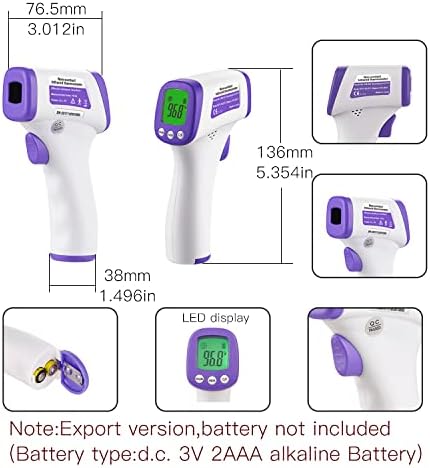
Image: A diagram illustrating the physical dimensions of the thermometer and the location of its battery compartment, emphasizing that batteries are not included.
5. Operating Instructions
5.1 Taking a Body Temperature Reading
For accurate body temperature measurement, ensure the thermometer is in Body Mode.
- Turn on the thermometer by pressing the Measurement Trigger Button.
- Ensure the display shows the Body Mode icon (usually a human head symbol). If not, press the "Mode" button to switch between Body and Object modes.
- Hold the thermometer 5-8 cm (2-3 inches) away from the center of the forehead.
- Press the Measurement Trigger Button once. The temperature will be displayed on the LCD screen within 1 second.
- The backlight color will indicate the temperature range:
- Green Backlight: Normal temperature (95.0-99.5°F / 35.0-37.4°C)
- Orange Backlight: Low fever (99.68-100.4°F / 37.5-37.9°C)
- Red Backlight: High fever (>100.4°F / >38.0°C)

Image: A visual demonstration of the non-contact measurement feature, showing the thermometer held at a distance of 5-8 cm from a baby's forehead for safety and accuracy.

Image: The thermometer in use, demonstrating its ability to take a temperature reading in less than one second, ideal for quick measurements on infants.

Image: Three thermometers displaying different backlight colors (green, orange, red) corresponding to normal, low fever, and high fever temperature ranges, respectively.
5.2 Taking an Object Temperature Reading
The thermometer can also measure the temperature of objects, surfaces, or liquids.
- Turn on the thermometer.
- Press the "Mode" button to switch to Object Mode (usually indicated by an object or house icon).
- Point the thermometer at the object whose temperature you wish to measure.
- Press the Measurement Trigger Button. The temperature will be displayed.

Image: Illustrations showing the thermometer's versatility for use in various public settings (office, station, hospital, school, airport, customs) and its capability to measure the temperature of objects like baby bottles, food, and room surfaces.
5.3 Switching Temperature Units (°C/°F)
To switch between Celsius (°C) and Fahrenheit (°F):
- With the thermometer turned on, press the "C/F" button. The unit on the display will change accordingly.
5.4 Memory Recall
The thermometer stores previous temperature readings.
- With the thermometer turned on, press the "MEM" button to cycle through stored readings.
6. Maintenance and Care
- Cleaning: Wipe the thermometer body with a soft, slightly damp cloth. For the sensor lens, use a cotton swab lightly moistened with alcohol. Do not use abrasive cleaners or immerse the device in water.
- Storage: Store the thermometer in a cool, dry place, away from direct sunlight and extreme temperatures.
- Battery Replacement: Replace batteries when the low battery indicator appears on the display. Remove batteries if the device is not used for prolonged periods to prevent leakage.
7. Troubleshooting
| Problem | Possible Cause | Solution |
|---|---|---|
| No display or device won't turn on. | Batteries are dead or incorrectly installed. | Check battery polarity or replace with new AAA batteries. |
| Inaccurate readings. | Sensor lens is dirty; measurement distance is incorrect; ambient temperature fluctuations. | Clean the sensor lens; ensure 5-8 cm distance from forehead; allow thermometer to acclimatize to room temperature for 15-20 minutes before use. |
| "Lo" or "Hi" displayed. | Temperature is outside the measurable range. | Ensure measurement is within the specified operating range (e.g., 32°C-42.9°C for body mode). |
| Display shows "Err". | System error or malfunction. | Remove batteries, wait 1 minute, then reinsert. If error persists, contact customer support. |
8. Specifications
- Model: HW-F7
- Measurement Method: Non-Contact Infrared
- Measurement Distance: 5-8 cm
- Measurement Time: Less than 1 second
- Display: LCD with Backlight (Green, Orange, Red)
- Temperature Units: Celsius (°C) / Fahrenheit (°F)
- Power Supply: DC 3V (2 x AAA batteries, not included)
- Automatic Shut-off: Yes
- Memory Function: Yes
- Special Features: Fever Alarm, Non-Contact
- Material: Plastic
- Dimensions: Approximately 6.5 x 3.54 x 1.97 inches (16.5 x 9 x 5 cm)
- Weight: Approximately 3.53 ounces (100g)
- Manufacturer: Dongguan SIMZO Electronic Technology Co.,Ltd
- Certifications: CE
9. Warranty and Support
For warranty information or technical support, please contact MOES customer service through the retailer where the product was purchased or visit the official MOES website. Please retain your purchase receipt as proof of purchase.
Manufacturer: Dongguan SIMZO Electronic Technology Co.,Ltd
Brand: MOES
Website: Visit the MOES Store on Amazon
Ask a question about this manual
Ask about setup, troubleshooting, compatibility, parts, safety, or missing instructions. Manuals+ will review the question and use this page’s manual context to help answer it.