
Introduction
This manual provides essential instructions for the Easytry123 Replacement Remote Control (Model: B086H8722F). This remote is designed to function as a direct replacement for specific Hisense Smart LED HDTV models. It operates using infrared technology and requires 2 AAA batteries (not included).
Important Note: This is a replacement remote control and is not a universal remote. While it is designed to work with the listed Hisense TV models, some advanced or specific functions of your original remote may not be fully supported. Please ensure your TV model is listed for compatibility.
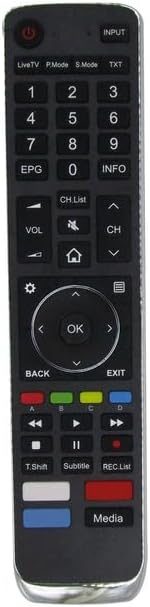
Figure 1: Front view of the Easytry123 Replacement Remote Control. This image displays the full layout of buttons, including the power button, number pad, navigation controls, volume and channel buttons, and media playback keys.
Setup
1. Battery Installation
- Locate the battery compartment on the back of the remote control.
- Press down on the latch and slide the battery cover downwards to open it.
- Insert two (2) AAA batteries, ensuring the positive (+) and negative (-) terminals align correctly with the markings inside the compartment.
- Slide the battery cover back into place until it clicks securely.
Note: No programming or code setup is required for this remote control. Once batteries are installed, it is ready for use with compatible Hisense TVs.

Figure 2: Rear view of the remote control with the battery compartment cover removed, showing the empty battery slots.

Figure 3: Rear view of the remote control with two AAA batteries correctly installed in the compartment.
Operating Instructions
The Easytry123 Replacement Remote Control features an ergonomic design and standard button layout for intuitive operation of your Hisense Smart LED HDTV.
Key Functions:
- Power Button (●): Turns the TV on or off.
- Input: Selects the input source (HDMI, AV, etc.).
- Number Pad (0-9): Directly enters channel numbers.
- VOL +/-: Adjusts the volume level.
- CH +/-: Changes the TV channel.
- Mute: Mutes or unmutes the TV audio.
- Navigation Pad (Up, Down, Left, Right, OK): Navigates menus and confirms selections.
- Back: Returns to the previous menu or screen.
- Exit: Exits the current menu or application.
- Home (⌂): Accesses the Smart TV home screen.
- EPG: Displays the Electronic Program Guide.
- INFO: Displays information about the current program.
- Media Playback Controls (Play, Pause, Stop, Rewind, Fast Forward): Controls media playback.
- Colored Buttons (Red, Green, Yellow, Blue): Functionality varies by TV model and application. Refer to your TV's user manual for specific uses.
Maintenance
Battery Replacement:
Replace batteries when the remote's response becomes sluggish or stops working. Always replace both AAA batteries simultaneously with new ones. Do not mix old and new batteries, or different types of batteries.
Cleaning:
To clean the remote, gently wipe its surface with a soft, dry cloth. For stubborn dirt, slightly dampen the cloth with water or a mild, non-abrasive cleaner. Avoid using harsh chemicals or excessive moisture, as this can damage the remote's electronics.
Troubleshooting
- Remote not responding:
- Ensure there is a clear line of sight between the remote and the TV's infrared sensor.
- Check if the batteries are correctly installed with the correct polarity.
- Replace the batteries with fresh AAA batteries.
- Verify that your TV model is listed as compatible with this remote control.
- Some functions not working:
- As a replacement remote, some advanced or specific functions of your original TV remote may not be supported. This is normal for replacement units.
- Refer to your Hisense TV's original user manual for specific button functionalities if you suspect a feature should be working.
Specifications
| Brand | Easytry123 |
| Model | B086H8722F |
| Compatible Devices | Hisense Smart LED HDTVs (Models: 55RG, 75R7, 65R7, 55R7, 50R7, 65R8, 65P1, 24P2, 32P2, 39P4, 49P4, 55P4, 55PX, 65PX) |
| Connectivity Technology | Infrared (IR) |
| Controller Type | Button Control |
| Special Feature | Ergonomic Design |
| Batteries Required | 2 x AAA (not included) |
Warranty and Support
Specific warranty information for this Easytry123 Replacement Remote Control is not provided in the product details. For any support inquiries or to check return policies, please refer to the retailer or seller from whom the product was purchased.
For detailed information regarding your Hisense TV's features and functions, please consult the original user manual provided with your television.