1. Introduction
The Lascar EL-SIE-2 is a sophisticated data logger designed to monitor and record environmental humidity and temperature. This device features an integrated display for real-time readings and status, and its advanced onboard software allows for easy configuration and data analysis directly through a web browser, eliminating the need for dedicated software installation.
Key Features:
- Measures and records humidity and temperature from -18°C to 55°C using an internal sensor with ±0.2°C accuracy.
- Logs over 1 million temperature readings onto non-volatile internal memory.
- LCD display shows current temperature readings, minimum and maximum readings, battery level, and alarm status.
- No software download required; configure using a web browser.
- Recorded readings can be stored to the EasyLog Cloud for viewing on any device or browser.
- Includes two AAA alkaline batteries, a mounting bracket, and a USB cable.
2. Setup
2.1. Battery Installation
- Locate the battery compartment on the rear of the EL-SIE-2 data logger.
- Open the compartment cover.
- Insert two AAA alkaline batteries, ensuring correct polarity (+/-).
- Close the battery compartment cover securely.
2.2. Mounting the Device
The EL-SIE-2 is supplied with a mounting bracket for secure wall installation.
- Choose a suitable location for mounting, ensuring it is representative of the environment to be monitored.
- Secure the mounting bracket to the desired surface using appropriate fasteners (not included).
- Slide the EL-SIE-2 data logger into the mounted bracket until it clicks into place.
2.3. Initial Configuration
The EL-SIE-2 features onboard software accessible via a web browser.
- Connect the data logger to your PC or Mac using the provided USB cable.
- Open a web browser (e.g., Chrome, Firefox, Edge). The device will appear as a removable drive.
- Navigate to the device's web interface (usually by opening the drive and clicking on the provided HTML file or navigating to a specific IP address if prompted).
- Follow the on-screen instructions to configure logging parameters such as sample rate, alarm thresholds, and start mode.
3. Operation
3.1. Display Overview
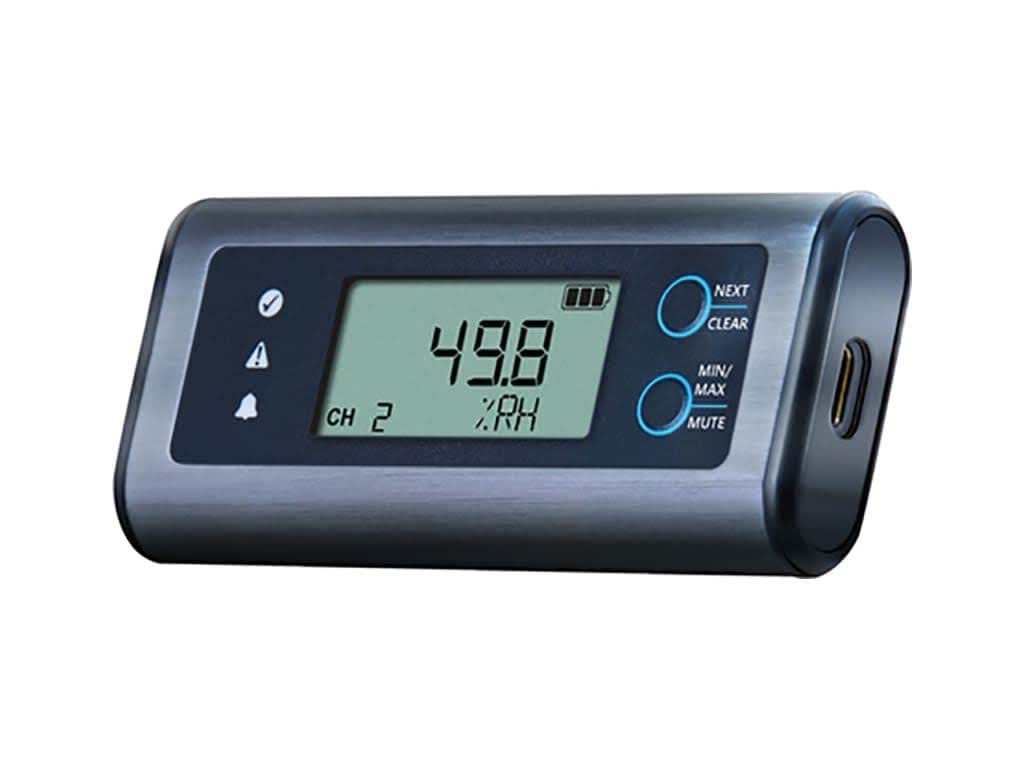
A close-up view of the Lascar EL-SIE-2 data logger. The device features a rectangular, dark gray casing with a clear LCD screen displaying '49.8 %RH' and 'CH 2'. To the left of the screen are indicator icons for status, alert, and alarm. To the right, two circular buttons are labeled 'NEXT/CLEAR' and 'MIN/MAX/MUTE'. A USB-C port is visible on the right side of the device.
The EL-SIE-2 features a clear LCD that provides immediate information:
- Current Readings: Displays the real-time humidity (%RH) and temperature (°C/°F).
- Battery Level: An icon indicates the remaining battery life.
- Alarm Status: Icons illuminate to indicate if an alarm condition is met.
- Channel Indicator: 'CH 2' indicates the active measurement channel.
3.2. Button Functions
- NEXT / CLEAR Button (Top): Press to cycle through display modes or clear certain indicators.
- MIN/MAX / MUTE Button (Bottom): Press to view minimum and maximum recorded values. Hold to mute audible alarms.
3.3. Data Logging and Access
Once configured, the EL-SIE-2 will automatically begin logging data according to your settings. Data can be accessed and analyzed in two primary ways:
- Direct Connection: Connect the logger to a computer via USB. Access the onboard web interface to view, analyze, and download recorded data.
- EasyLog Cloud: Upload recorded data to the EasyLog Cloud for remote access and analysis from any internet-connected device.
4. Maintenance
4.1. Battery Replacement
The EL-SIE-2 uses two AAA alkaline batteries, which typically last over one year. Replace batteries when the low battery indicator appears on the display to ensure continuous operation and data integrity. Follow the steps outlined in Section 2.1 for battery installation.
4.2. Cleaning
To clean the device, wipe the exterior with a soft, damp cloth. Do not use abrasive cleaners or immerse the device in water.
5. Troubleshooting
5.1. Device Not Responding
- Check battery level and replace if necessary.
- Ensure the USB cable is securely connected to both the device and the computer.
- Try connecting to a different USB port or computer.
5.2. Data Not Logging
- Verify that the device was properly configured to start logging via the web interface.
- Check the device's internal memory status; if full, download data and clear memory.
6. Specifications
| Specification | Value |
|---|---|
| Item Model Number | PS-2204A |
| Package Dimensions | 6 x 3 x 1 inches; 4.8 ounces |
| Batteries Required | 2 AAA batteries |
| Battery Description | Alkaline |
| Mounting Type | Wall Mount |
| Upper Temperature Rating | 55 Degrees Celsius |
| Temperature Accuracy | 1°C |
| Manufacturer | Lascar Electronics |
| Date First Available | August 19, 2019 |
7. Warranty and Support
For warranty information, technical support, or service inquiries, please refer to the official Lascar Electronics website or contact their customer support directly. Keep your purchase receipt for warranty claims.


