
Introduction
The MISERWE Skin Scrubber is a versatile facial device designed to enhance your skincare routine. It utilizes ultrasonic vibrations to assist in deep cleansing, blackhead removal, and improved absorption of skincare products. This manual provides essential information for the safe and optimal use of your device.

Image: Common skin concerns addressed by the device.
Safety Information
- Do not use the device while charging.
- Keep the device away from water. The body of the equipment is not waterproof.
- Ensure your face is moist with cream or steam before using the skin spatula.
- Move the head of the skin scrubber slowly on the face without stopping.
- The device has a 5-minute auto-off function to prevent overuse and potential skin irritation.
- This device is recommended to be charged with a DC5V 0.5A charger.
Package Contents
Verify that all items are present in your package:
- 1x MISERWE Skin Scrubber device
- 1x USB charging cord
- 2x Silicone cases (for cleaning assistance)
- 1x User manual (this document)
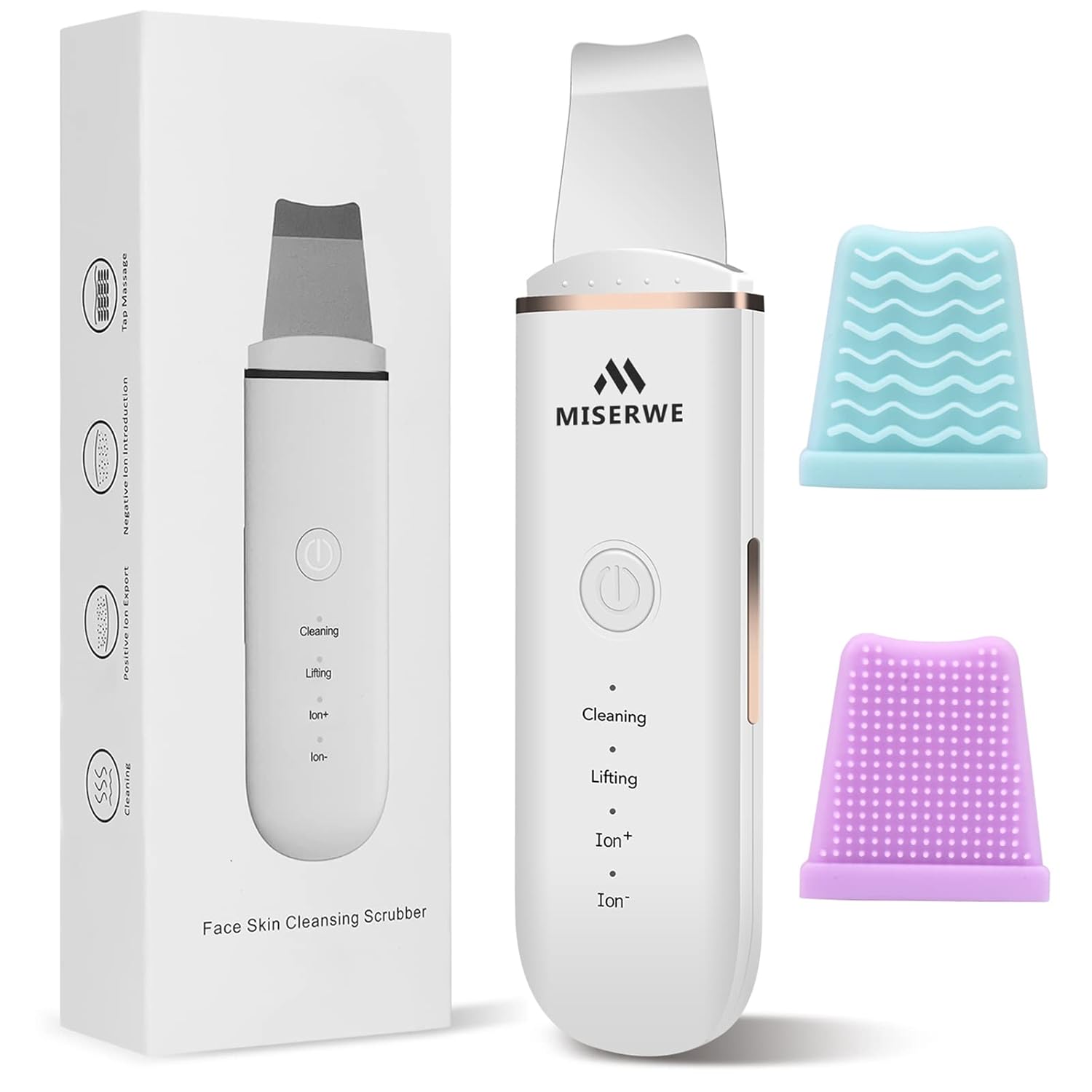
Image: Contents of the MISERWE Skin Scrubber package.
Device Overview and Charging
The MISERWE Skin Scrubber features a stainless steel spatula and a user-friendly interface with a power button and mode indicator lights.
Charging Instructions:
- Connect the provided USB charging cord to the device and a compatible DC5V 0.5A charger (e.g., PC, power bank).
- When first using the skin scrubber, charge it for approximately 2-5 hours.
- The device cannot be operated while charging.
- A full charge provides sufficient power for multiple uses.
Operating Instructions
Follow these steps for effective use of your skin scrubber:
- Preparation: Ensure your face is thoroughly cleansed and kept moist with water, a facial cream, or steam throughout the treatment. This is crucial for the device's effectiveness and to prevent skin irritation.
- Power On: Press and hold the power button for 3 seconds to turn on the device.
- Select Mode: Press the power button briefly to cycle through the available modes: Cleaning, Lifting, Ion+, and Ion-.
- Application: Gently move the stainless steel spatula slowly across your skin. Do not apply excessive pressure or hold the device stationary on one spot. Ensure your fingers are in contact with the metal strips on the sides of the device for proper function.
- Auto-Off: The device will automatically turn off after 5 minutes of continuous operation.
- Post-Use: After each use, clean the spatula head as described in the Maintenance section.

Image: Visual representation of the device's deep cleansing, nutrient leading-in, and blackhead removal actions.
Understanding the 4 Modes
The MISERWE Skin Scrubber offers four distinct modes to cater to various skincare needs:
1. Cleaning Mode
This mode uses high-frequency vibration for deep facial cleansing. It helps to remove dirt, oil, and impurities from pores. Use with facial foam or cleanser on moist skin.

Image: Cleaning Mode application with facial foam.
2. Ion+ Mode (Deep Cleansing & Blackhead Removal)
The Ion+ mode works with positive ions to draw out stubborn blackheads and deeply embedded impurities. Use with toner on moist skin.

Image: Ion+ Mode application with toner.
3. Ion- Mode (Nutrient Absorption)
The Ion- mode utilizes negative ions to help the skin absorb nutrients from skincare products more effectively. Apply your favorite serum or mask before using this mode.

Image: Ion- Mode application with serum or mask.
4. Lifting Mode (EMS Facial Massage)
This mode provides an EMS (Electrical Muscle Stimulation) facial massage, which can help with wrinkle prevention and skin tightening. Use after applying your regular skincare cream.

Image: Lifting Mode application with facial cream.
Maintenance and Care
Proper maintenance ensures the longevity and hygiene of your device:
- After each use, wipe the stainless steel spatula head with a soft, damp cloth or a cotton pad.
- Do not rinse the entire device under water as it is not waterproof.
- Store the device in a clean, dry place, away from direct sunlight and extreme temperatures.
- The included silicone cases can be used to assist in cleaning the skin.
Troubleshooting
If you encounter issues with your MISERWE Skin Scrubber, refer to the following common solutions:
| Problem | Possible Cause | Solution |
|---|---|---|
| Device does not turn on. | Low battery or not charged. | Charge the device for 2-5 hours. Ensure the power button is pressed and held for 3 seconds. |
| Device not vibrating or vibrating weakly. | Skin is not moist enough; fingers not touching metal strips; low battery. | Ensure skin is consistently moist. Make sure your fingers are in contact with the side metal strips. Recharge the device. |
| Device turns off unexpectedly. | 5-minute auto-off function activated; low battery. | This is normal operation for the auto-off. If it happens sooner, recharge the device. |
Specifications
| Feature | Detail |
|---|---|
| Model Number | MIS-014 |
| Brand | MISERWE |
| Material | Stainless Steel (spatula) |
| Power Source | 1 Lithium Polymer battery (included) |
| Charging Input | DC5V 0.5A (via USB cord) |
| Product Dimensions | 3.15 x 1.18 x 7.87 inches |
| Item Weight | 4.94 ounces |
| UPC | 602309955120 |
Warranty and Support
For warranty information or technical support, please refer to the product packaging or contact MISERWE customer service through the retailer where the product was purchased. Keep your purchase receipt as proof of purchase.