
1. Introduction
This manual provides instructions for the Aramox Fuel Tank Level Sensor, model 17047-SNA-000. This component is designed to replace the original fuel level sensor in compatible vehicles, providing fuel level data to the vehicle's dashboard gauge. It is compatible with Honda Civic FA1 and FA3 sedan models manufactured between 2006 and 2011.
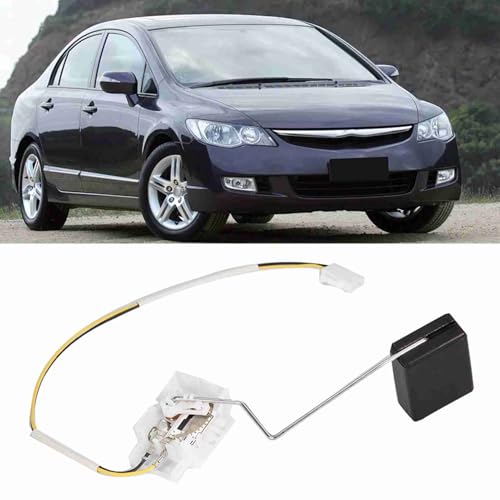
Image 1.1: Aramox Fuel Tank Level Sensor (Model 17047-SNA-000) shown with a compatible vehicle.
2. Product Features
- Fuel Level Data: Provides fuel level information to the vehicle's dashboard gauge.
- Compatibility: Designed for direct replacement in Sedan FA1 and FA3 models from 2006 to 2011.
- OE Fitment: Matches original equipment specifications for part number 17047-SNA-000.
- Material: Constructed from robust ABS plastic.
- Corrosion Resistance: The ABS material offers resistance to fuel corrosion and wear.
3. Setup and Installation
Installation of the fuel tank level sensor requires access to the vehicle's fuel tank assembly. It is recommended that installation be performed by a qualified automotive technician to ensure proper function and safety.
3.1. Safety Precautions
- Ensure the vehicle's engine is off and cool.
- Disconnect the vehicle's battery to prevent electrical hazards.
- Relieve fuel system pressure according to the vehicle manufacturer's service manual.
- Work in a well-ventilated area and avoid open flames or sparks.
3.2. Installation Steps (General Guide)
- Locate the fuel pump access panel, typically under the rear seat or in the trunk.
- Carefully remove the access panel and disconnect any electrical connectors and fuel lines from the fuel pump assembly.
- Remove the fuel pump assembly from the fuel tank.
- Detach the old fuel level sensor from the fuel pump assembly. Note its orientation for correct installation of the new sensor.
- Install the new Aramox Fuel Tank Level Sensor (17047-SNA-000) onto the fuel pump assembly, ensuring all connections are secure.
- Reinstall the fuel pump assembly into the fuel tank, ensuring the gasket is properly seated to prevent leaks.
- Reconnect fuel lines and electrical connectors.
- Reinstall the access panel.
- Reconnect the vehicle's battery.

Image 3.1: Detailed view of the sensor mechanism, highlighting its material (ABS), OE part number (17047-SNA-000), and fitment for Honda Civic FA1/FA3 2006-2011.
4. Operation
Once correctly installed, the Aramox Fuel Tank Level Sensor operates automatically. It continuously measures the fuel level within the tank and transmits this data to the vehicle's fuel gauge on the dashboard. No user intervention is required for its operation.
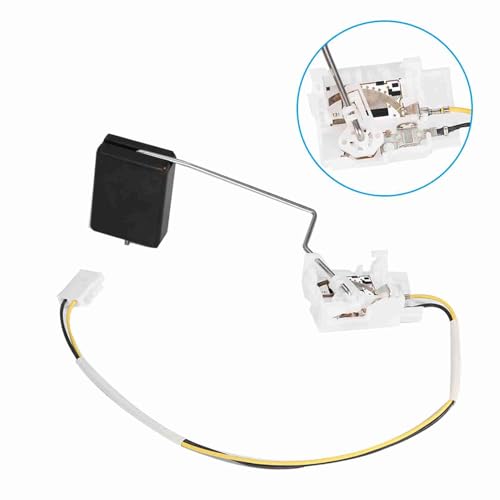
Image 4.1: The fuel level sensor, with an inset showing the internal components responsible for fuel level measurement.
5. Maintenance
The Aramox Fuel Tank Level Sensor is designed for long-term reliability and typically requires no routine maintenance. Its construction from corrosion-resistant ABS material helps ensure consistent performance over its service life. If issues arise, refer to the troubleshooting section.
6. Troubleshooting
If the fuel gauge displays inaccurate readings or ceases to function after installation, consider the following:
- Check Connections: Ensure all electrical connectors and fuel lines are securely attached and free from damage.
- Verify Compatibility: Double-check that the sensor model (17047-SNA-000) is correct for your specific Honda Civic FA1/FA3 model and year (2006-2011).
- Inspect for Obstructions: Confirm that the sensor's float arm can move freely within the fuel tank and is not obstructed.
- Professional Diagnosis: If the problem persists, it is advisable to consult a professional automotive technician for diagnosis and repair.
7. Specifications
| Feature | Specification |
|---|---|
| Brand | Aramox |
| Model Number | 17047-SNA-000 |
| Material | Acrylonitrile Butadiene Styrene (ABS) |
| Item Weight | 0.04 Kilograms (approximately 1.41 ounces) |
| Product Dimensions (L x W x H) | 3.94 x 3.94 x 3.94 inches |
| Mounting Type | Flange Mount |
| Output Type | Digital |
| Specific Uses | Automotive |
8. Warranty and Support
For information regarding product warranty, please refer to the documentation provided at the time of purchase or contact the seller directly. For technical support or assistance, please reach out to the Aramox customer service or your point of purchase.