
1. Introduction
Thank you for purchasing the Kaiser KSW-5006 Bluetooth Speaker. This portable speaker features a 6.5-inch driver, 20W RMS power, a circular LED light, and multiple connectivity options including Bluetooth, FM radio, USB, Micro SD, and Auxiliary input. It also supports KSR-Link technology for wireless stereo pairing. This manual provides essential information for safe and optimal use of your device.
2. Safety Information
- Read all instructions before using the speaker.
- Keep the speaker away from water, moisture, and extreme temperatures.
- Do not attempt to disassemble or repair the unit yourself. Refer all servicing to qualified personnel.
- Use only the provided charging cable or a certified equivalent.
- Avoid prolonged exposure to high volume levels to prevent hearing damage.
- Ensure proper ventilation when operating the speaker.
3. Package Contents
Please check the package for the following items:
- Kaiser KSW-5006 Bluetooth Speaker
- USB Charging Cable
- Instruction Manual
4. Product Overview
Familiarize yourself with the speaker's components and controls.
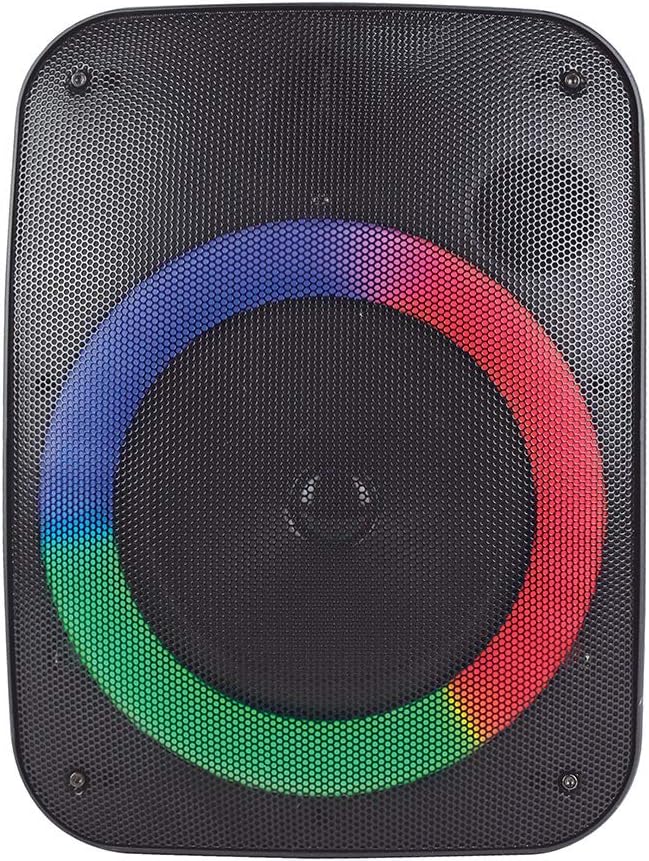
This image shows the Kaiser KSW-5006 Bluetooth speaker, highlighting its compact design and the speaker grille.
Control Panel

A close-up view of the speaker's top control panel, featuring buttons for lights, mode/link, track control, play/pause, and bass adjustment.
- LUCES (Lights) Button: Press to cycle through light modes or turn off the circular LED light.
- MODO LINK (Mode/Link) Button: Press to switch between input modes (Bluetooth, FM, USB, Micro SD, AUX). Long press to activate KSR-Link pairing.
- Previous Track / Volume Down Button: Short press for previous track. Long press to decrease volume.
- Play/Pause Button: Press to play or pause audio. In FM mode, long press to auto-scan and save stations.
- Next Track / Volume Up Button: Short press for next track. Long press to increase volume.
- BAJOS (Bass) Button: Press to adjust bass level.
Ports and Indicators
- USB Port: For USB flash drive playback.
- Micro SD Card Slot: For Micro SD card playback.
- AUX Input: 3.5mm jack for connecting external audio devices.
- Charging Port: For connecting the USB charging cable.
- Charging Indicator: LED light indicating charging status.
5. Setup
5.1 Initial Charging
Before first use, fully charge the speaker. Connect the USB charging cable to the speaker's charging port and the other end to a USB power adapter (not included) or a computer's USB port. The charging indicator will illuminate during charging and turn off when fully charged. A full charge typically takes several hours.
5.2 Powering On/Off
To power on the speaker, locate the power switch (usually on the back or side) and slide it to the 'ON' position. To power off, slide the switch to the 'OFF' position.
6. Operating Instructions
6.1 Bluetooth Pairing
- Power on the speaker. It will automatically enter Bluetooth pairing mode, indicated by a flashing LED.
- On your mobile device, enable Bluetooth and search for available devices.
- Select "KSW-5006" from the list of devices.
- Once paired, the speaker will emit a confirmation sound, and the LED will stop flashing.
- You can now play audio from your device through the speaker.
6.2 KSR-Link Function (Wireless Stereo Pairing)
To pair two KSW-5006 speakers for stereo sound:
- Ensure both KSW-5006 speakers are powered on and in Bluetooth mode, but not yet connected to any device.
- On one of the speakers (this will be the primary speaker), long press the "MODO LINK" button. The speaker will emit a sound indicating it's searching for another speaker.
- The two speakers will automatically connect to each other. A confirmation sound will indicate successful pairing.
- Now, connect your mobile device to the primary speaker via Bluetooth as described in section 6.1.
- Audio will now play in stereo through both speakers.
6.3 FM Radio
- Press the "MODO LINK" button repeatedly until you enter FM radio mode.
- Long press the "Play/Pause" button to start an automatic scan for FM stations. The speaker will save all found stations.
- Use the "Previous Track" and "Next Track" buttons to navigate between saved stations.
6.4 USB / Micro SD Playback
- Insert a USB flash drive or a Micro SD card (with audio files) into the respective port/slot.
- The speaker will automatically switch to USB or Micro SD mode and begin playing audio. If not, press the "MODO LINK" button to select the correct mode.
- Use the "Previous Track", "Play/Pause", and "Next Track" buttons to control playback.
6.5 AUX Input
- Connect one end of a 3.5mm audio cable (not included) to the AUX input port on the speaker.
- Connect the other end of the cable to the audio output jack of your external device (e.g., smartphone, MP3 player).
- Press the "MODO LINK" button repeatedly until you enter AUX mode.
- Control playback and volume from your external device.
6.6 Light Control
Press the "LUCES" button to cycle through different circular LED light modes or to turn the lights off.
6.7 Bass Adjustment
Press the "BAJOS" button to adjust the bass level of the audio output.
7. Maintenance
- Cleaning: Use a soft, dry cloth to clean the speaker's exterior. Do not use abrasive cleaners or solvents.
- Storage: Store the speaker in a cool, dry place away from direct sunlight and extreme temperatures.
- Battery Care: To prolong battery life, avoid fully discharging the battery frequently. Charge the speaker regularly, even if not in use for extended periods.
- Water Exposure: This speaker is not waterproof. Avoid exposing it to rain, splashes, or submersion in water.
8. Troubleshooting
| Problem | Possible Cause | Solution |
|---|---|---|
| Speaker does not power on. | Battery is depleted. | Charge the speaker fully. |
| No sound. | Volume is too low; incorrect input mode; device not connected. | Increase volume; press MODO LINK to select correct input; ensure device is properly connected/paired. |
| Bluetooth pairing fails. | Speaker is already paired; device Bluetooth is off; speaker too far. | Ensure speaker is in pairing mode; enable Bluetooth on device; move device closer to speaker (within 10m). |
| KSR-Link pairing fails. | Speakers are already connected to a device; not in correct mode. | Ensure both speakers are in Bluetooth mode and not connected to any device before initiating KSR-Link. |
| Poor FM reception. | Weak signal; environmental interference. | Relocate the speaker; try auto-scanning again. |
9. Specifications

The speaker shown with its approximate dimensions: 32 cm height, 24 cm width, and 20 cm depth.
| Feature | Detail |
|---|---|
| Model | KSW-5006 |
| Brand | Kaiser |
| Speaker Output Power | 20 Watts RMS |
| Frequency Response | 8 KHz |
| Connectivity Technology | Auxiliary, Bluetooth, USB |
| Audio Output Mode | Stereo |
| Speaker Type | Woofer |
| Woofer Diameter | 4 Inches |
| Color | Black |
| Waterproof | No |
| Bluetooth Range | 10 Meters |
| Average Battery Life | 10 Hours |
| Dimensions (D x W x H) | 20 cm x 24 cm x 32 cm |
| Item Weight | 2.06 Kilograms |
| Power Source | Battery |
| Battery Type | 1 Lithium Ion (included) |
| Battery Capacity | 10000 Milliamp Hours |
10. Warranty and Support
This product is listed with "Sin garantia" (No warranty). Please check with your retailer or point of purchase for specific warranty terms and conditions that may apply. For technical support or inquiries, please refer to the contact information provided by your retailer or visit the official Kaiser website.


