
Introduction
Thank you for purchasing the Viozon 2-in-1 Monitor and Laptop Desk Mount Arm. This product is designed to enhance your ergonomic setup by providing adjustable support for both your monitor and laptop, freeing up valuable desk space and promoting a healthier posture. Please read this manual carefully before installation and use to ensure proper setup and safe operation.
Safety Information
- Ensure the desk surface is sturdy enough to support the combined weight of the mount, monitor, and laptop.
- Do not exceed the maximum weight capacity of 9kg (19.8 lbs) per arm.
- Verify that your monitor has VESA mounting holes (75x75mm or 100x100mm).
- Keep children and pets away during installation.
- Tighten all screws firmly but do not overtighten to avoid stripping threads.
- Regularly check all connections and adjustments to ensure stability.
Package Contents
Please verify that all components are present before beginning installation. Refer to the product packaging for a detailed list of included parts.
Setup Instructions
1. Choose Your Mounting Method
The Viozon desk mount supports two installation methods: Clamp Type and Grommet Type. Select the method suitable for your desk.
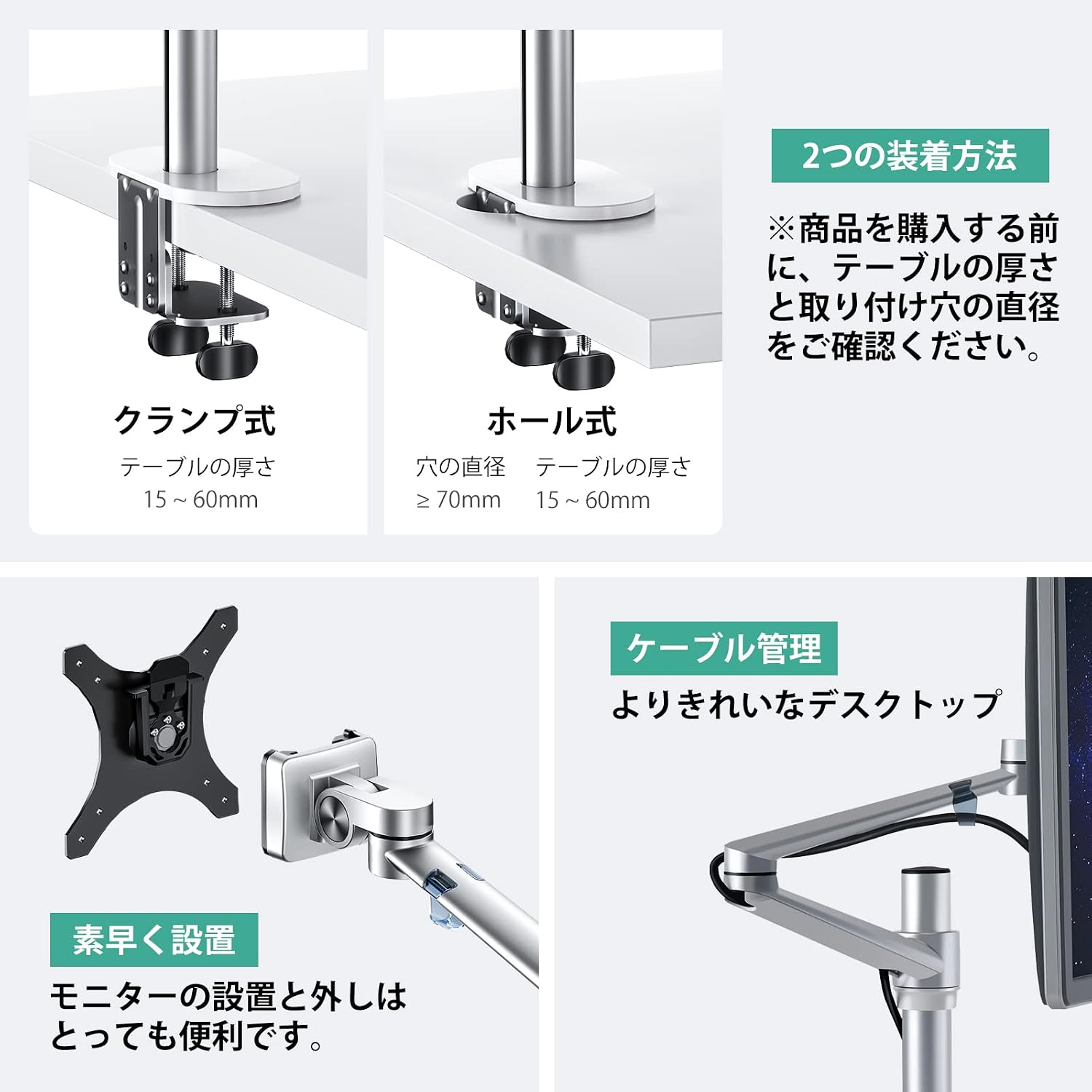
Image: Clamp and Grommet Mounting Options. The clamp type is suitable for desk thicknesses between 15-60mm. The grommet type requires a hole diameter of 70mm or more and a desk thickness of 15-60mm.
2. Assemble the Arm and Attach to Desk
Follow the instructions provided with your product to assemble the arm components and securely attach the base to your desk using either the clamp or grommet method. Ensure the base is stable before proceeding.
3. Attach Monitor and Laptop Tray
Attach your VESA-compatible monitor (17-32 inches) to the monitor arm using the provided screws. For your laptop (12-17 inches), place it securely on the laptop tray. Ensure both are firmly attached.

Image: Product dimensions and compatibility. Supports 17-32 inch VESA monitors (75x75mm, 100x100mm) and 12-17 inch laptops.
4. Adjust Tension
The arm features tension adjustment to accommodate different weights and allow for smooth movement. Use the included hex wrench to adjust the tension. Turn clockwise to increase tension (for heavier devices) and counter-clockwise to decrease tension (for lighter devices).

Image: Adjusting arm tension. Turn the screw clockwise to increase tension for heavier monitors.
Operating Instructions
Once installed, you can adjust your monitor and laptop to your preferred ergonomic position.
Adjusting Position
- Height Adjustment: The arm allows for vertical adjustment to align your screen at eye level.
- Tilt: Tilt your monitor up to ±90° to reduce glare and optimize viewing angles.
- Swivel: Swivel the monitor ±45° to share your screen with others or change orientation.
- Rotation: Rotate the monitor 360° for portrait or landscape viewing.

Image: Monitor adjustment capabilities including tilt, rotation, and swivel.
Cable Management
Utilize the integrated cable management clips along the arm to route and conceal cables, maintaining a clean and organized workspace.

Image: Cable management feature for a tidy desktop.
Maintenance
- Clean the mount with a soft, damp cloth. Avoid abrasive cleaners.
- Periodically check all screws and connections to ensure they remain tight and secure.
- Do not lubricate the moving parts unless specifically instructed by the manufacturer.
Troubleshooting
Monitor Tilting Down (Loose Adapter)
If your monitor is tilting downwards and does not hold its position, the tension in the adapter may be too loose. Use the provided hex wrench to turn the screw in the '+' direction to increase tension until the monitor holds its desired angle.
Laptop Tray or VESA Mount is Tilted
If the laptop tray or VESA mount appears tilted or not level, you can adjust its rotation. The VESA plate and laptop tray can be rotated to correct any misalignment. Gently rotate the component until it is level.
Specifications
| Brand | Viozon |
| Model Number | OL-3L |
| Material | Aluminum |
| Color | Silver |
| Monitor Compatibility | 17-32 inches (VESA 75x75mm, 100x100mm) |
| Laptop Compatibility | 12-17 inches |
| Max Load Capacity (per arm) | 9 kg (19.8 lbs) |
| Mounting Type | Desk Clamp or Grommet |
| Adjustments | Height, Tilt (±90°), Swivel (±45°), Rotation (360°) |
Warranty and Support
Viozon products come with a standard manufacturer's warranty. For specific warranty details, please refer to the warranty card included with your product or visit the official Viozon website. If you encounter any issues or require assistance, please contact Viozon customer support through the contact information provided on the product packaging or their official website.
