1. Introduction and Overview
The Samsung 75-inch Q60T QLED 4K UHD HDR Smart TV delivers ultra-sharp UHD resolution, rich HDR color, and smart hub features for an immersive viewing experience. This manual provides essential information for setting up, operating, and maintaining your television.
Key Features:
- 100% Color Volume with Quantum Dot: Quantum dots produce over a billion shades of color that remain true-to-life.
- Dual LED: A system of dedicated warm and cool LED backlights enhances contrast details.
- Quantum HDR: Expands the range of color and detail beyond standard HDTVs.
- Smart TV Powered by Tizen: Offers next-generation apps, easy control, and enhancements for the TV watching experience.
- Quantum Processor 4K Lite: This ultra-fast processor optimizes content for QLED and transforms content into stunning 4K.
- Alexa Built-in: Voice control for TV functions and smart home devices.

Figure 1: Front view of the Samsung 75-inch Q60T QLED 4K UHD HDR Smart TV.
2. Setup
2.1 Unpacking and Assembly
Carefully remove the television and all components from the packaging. It is recommended to have at least two people for safe handling due to the size and weight of the TV.
Stand Assembly:
Attach the included stand legs to the bottom of the television. Ensure they are securely fastened according to the instructions provided in the quick setup guide. The stand legs are designed for stability on a flat surface.
Wall Mounting:
If you choose to wall mount your TV, use a VESA-compliant wall mount kit (sold separately). The TV supports M8 screws for mounting. Consult a professional for wall mounting to ensure proper installation and safety.
2.2 Placement Considerations
Place the TV on a stable, level surface or mount it securely on a wall. Ensure adequate ventilation around the TV to prevent overheating. Avoid placing the TV in direct sunlight or near heat sources.
Video 1: This video demonstrates the TV's size and how it fits into a living space, offering a visual reference for placement.
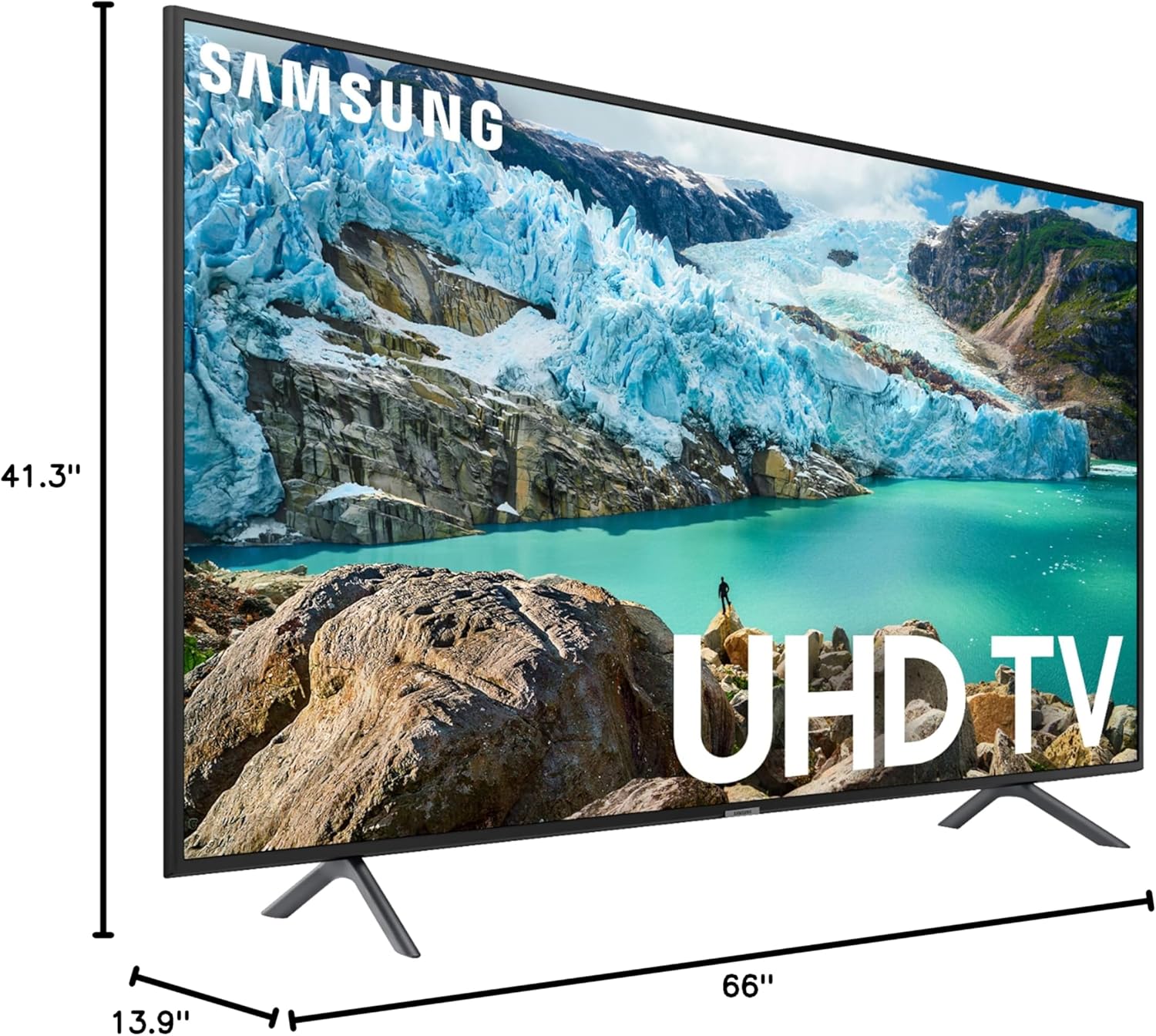
Figure 2: TV dimensions for planning placement.
2.3 Connections
Connect your external devices to the TV using the appropriate ports. The TV features multiple connectivity options:
- HDMI Ports: For connecting devices like gaming consoles, Blu-ray players, and set-top boxes.
- USB Ports: For connecting USB storage devices to view media files.
- Ethernet Port: For a wired internet connection.
- Wireless Connectivity: Built-in Wi-Fi for internet access.
- Bluetooth: For connecting wireless headphones or other Bluetooth-enabled audio devices.
3. Operating Instructions
3.1 Smart Hub and Tizen OS
The Samsung Smart TV is powered by the Tizen operating system, providing a user-friendly interface for accessing apps, streaming services, and live TV. Navigate the Smart Hub using your Samsung Smart Control remote.
Key Smart Hub Features:
- App Access: Download and manage a wide range of streaming and utility applications.
- Samsung TV Plus: Enjoy free, ad-supported live TV channels and on-demand content.
- Universal Guide: Get personalized recommendations for content across various apps and live TV.
3.2 Voice Control (Alexa Built-in)
Your Samsung Q60T TV includes Alexa built-in, allowing you to control your TV and smart home devices using voice commands. Simply press the microphone button on your remote and speak your command.
3.3 Picture Quality Overview
The QLED display offers vibrant colors and sharp details. The Quantum Processor 4K Lite enhances content to 4K resolution, providing an optimized viewing experience.
Video 2: This short video demonstrates the clear picture quality of the Samsung TV while displaying content.
3.4 Gaming Features
The Q60T is designed to enhance your gaming experience with features like a 120Hz refresh rate and support for Variable Refresh Rate (VRR) when connected to compatible gaming PCs or consoles. Quantum HDR provides a wider range of colors and contrast for more realistic gameplay.
Game Mode Settings:
- Auto Game Mode: Automatically optimizes settings for gaming when a console is detected.
- Game Motion Plus: Adjusts blur and judder reduction for smoother motion.
- Dynamic Black Equalizer: Enhances visibility in dark game scenes.
3.5 Picture and Sound Settings
Access the TV's settings menu to customize picture and sound to your preferences.
Picture Settings:
- Picture Mode: Choose from Standard, Dynamic, Movie, or Eco modes.
- EyeComfort Mode: Adjusts screen color tone based on ambient light.
- Smart Calibration: Calibrates picture quality using a compatible smartphone.
- Expert Settings: Fine-tune advanced picture parameters like brightness, contrast, sharpness, and color.
Sound Settings:
- Sound Output: Select TV Speaker, Optical Receiver, or Bluetooth Speaker.
- Sound Mode: Choose from Standard or Amplified.
- Equalizer: Adjust bass and treble levels.
- HDMI-eARC Mode: Enable for enhanced audio return channel functionality with compatible sound systems.
- Auto Volume: Automatically equalizes sound levels across different channels and sources.
4. Maintenance
4.1 Cleaning the TV
To clean the screen, gently wipe it with a soft, lint-free cloth. For the exterior, use a soft, dry cloth. Avoid using harsh chemicals, abrasive cleaners, or waxes, as these can damage the TV's finish.
4.2 General Care
Unplug the TV from the power outlet during lightning storms or when it will be left unattended for long periods. Do not block ventilation openings. Keep the TV away from moisture and extreme temperatures.
5. Troubleshooting
If you encounter issues with your TV, refer to the following common solutions:
- No Power: Ensure the power cable is securely connected to the TV and a working power outlet. Check the remote control's battery.
- No Picture/Sound: Verify that the correct input source is selected. Check all cable connections to external devices.
- Remote Not Working: Ensure there are no obstructions between the remote and the TV. Replace the remote's batteries if necessary.
- Internet Connection Issues: Check your router and modem. Reconnect the TV to your Wi-Fi network or try a wired Ethernet connection.
For more detailed troubleshooting, consult the full user manual available on the Samsung support website.
6. Specifications
| Feature | Specification |
|---|---|
| Brand | Samsung |
| Model Number | QN75Q60TAFXZARB |
| Screen Size | 75 Inches |
| Display Technology | QLED |
| Resolution | 4K UHD (3840 x 2160) |
| Refresh Rate | 120 Hz |
| Special Feature | Flat |
| Connectivity Technology | Bluetooth, Ethernet, HDMI, USB, Wireless |
| Aspect Ratio | 16:9 |
| Product Dimensions | 64.96 x 13.78 x 39.37 inches (with stand) |
| Item Weight | 79.3 Pounds |
| Color Name | Black |
| Voltage | 100 Volts (AC) |
| Wattage | 150 watts |

Figure 3: Side profile of the TV.
7. What's in the Box
The following items are included with your Samsung 75-inch Q60T QLED 4K UHD HDR Smart TV:
- Samsung 75-inch Q60T QLED 4K UHD HDR Smart TV
- Power Cable
- Standard Smart Remote
- Samsung Smart Control
- Manual (this document)
8. Warranty and Support
This product is offered as an Amazon Renewed item and comes with a 90-day return policy for refunds or replacements. For technical assistance or customer support, please refer to the contact information provided by Amazon Renewed or Samsung's official support channels.
For further assistance, visit the Samsung support website or contact their customer service directly.


