
1. Important Safety Instructions
To ensure safe operation and prevent injury or damage, please read and follow these instructions carefully before using the IRIS JY-868A Foot Spa Massager.
- Do Not Operate Without Water: Always ensure the foot spa is filled with water before turning it on.
- Maintain Water Level: Keep the water volume between the indicated maximum and minimum lines to prevent overflow or damage to the heating elements.
- Protect Control Panel: Keep the control panel dry and away from water splashes to avoid electrical hazards.
- Electrical Safety: Do not immerse the unit in water. Ensure hands are dry when plugging or unplugging the device.
- Supervision: This appliance is not intended for use by persons with reduced physical, sensory, or mental capabilities, or lack of experience and knowledge, unless they have been given supervision or instruction concerning use of the appliance by a person responsible for their safety.
- Leakage Protection: The product is equipped with a leakage protection function for enhanced user safety. However, always exercise caution.
- Unplug When Not in Use: Always unplug the foot spa from the power outlet when not in use, before cleaning, or before moving.
- Avoid Overfilling: The front curve of the product helps prevent water from spilling, but avoid overfilling to prevent accidental spills.
2. Product Overview
The IRIS JY-868A Foot Spa Massager is designed to provide a relaxing foot spa experience. It features bubble massage, infrared water heating, and manual rollers to help improve circulation and relieve foot fatigue.
Key Features:
- Manual Rollers: Equipped with strong manual rollers to stimulate foot reflexology points and improve blood circulation.
- Bubble Massage: Calming bubbles provide a soothing massage to relax tired feet.
- Infrared Water Heating: Integrated heating technology allows water temperature to be set between 35-48°C for a warm and comfortable experience.
- Digital Control Panel: An easy-to-understand LCD screen displays the set temperature and working mode, allowing control over bubble massage, heating, and timer functions.
- Timer Function: Adjust the massage duration to your preference.
- Deep Tub Design: Provides ample water capacity for a comprehensive foot spa.
- Convenient Handling: Features a no-slip handle for easy movement and a drain pipe for effortless water draining.
- Detachable Components: The storage box and massage rollers are detachable for easy cleaning.
Product Components:
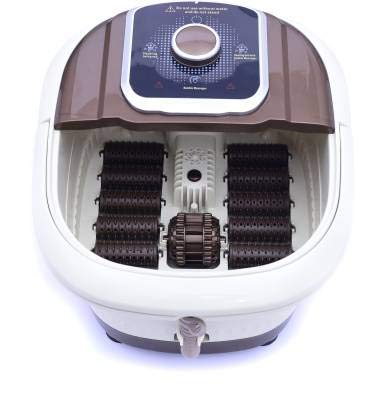
Image 2.1: Top view of the IRIS JY-868A Foot Spa Massager in operation, showing the control panel, bubbling water, and manual rollers.
- Control Panel: Digital display and buttons for operating functions.
- Foot Tub: Main basin for water and feet.
- Manual Rollers: Located at the bottom of the tub for foot massage.
- Drain Pipe: For convenient water drainage.
- Handle: For easy carrying and movement.
- Splash Guard: Integrated design to minimize water splashing.
3. Setup
- Placement: Place the foot spa massager on a flat, stable, and dry surface. Ensure it is near a power outlet and away from any electronic devices or water-sensitive areas.
- Fill with Water: Fill the foot tub with warm or cold water. Ensure the water level is between the "MIN" and "MAX" indicators inside the tub. Do not overfill.
- Connect Power: Plug the power cord into a standard electrical outlet.
- Positioning: Ensure the handle is in a stable position or folded down before use.
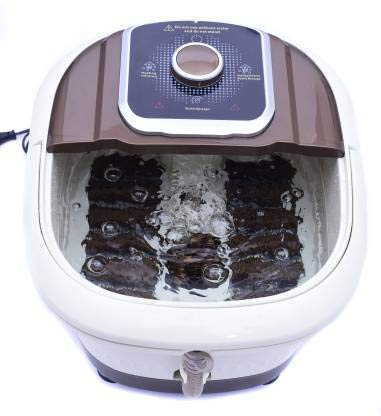
Image 3.1: Side view of the IRIS JY-868A Foot Spa Massager with its handle in the upright position, ready for transport.
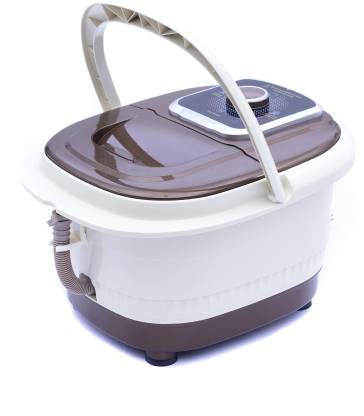
Image 3.2: Side view of the IRIS JY-868A Foot Spa Massager with its handle folded down, indicating readiness for use or storage.
4. Operating Instructions
- Power On: Press the power button on the digital control panel to turn on the foot spa. The LCD screen will illuminate.
- Set Temperature: Use the temperature control buttons (usually '+' and '-') on the control panel to set your desired water temperature. The temperature can be adjusted between 35°C and 48°C. The unit will begin heating the water to the set temperature.
- Activate Bubble Massage: Press the bubble function button on the control panel to activate the soothing bubble massage.
- Use Manual Rollers: Place your feet into the tub. Gently move your feet back and forth over the manual rollers at the bottom of the tub for a targeted massage.
- Set Timer (if available): If your model includes a timer function, use the timer button to set the desired duration for your foot spa session.
- Enjoy Your Spa: Relax and enjoy the foot spa experience.
- Power Off: After your session, press the power button to turn off the unit. Unplug the power cord from the outlet.
5. Maintenance
Regular cleaning and proper storage will extend the life of your foot spa massager.
- Drain Water: After each use, unplug the unit. Position the foot spa over a drain or basin. Pull out the drain pipe and remove the stopper to allow water to flow out completely.
- Clean Tub: Rinse the tub with clean water. Use a soft cloth and mild soap to wipe down the interior and exterior surfaces. Do not use abrasive cleaners or harsh chemicals.
- Clean Detachable Parts: The storage box and massage rollers are detachable. Remove them and clean separately with water and mild soap. Rinse thoroughly and allow to air dry.
- Dry Thoroughly: Ensure all parts are completely dry before storing the unit.
- Storage: Store the foot spa in a cool, dry place, away from direct sunlight and out of reach of children.
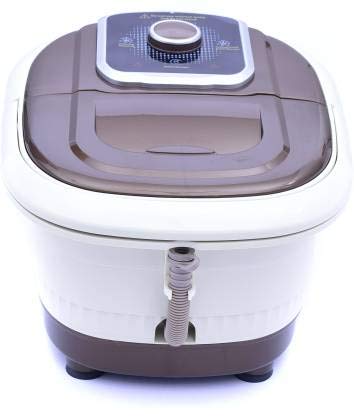
Image 5.1: Detailed view of the drain pipe and stopper on the IRIS JY-868A Foot Spa Massager, used for emptying water.
6. Troubleshooting
If you encounter any issues with your IRIS JY-868A Foot Spa Massager, please refer to the following common problems and solutions:
| Problem | Possible Cause | Solution |
|---|---|---|
| Unit does not power on. |
|
|
| Water is not heating or bubbles are not working. |
|
|
| Water is leaking. |
|
|
7. Specifications
| Brand | IRIS |
| Model Name | JY-868 |
| Item Part Number | JY-868A |
| Massager Form | Foot Spa Massager |
| Use For | Foot |
| Special Feature | Strong (Rollers), Temperature Control, Deep Tub |
| Specific Uses | Circulation, Fasciitis |
| Product Benefits | Blood Flow Control |
| Color | Brown, White |
| Item Weight | 200 g |
| Package Dimensions | 10 x 5 x 5 cm |
8. Warranty and Support
Specific warranty information for the IRIS JY-868A Foot Spa Massager is not provided in the available product details. For warranty claims, technical support, or service inquiries, please contact the retailer or manufacturer directly using the contact information provided at the time of purchase.