
1. Introduction
This manual provides essential instructions for the safe and effective use of your BestQool Red Light Therapy Pro100 device. The Pro100 is designed to deliver specific wavelengths of red and near-infrared light to the body. Please read this manual thoroughly before operating the device and retain it for future reference.

Figure 1: BestQool Red Light Therapy Pro100 Device
2. Safety Information
Adhere to the following safety precautions to prevent injury or damage to the device:
- Eye Protection: Always wear the provided protective glasses during operation to shield your eyes from intense light.
- Skin Sensitivity Test: Before first use, perform a skin sensitivity test. Expose a small area of skin to the light for 5-10 minutes. Observe for any adverse reactions over 24 hours. Discontinue use if irritation occurs.
- Distance: Maintain a recommended distance from the device as specified in the usage guidelines.
- Temperature: The device emits gentle warmth. It is not designed as a high-heat device.
- Environment: Keep the device away from water, excessive heat, and high humidity. Do not operate in wet conditions.
- Medical Conditions: Consult a healthcare professional before use if you have any medical conditions, are pregnant, or are taking photosensitizing medications.
- Children and Pets: Keep the device out of reach of children and pets.

Figure 2: Important Usage Tips
3. Product Overview and Specifications
The BestQool Pro100 is a red light therapy panel featuring dual-chip LEDs and multiple wavelengths for targeted application.
Key Features:
- Wavelengths: 630nm, 660nm (Red Light), 850nm, 940nm (Near-Infrared Light).
- LEDs: 100 Elite Grade Dual Chip LEDs.
- Irradiance: 109 milliwatts per square centimeter (mW/cm²) at 3 inches.
- Control: Integrated digital timer and touch panel for session management.
- EMF: Designed for low to zero EMF output at 6 inches.
- Modular Design: Connectable with other BestQool Pro series panels for expanded coverage.
- Certification: Class II device certified.
Technical Specifications:
- Dimensions: 19.7 x 8.4 x 2.6 inches (50 x 21.3 x 6.6 cm)
- Weight: 6.59 Pounds (3 kg)
- Power Consumption: 170 Watts
- Beam Angle: 60 degrees
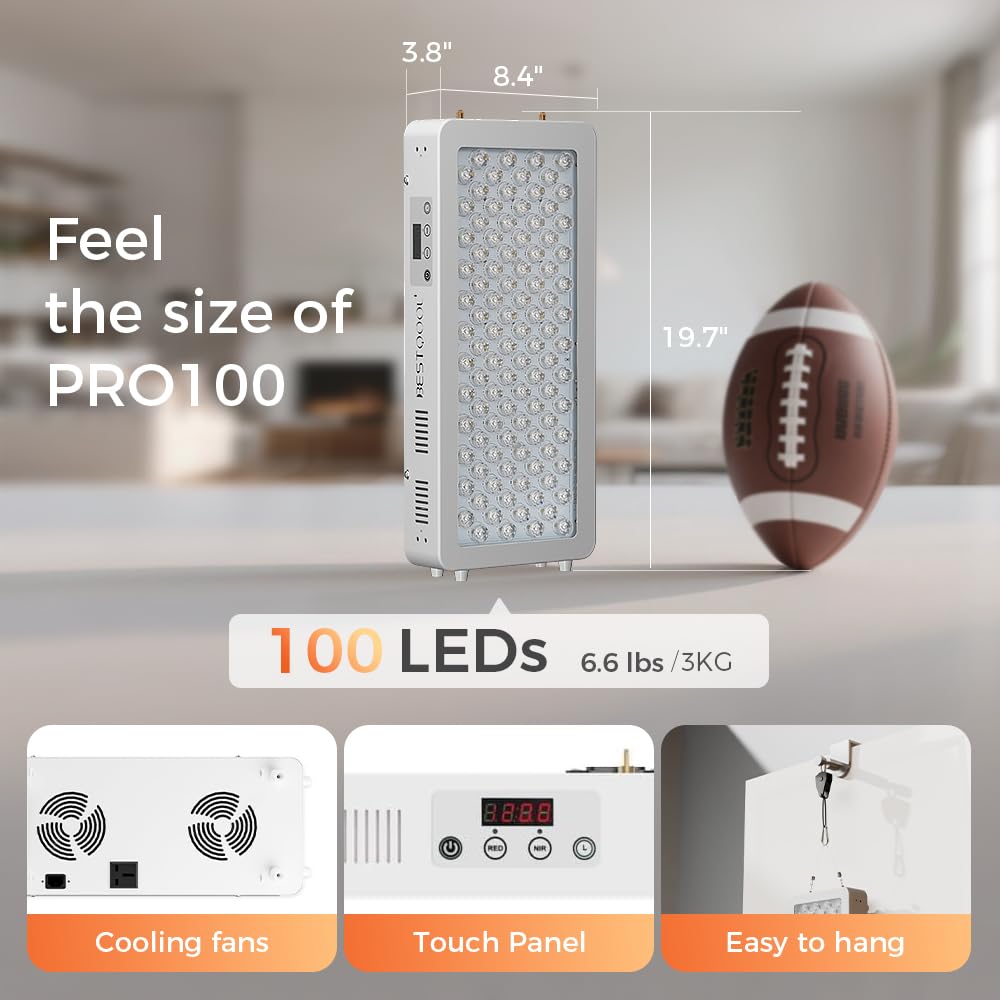
Figure 3: Pro100 Dimensions and Features

Figure 4: Pro100 Key Features
4. Package Contents
Verify that all items are present in the package:
- BestQool Red Light Therapy Pro100 Device
- User Manual
- Splicing Sheet (for modular connection)
- Braided Steel Cables (for hanging)
- Protective Glasses
- Adjustable Rope
- Door Hook
- Power Cord

Figure 5: What's in the Box
5. Setup and Installation
Follow these steps to set up your Pro100 device:
- Unpack: Carefully remove all components from the packaging.
- Choose Location: Select a stable and dry location for the device. Ensure adequate space for safe operation and ventilation.
- Mounting (Optional):
- For hanging, attach the braided steel cables to the designated points on the device.
- Use the adjustable rope and door hook for temporary hanging on a door, or secure the cables to a suitable ceiling mount (not included).
- Power Connection: Connect the power cord to the device's power input port located on the back. Plug the other end into a standard electrical outlet.
- Modular Connection (Optional): If connecting multiple Pro100 devices, use the provided splicing sheet to securely join them according to the instructions in the separate modular setup guide.

Figure 6: Rear Panel with Power Input
6. Operation Instructions
Operating the Pro100 device is straightforward:
- Power On: Press the power button on the touch panel to turn on the device.
- Select Mode: Use the mode selection buttons to choose between Red Light only, Near-Infrared Light only, or a combination of both.
- Set Timer: Adjust the session duration using the timer buttons. The digital display will show the remaining time.
- Start Session: Once the desired mode and time are set, the device will begin emitting light.
- Power Off: The device will automatically turn off after the timer expires. You can also manually turn it off by pressing the power button.

Figure 7: Control Panel
7. Usage Guidelines
For optimal results, follow these guidelines:
- Frequency: Use the device at least 4 times per week. Consistent use is recommended.
- Session Duration: Recommended session times are typically 15-30 minutes.
- Distance: Position the device approximately 6 inches from the skin for effective light delivery.
- Skin Contact: For best results, ensure the light directly contacts bare skin. Clothing can significantly reduce light absorption.
Recommended Session Times by Area:
- Shoulder Pain: 20-35 minutes
- Back Area: 30-45 minutes
- Joint Stiffness: 25-35 minutes

Figure 8: Bare Skin Usage for Optimal Results

Figure 9: How to Use - Session Recommendations
8. Maintenance
Proper maintenance ensures the longevity and performance of your device:
- Cleaning: Disconnect the power before cleaning. Use a soft, dry cloth to wipe the surface of the device. Do not use abrasive cleaners or immerse the device in water.
- Storage: Store the device in a cool, dry place away from direct sunlight and extreme temperatures.
- Inspection: Periodically inspect the power cord and device for any signs of damage. Do not use if damaged.
9. Troubleshooting
If you encounter issues with your BestQool Pro100, refer to the following table:
| Problem | Possible Cause | Solution |
|---|---|---|
| Device does not turn on | Power cord not properly connected; No power from outlet. | Ensure power cord is securely plugged into device and outlet. Test outlet with another device. |
| Lights flicker | Loose connection; Power supply issue. | Check all connections. If problem persists, contact support. |
| Device overheats | Blocked ventilation; Prolonged use. | Ensure cooling fans on the back are not obstructed. Allow device to cool down between sessions. |
| Digital timer not working | Control panel malfunction. | Try restarting the device. If issue continues, contact support. |
10. Warranty and Support
The BestQool Pro100 device includes a 30-day testing period, allowing users to evaluate its performance. For any product-related inquiries, technical support, or warranty claims, please refer to the contact information provided with your purchase documentation or visit the official Bestqool website.


