
Plugfones Protector VL Audio
Plugfones Protector VL Audio Earbuds Instruction Manual
Model: Protector VL Audio (852837007277)
1. Introduction
The Plugfones Protector VL Audio Earbuds are designed to provide hearing protection while allowing audio playback in noisy environments. They combine noise-reducing earplugs with integrated speakers, featuring OSHA-compliant volume limiting technology.
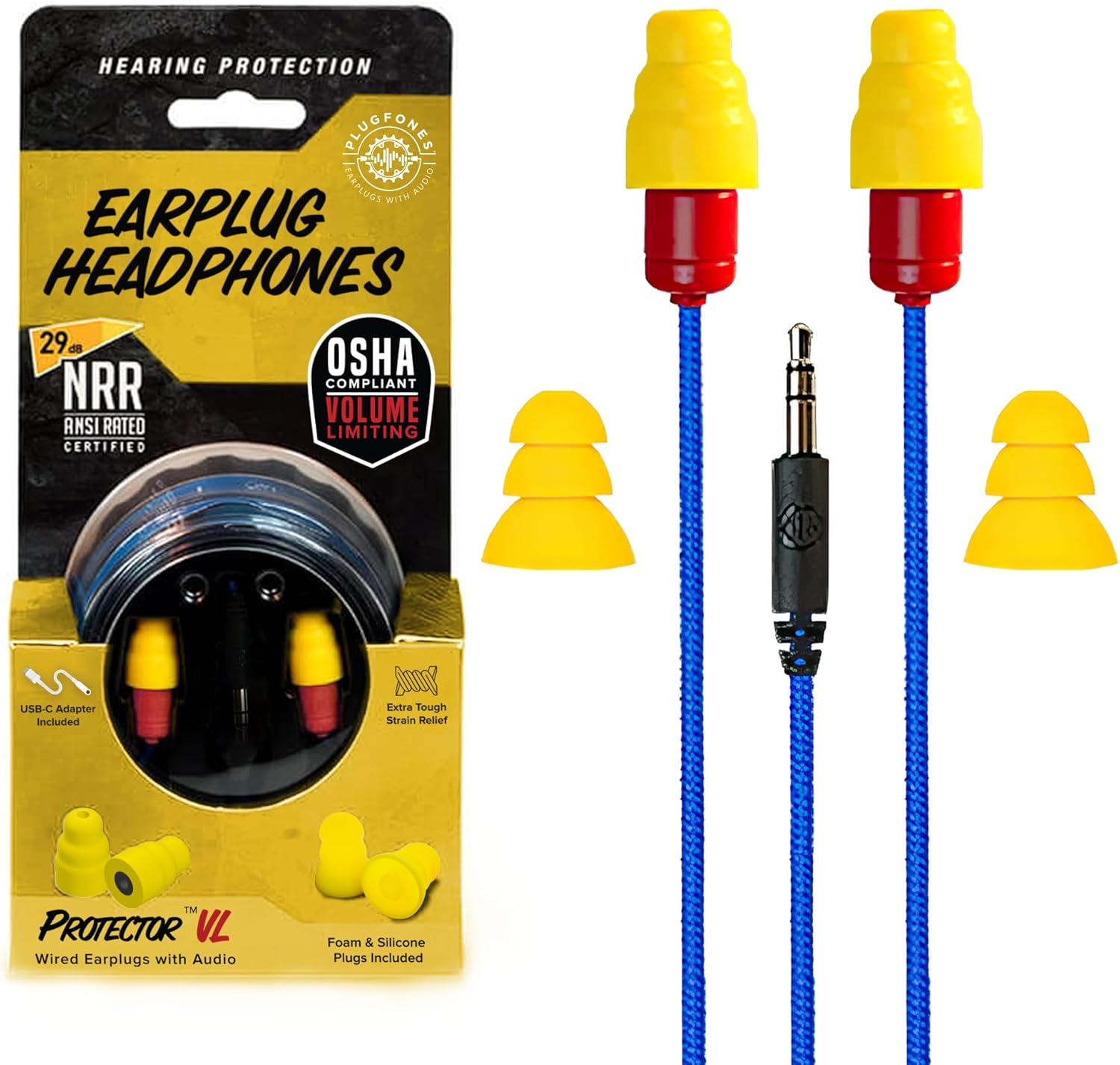
Image 1: Plugfones Protector VL Audio Earbuds, showing the product in its retail packaging and the earbuds themselves with the 3.5mm jack and interchangeable earplugs.
2. Safety Information
- Hearing Protection: These earbuds are designed to provide hearing protection with a Noise Reduction Rating (NRR) of up to 29 dB. Always ensure proper fit for maximum protection.
- Volume Limiting: The WorkSafe Volume Limiting Technology restricts speaker volume below 82 dB to comply with OSHA guidelines, preventing noise-induced hearing damage.
- Water Resistance: This product is Not Water Resistant. Avoid exposure to water or excessive moisture to prevent damage.
- Usage Environment: While designed for noisy environments, be aware of your surroundings. Reduced ambient sound may affect situational awareness.

Image 2: A worker wearing Plugfones Protector VL earbuds, highlighting the OSHA-compliant volume limiting feature and the visible red tip for easy compliance checks.
3. Package Contents
Verify that all items are present in your package:
- Plugfones Protector VL Audio Earbuds with TuffCord and 3.5mm Jack
- One pair of ComforTiered Foam Plugs (29 dB NRR)
- One pair of ComforTiered Silicone Plugs (27 dB NRR)
- Waterproof Case (for storage)

Image 3: An illustration of the package contents, showing the earbuds, a waterproof case, one pair of ComforTiered Silicone Plugs, and one pair of ComforTiered Foam Plugs.
4. Setup and Installation
4.1 Choosing and Attaching Earplugs
The Protector VL comes with two types of interchangeable earplugs: foam and silicone. Select the type that provides the best fit and comfort for your ears, and the appropriate Noise Reduction Rating (NRR) for your environment.
- Foam Plugs: Offer a 29 dB NRR. These are generally compressed before insertion and expand to fit the ear canal.
- Silicone Plugs: Offer a 27 dB NRR. These are typically inserted directly into the ear canal.
To attach: Gently twist and pull off the existing earplug from the earbud speaker. Align the new earplug with the speaker and push it firmly into place until secure.

Image 4: A visual comparison of the foam and silicone earplugs, detailing their Noise Reduction Ratings (NRR) and confirming that one pair of each is included.
4.2 Connecting to Audio Source
The Plugfones Protector VL uses a standard 3.5mm audio jack. Insert the jack into the 3.5mm audio output port of your compatible device (e.g., smartphone, MP3 player, radio).
The integrated jack is designed to restrict volume levels to comply with OSHA guidelines, ensuring safe listening.
5. Operation
5.1 Proper Insertion for Noise Reduction
For optimal noise reduction and sound quality, proper insertion of the earplugs is crucial:
- For Foam Plugs: Roll the foam plug into a thin, creaseless cylinder. Insert the rolled plug into your ear canal and hold it in place for 10-15 seconds while it expands to create a seal.
- For Silicone Plugs: Gently push the silicone plug into your ear canal until it feels snug and creates a seal. Do not force it.
A good seal is indicated by a noticeable reduction in ambient noise and clear audio playback.
5.2 Audio Playback and Volume Control
Once connected, begin audio playback on your device. The Plugfones Protector VL features Hi-Fi tuned speakers designed for clear audio in noisy environments.
Volume is controlled via your connected audio device. The WorkSafe Volume Limiting Technology ensures that the maximum output volume remains below 82 dB, regardless of your device's volume setting, to protect your hearing.

Image 5: A detailed view of an earbud speaker, illustrating the concept of blocking external noise while delivering clear audio.
6. Care and Maintenance
6.1 Cleaning
- Earplugs: Regularly clean the silicone earplugs with mild soap and water. Allow them to air dry completely before reattaching. Foam earplugs are generally disposable and should be replaced when dirty or no longer providing a good seal.
- Earbud Speakers and Cable: Wipe the earbud speakers and TuffCord cable with a dry or slightly damp cloth. Do not submerge the earbuds in water.
6.2 Storage
When not in use, store your Plugfones Protector VL in the provided waterproof case to protect them from dust, dirt, and accidental damage.
6.3 Durability Features
The Protector VL features a TuffCord cable, designed to be flexible, tear-resistant, and weather-resistant, enhancing the product's longevity in demanding work environments.

Image 6: A detailed view of the TuffCord cable, highlighting its tear-resistant, flexible, durable, and weather-resistant properties.
The earbuds are also designed to be moisture-resistant to handle sweat and humidity, but are not fully waterproof.

Image 7: Plugfones Protector VL earbuds shown with water droplets, illustrating their sweat-resistant design for use in humid or active conditions.
7. Troubleshooting
| Problem | Possible Cause | Solution |
|---|---|---|
| No sound or very low volume |
|
|
| Poor sound quality or muffled audio |
|
|
| Earplugs fall out easily |
|
|
8. Specifications
| Feature | Detail |
|---|---|
| Model Name | VL Audio |
| Connectivity Technology | Wired |
| Headphones Jack | 3.5 mm Jack |
| Noise Reduction Rating (NRR) | 29 dB (Foam Plugs), 27 dB (Silicone Plugs) |
| Volume Limiting | WorkSafe Technology (below 82 dB) |
| Cable Type | TuffCord (Tear-Resistant, Flexible, Durable, Weather-Resistant) |
| Ear Placement | In Ear |
| Form Factor | In Ear |
| Material | Plastic |
| Recommended Uses | Noise Protection |
| Compatible Devices | Any audio source with a 3.5 mm output |
| Control Type | Volume Control (via source device, limited by earbuds) |
| Frequency Range | 20 Hz - 20,000 Hz |
| Water Resistance Level | Not Water Resistant (Moisture-resistant for sweat/humidity) |
| Item Weight | 10 Grams (0.353 ounces) |
| Manufacturer | Plugfones |
| Item Model Number | 852837007277 |
| UPC | 852837007253 |
9. Warranty and Support
For warranty information, product support, or to purchase replacement parts, please visit the official Plugfones website or contact their customer service directly.
Manufacturer: Plugfones
Website: Plugfones Official Store (Link provided for reference to the brand's Amazon store, actual support website may vary)
Ask a question about this manual
Ask about setup, troubleshooting, compatibility, parts, safety, or missing instructions. Manuals+ will review the question and use this page’s manual context to help answer it.