1. Introduction
This manual provides comprehensive instructions for the REDLIRO Under Desk Treadmill, model JK03F. Designed for both walking and running, this compact and foldable treadmill offers a versatile solution for exercise at home or in the office. Please read this manual thoroughly before initial use to ensure proper setup, safe operation, and effective maintenance of your equipment.

Figure 1.1: The REDLIRO Under Desk Treadmill in both walking (under desk) and running (with handrail) modes, alongside its remote control.
2. Safety Instructions
To prevent injury and ensure safe operation, adhere to the following safety guidelines:
- Always consult a physician before starting any new exercise program.
- Place the treadmill on a flat, stable surface with adequate clearance around it (at least 2 feet at the rear and sides).
- Ensure the safety key is properly attached to your clothing and the treadmill console before starting.
- Do not allow children or pets near the treadmill while it is in operation.
- Wear appropriate athletic footwear and clothing. Avoid loose clothing that could get caught.
- Do not operate the treadmill if it is damaged or malfunctioning.
- Unplug the treadmill from the power outlet when not in use or before cleaning/maintenance.
- The maximum user weight for this treadmill is 220 lbs (100 kg). Do not exceed this limit.
- Maintain a firm grip on the handrails when starting or stopping the treadmill, or if you feel unsteady.
- Do not step on or off the treadmill while the belt is moving.
3. Package Contents
Verify that all components are present and undamaged upon unpacking:
- REDLIRO Under Desk Treadmill (Model JK03F)
- Remote Control
- Power Cord
- Safety Key
- Lubrication Oil
- User Manual (this document)
4. Setup
4.1 Unpacking and Placement
- Carefully remove the treadmill from its packaging.
- Place the treadmill on a firm, level surface. Ensure there is at least 2 feet of clear space behind and on both sides of the treadmill for safety.
4.2 Handrail Configuration
The REDLIRO JK03F treadmill features a foldable handrail, allowing for two operational modes:
- Walking Mode: For under-desk use, the handrail can be folded down. This limits the maximum speed.
- Running Mode: For higher speeds and added stability, raise the handrail to its upright position.
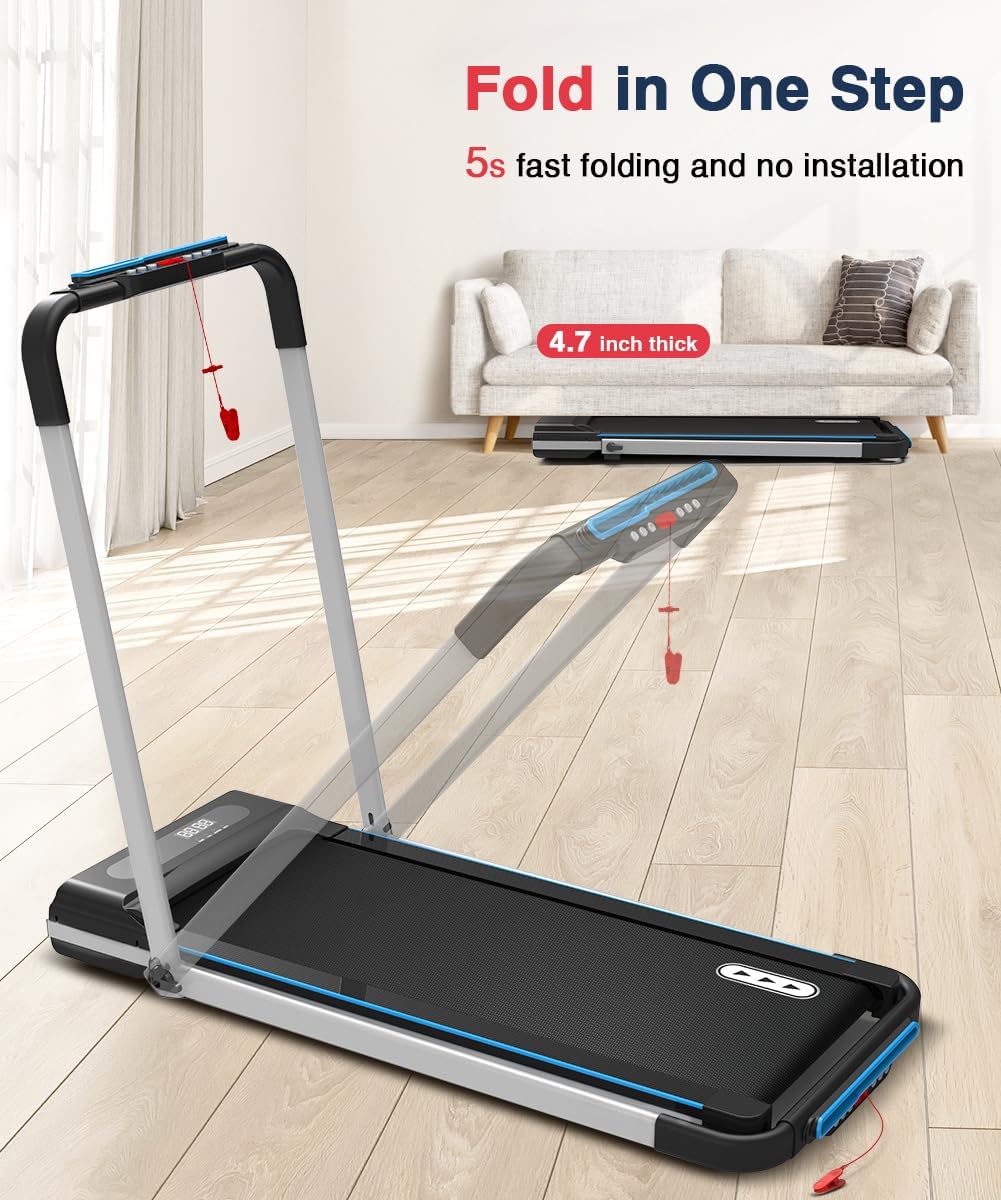
Figure 4.1: Illustration of the treadmill's one-step folding mechanism, showing the handrail lowering for compact storage or walking mode.
4.3 Power Connection
- Connect the power cord to the treadmill's power input port.
- Plug the other end of the power cord into a grounded 110V electrical outlet.
- Ensure the power switch on the treadmill is in the "ON" position.
5. Operating Instructions
5.1 Getting Started
- Attach the safety key clip to your clothing. The magnetic end of the safety key must be placed on the designated area of the console for the treadmill to operate.
- Stand on the side rails of the treadmill, not on the running belt.
- Press the Power button on the remote control to turn on the treadmill.
5.2 Remote Control Functions
The remote control allows you to manage all treadmill functions:
- Power Button: Turns the treadmill ON/OFF.
- '+' Button: Increases speed.
- '-' Button: Decreases speed.
- 'M' Button: Cycles through different modes (e.g., manual, preset programs).
- 'P' Button: Selects preset programs.

Figure 5.1: The LED display showing exercise data and the remote control for operational adjustments.
5.3 Walking Mode (Handrail Down)
With the handrail folded down, the treadmill operates in walking mode, ideal for use under a standing desk.
- Maximum speed in this mode is typically 4.0 MPH.
- Use the remote control to adjust speed.

Figure 5.2: A user utilizing the treadmill in walking mode under a standing desk, demonstrating its quiet operation.
5.4 Running Mode (Handrail Up)
When the handrail is in the upright position, the treadmill can be used for jogging and running at higher speeds.
- Speed range is 0.5-7.5 MPH.
- Hold the handrails for balance, especially when increasing speed.

Figure 5.3: A user running on the treadmill with the handrail extended for support.
5.5 Preset Programs
The treadmill includes 12 preset programs. To select a program:
- Press the 'M' button to enter program selection mode.
- Use the 'P' button to cycle through the 12 available programs.
- Once a program is selected, the treadmill will automatically adjust speed according to the program's profile.
5.6 LED Display
The LED display provides real-time feedback on your workout:
- TIME: Duration of your workout.
- CAL: Estimated calories burned.
- SPEED: Current speed of the running belt.
- DIST: Distance covered during your workout.
6. Maintenance
6.1 Cleaning
- Always unplug the treadmill before cleaning.
- Wipe down the console and exterior surfaces with a soft, damp cloth. Avoid abrasive cleaners or solvents.
- Regularly vacuum underneath the treadmill to prevent dust and debris buildup.
6.2 Lubrication
The running belt requires periodic lubrication to ensure smooth operation and prolong its lifespan.
- Unplug the treadmill.
- Loosen the rear roller bolts slightly to lift the belt.
- Apply a small amount of the provided silicone lubricant evenly under the center of the running belt.
- Tighten the rear roller bolts.
- Plug in the treadmill and run it at a low speed (e.g., 1-2 MPH) for 5 minutes to distribute the lubricant.
- Lubricate every 3-6 months, or after approximately 50 hours of use, depending on usage frequency.
6.3 Belt Adjustment
If the running belt starts to slip or drift to one side, it may need adjustment. Refer to the specific instructions in the included quick start guide or contact customer support for detailed guidance.
7. Troubleshooting
If you encounter issues with your treadmill, refer to the following common problems and solutions:
| Problem | Possible Cause | Solution |
|---|---|---|
| Treadmill does not power on. | Power cord not connected, power switch off, safety key not in place. | Ensure power cord is securely plugged in, power switch is ON, and safety key is correctly positioned. |
| Running belt stops or slips. | Belt too loose, insufficient lubrication, motor overload. | Adjust belt tension, apply lubricant (see Section 6.2), ensure user weight is within limits. |
| Unusual noise during operation. | Loose components, belt friction, motor issue. | Check for loose screws, lubricate belt, contact customer support if noise persists. |
| Remote control not responding. | Dead batteries, remote out of range, interference. | Replace remote control batteries, ensure clear line of sight to treadmill console, reduce interference. |
8. Specifications
Detailed technical specifications for the REDLIRO Under Desk Treadmill JK03F:
| Model Number | JK03F |
| Brand | REDLIRO |
| Motor Horsepower | 2.25 HP |
| Speed Range | 0.5 - 7.5 MPH (0.8 - 12 km/h) |
| Running Area (L x W) | 41 inches x 15 inches (104.14 cm x 38.1 cm) |
| Maximum User Weight | 220 lbs (100 kg) |
| Rated Voltage | 110 V |
| Product Dimensions (L x W x H) | 51.9 x 24.8 x 42.1 inches (132 x 63.5 x 106.6 cm) |
| Folded Dimensions (L x W x H) | 20.4 x 9.8 x 16.9 inches (51.8 x 24.9 x 42.9 cm) |
| Product Weight | 48.63 lbs (22.06 kg) |
| Display Type | LED (Time, Calories, Speed, Distance) |
| Preset Programs | 12 |
| Material | Aluminum (main), Alloy Steel (frame) |
| Special Features | Foldable, Remote Control |

Figure 8.1: An illustration of the treadmill's 2.25 HP motor and key performance specifications.

Figure 8.2: Depiction of the 5-layer running belt and 4-point softer rubber cushioning system for enhanced user comfort.
9. Warranty and Support
The REDLIRO Under Desk Treadmill (Model JK03F) comes with a 12-month warranty from the date of purchase. This warranty covers manufacturing defects and material flaws under normal use. It does not cover damage caused by misuse, accidents, unauthorized modifications, or improper maintenance.
For warranty claims, technical assistance, or replacement parts, please contact REDLIRO customer support. Have your purchase receipt and product model number (JK03F) ready when contacting support.


