
1. Product Overview
The Tribesigns Computer Desk with Hutch is a versatile furniture piece designed for home office, study, or workstation use. It features a spacious desktop, a divided hutch on top, and an open storage shelf below, providing ample space for computers, books, and office supplies. Its industrial style, combining wooden boards and a durable metal frame, ensures both aesthetic appeal and stability.
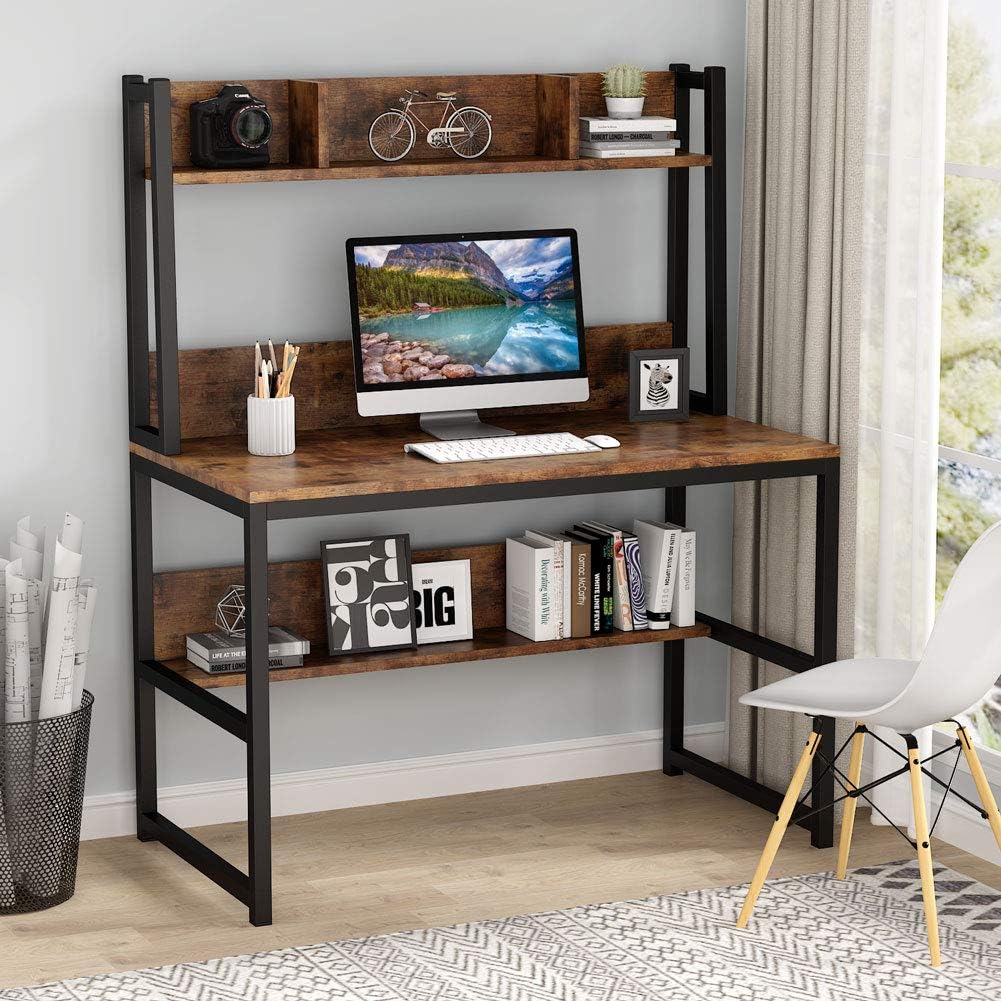
Figure 1: Tribesigns Computer Desk with Hutch, showcasing its design and storage capabilities.
2. Safety Information
Please read and understand all safety instructions before assembly and use. Failure to follow these instructions may result in injury or damage to the product.
- Weight Limit: Be aware of the desk's weight capacity. Do not overload the desktop, hutch, or bottom shelf. Refer to the specifications for maximum load.
- Assembly: Follow all assembly instructions carefully. Ensure all screws and fasteners are securely tightened before use.
- Stability: Place the desk on a flat, level surface to prevent wobbling.
- Children: Keep small parts away from children during assembly. Do not allow children to climb on the desk.
3. Included Components and Tools
Before beginning assembly, verify that all parts and hardware are present. If any components are missing or damaged, please contact customer service.
3.1. Components
- Desktop Panel
- Hutch Panels (divided)
- Bottom Storage Shelf Panel
- Metal Frame Legs
- Various connecting hardware (screws, bolts, nuts, etc.)
3.2. Tools
- Assembly Instructions
- Necessary tools for assembly (e.g., Allen wrench) are included.

Figure 2: Example of desk components before assembly.
4. Assembly Instructions
Assembly typically takes 20-30 minutes. It is recommended to lay out all pieces according to their numbers and follow the instructions step by step.
- Unpack and Identify: Carefully unpack all components and hardware. Identify each part by comparing it with the provided parts list in the separate assembly manual.
- Prepare Workspace: Clear a spacious area for assembly. It is advisable to assemble the desk on a soft, clean surface to prevent scratches.
- Assemble Frame: Begin by assembling the metal frame legs. Connect the horizontal support bars to the vertical legs using the provided hardware. Ensure all connections are finger-tight at this stage.
- Attach Bottom Shelf: Secure the bottom storage shelf panel to the assembled metal frame. Tighten the screws partially.
- Attach Desktop: Carefully place the desktop panel onto the assembled frame. Align the pre-drilled holes with the frame and secure it using the appropriate screws.
- Assemble Hutch: Attach the hutch panels to the upper part of the metal frame. Ensure the divided sections are correctly oriented.
- Final Tightening: Once all components are in place, systematically tighten all screws and bolts using the included tools. Do not overtighten.
- Place Anti-Slip Pads: Attach the anti-slip leg pads to the bottom of the desk legs to prevent scratching floors and ensure stability.

Figure 3: Detailed dimensions of the assembled desk, useful for planning placement.
5. Operating and Usage
The Tribesigns Computer Desk with Hutch is designed for multifunctional use in various settings.
- Computer Desk: The main desktop provides ample space for a computer monitor, keyboard, mouse, and other peripherals.
- Study Desk: Ideal for studying, reading, and writing. The hutch offers convenient storage for books, stationery, and small decorative items.
- Workstation: Suitable for various work-from-home tasks, providing organized space for documents and equipment.
- Storage:
- The divided hutch on top is perfect for organizing smaller items, displaying decor, or holding frequently accessed books.
- The open shelf under the desk provides additional storage for larger books, binders, or electronic devices like routers.

Figure 4: The desk in a typical home office setting, demonstrating its functional design.

Figure 5: Close-up view of the open bookshelf design, ideal for storing frequently used items.
6. Maintenance and Care
Proper care will extend the life and maintain the appearance of your Tribesigns Computer Desk.
- Cleaning:
- For general cleaning, wipe the surfaces with a damp cloth.
- For drying and polishing, wipe with a dry cloth immediately after damp cleaning to prevent water spots.
- Avoid using harsh chemicals, abrasive cleaners, or polishes that may damage the finish.
- Spills: Wipe up spills immediately to prevent staining or damage to the wood veneer.
- Heat and Moisture: Avoid placing hot items directly on the desktop. Use coasters for drinks to protect against moisture rings.
- Sunlight: Prolonged exposure to direct sunlight may cause fading or discoloration.
- Hardware: Periodically check and retighten all screws and bolts to ensure the desk remains sturdy and stable.

Figure 6: The desktop features a waterproof and anti-scratch surface for durability.
7. Troubleshooting
This section addresses common issues you might encounter with your Tribesigns Computer Desk.
- Issue: The desk wobbles or feels unstable.
- Solution:
- Ensure the desk is placed on a flat, level surface.
- Check all assembly screws and bolts. Loosen them slightly, gently push down on the desk to settle it, then retighten all fasteners firmly.
- Verify that the anti-slip leg pads are properly installed and making full contact with the floor.
- Issue: Parts do not align during assembly.
- Solution:
- Double-check the assembly instructions to ensure you are using the correct parts for each step and that they are oriented correctly.
- Do not fully tighten screws until all components for a section are loosely assembled. This allows for minor adjustments.
- If a part seems defective, contact customer service for assistance.
- Issue: Missing or damaged parts upon delivery.
- Solution:
- Immediately contact Tribesigns customer service with your purchase details and a description of the missing or damaged parts.
8. Specifications
| Feature | Detail |
|---|---|
| Brand | Tribesigns |
| Model Number | HOGA-BDTB19BX |
| Product Dimensions (D x W x H) | 19.7"D x 42.1"W x 55.1"H (107cm W x 50cm D x 140cm H) |
| Color | Brown |
| Style | Industrial |
| Base Material | Metal |
| Top Material Type | Wood (Veneer finish) |
| Item Weight | 20 Kilograms |
| Special Feature | Convertible, Hutch and Open Shelf Storage |
| Room Type | Study Room, Home Office |
| Recommended Uses | Gaming, Studying, Writing |
| Required Assembly | Yes |
| Recommended Number of People for Assembly | 1 |
| Included Components | Storage Shelf, Instructions, Tools |
| Tabletop Thickness | 1.5 Millimeters |
| Leg Material | Metal (2.5cm x 2.5cm) |
9. Warranty and Customer Support
Tribesigns is committed to providing professional customer service and support for your product.
- Warranty: This product comes with an extended, time-based manufacturer's warranty. For specific details regarding coverage and duration, please refer to the warranty information provided with your purchase or contact Tribesigns customer service.
- Customer Service: For any questions, concerns, or assistance with assembly, missing parts, or product issues, please contact Tribesigns customer service.
- Online Resources: Visit the official Tribesigns website for additional product information, FAQs, and support.


