
UCLEAR 180506
UCLEAR Digital AMP GO2 Bluetooth Helmet Communication System User Manual
Model: 180506
Introduction
The UCLEAR Digital AMP GO2 Bluetooth Helmet Communication System is designed to provide reliable communication, music, and phone call capabilities for riders. This manual provides essential information for the proper setup, operation, and maintenance of your device.
Key Features:
- Intercom Range: Up to 800 meters per person
- Battery Life: Approximately 12 hours of average use
- CLEARlink Mobile App: Facilitates easy wireless firmware updates and configuration
- Durable Design: Controller is rugged and fully waterproof
- Universal Compatibility: Supports universal pairing with other Bluetooth devices
- Audio Customization: Graphic equalizer for personalizing audio output
- Versatile Mounting: Simple, universal mounting to various helmet styles
Package Contents
The UCLEAR Digital AMP GO2 (Single Kit) includes the following components:
- 1x UCLEAR Digital AMP GO2 Controller
- 1x Set of Helmet Speakers (Boost 2.0)
- 1x USB Charging Cable
- Mounting Hardware (various clips and adhesive pads)
- Speaker Mounting Pads

Image: UCLEAR Digital AMP GO2 Single Kit Contents. This image displays the main components included in the single kit: the AMP GO2 controller, a pair of Boost 2.0 speakers, a USB charging cable, and various mounting accessories.
Setup
Proper installation ensures optimal performance and comfort. Follow these steps to set up your UCLEAR Digital AMP GO2 system.
1. Mounting the Controller
The UCLEAR system offers universal fit mounting for various helmet styles. Determine the optimal mounting location on the left side of your helmet, typically near the jawline. Ensure the surface is clean and free of oils or debris for proper adhesion.

Image: UCLEAR Digital AMP GO2 Controller mounted on a helmet. The controller is shown attached to the side of a helmet, illustrating its compact design.
Adhesive Mount Installation:
- Identify a flat, clean surface on the left side of your helmet for the mount.
- Clean the chosen area thoroughly with a non-residue cleaner (e.g., alcohol) to ensure strong adhesion.
- Remove the protective film from the adhesive tape on the mount.
- Press the mount firmly onto the helmet surface. For best results, apply at room temperature and allow ample time for the adhesive to cure.
- Align the rails of the AMP GO2 controller with the mount and slide it straight down from the top until it snaps into place.
Temporary Clip Mount Installation:
- Insert the wings of the clip mount between the helmet shell and the cheek pad.
- Push the clip into position until it is secure.
- Align the rails of the AMP GO2 controller with the mount and slide it straight down from the top until it snaps into place.
2. Speaker and Microphone Installation
The UCLEAR system utilizes adaptive beam-forming audio processing through dual hidden microphones, often integrated directly into the speakers or as extended mics.
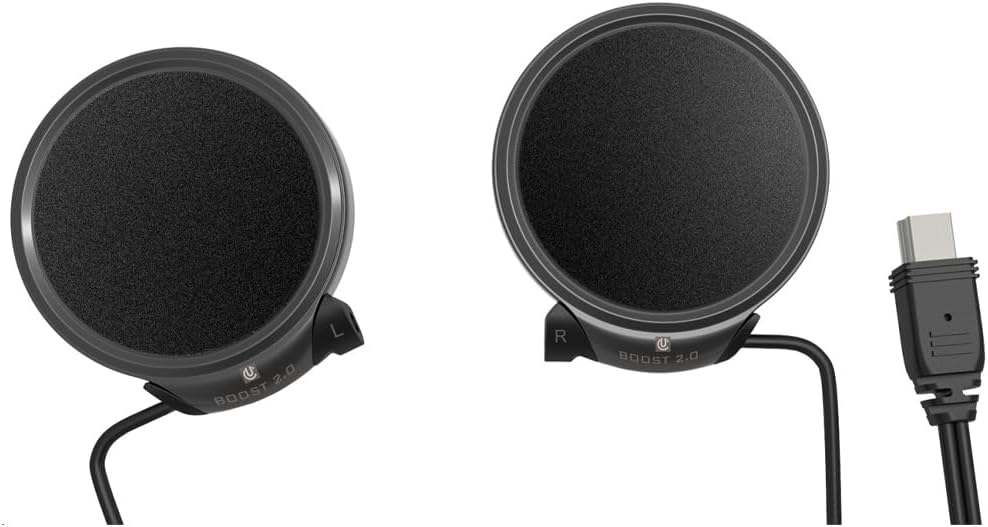
Image: UCLEAR Digital Boost 2.0 Speakers. These speakers feature integrated dual microphones for clear communication.
Speaker Placement:
- Locate the speaker pockets inside your helmet.
- Place the hook-and-loop speaker mounting rounds into the pockets.
- Position the speakers so that the center of the speaker aligns with the center of your ear canal. This improves sound quality and reduces outside noise.
- For speakers with integrated microphones (e.g., Boost 2.0), ensure the microphones face forward towards your mouth.
- For speakers with extended microphones (e.g., Pulse Pro), place the microphones in the brim of the helmet, under the liner, as wide as possible near the temples. Avoid placing them in vent channels. Alternatively, extended mics can be placed behind the cheek pads, up towards the mount, especially if you plan to wear goggles.
- Tuck any excess speaker wire slack underneath the helmet liner.
Earbud Installation (for Half Helmets/No Speaker Pockets):
- For half helmets or helmets without speaker pockets, use the UCLEAR earbud accessory.
- Conceal the dual mics and wires inside the helmet liner.
- Use the provided mounting pills to secure the mics in the brim of the helmet, near the temples.
- Run the wires back and Velcro them down above the ear so that only the earbud tips dangle down to ear level.
- The earbuds come with four silicone earbud tip options to provide up to 30 dB of hearing protection. Choose the size that best fits your ears.
Installation Video Guide
Video: "How to install UCLEAR Digital." This official seller video provides a detailed walkthrough of installing the UCLEAR Digital communication system on various helmet types, including mounting the controller, and placing speakers and microphones.
Operating Instructions
The UCLEAR Digital AMP GO2 is designed for intuitive operation. Once installed, you can access its features through the controller buttons and the CLEARlink Mobile App.
Power On/Off:
- To power on, press and hold the main power button until the indicator light illuminates.
- To power off, press and hold the main power button until the indicator light turns off.
Bluetooth Pairing:
- Ensure your AMP GO2 is powered on.
- Activate Bluetooth on your mobile device.
- Follow the pairing instructions in the CLEARlink Mobile App or refer to the quick start guide for manual pairing steps.
- The system supports universal pairing with other Bluetooth communication devices.
Intercom Communication:
The AMP GO2 allows for multi-person, hands-free intercom communication with an impressive range of up to 800 meters per person.
- Initiate or join intercom groups via the controller buttons or the CLEARlink Mobile App.
- The adaptive beam-forming audio processing ensures clear voice transmission by filtering out ambient noise.
Music and Phone Calls:
- Stream music from your paired device with customizable audio output via the graphic equalizer.
- Answer or make phone calls directly through the helmet system.
CLEARlink Mobile App:
Download the CLEARlink Mobile App for enhanced control and customization. The app allows for:
- Wireless firmware updates
- Configuration and preference settings
- Access to the user manual and tech support
Maintenance
To ensure the longevity and optimal performance of your UCLEAR Digital AMP GO2, follow these maintenance guidelines:
- Cleaning: Regularly wipe the controller and speakers with a soft, damp cloth. Avoid using harsh chemicals or abrasive cleaners.
- Waterproof Feature: The controller is fully waterproof. However, ensure all ports are securely closed when exposed to moisture.
- Charging: Charge the device using the provided USB cable. Avoid overcharging or using damaged cables.
- Storage: Store the device in a cool, dry place when not in use. Avoid extreme temperatures.
- Firmware Updates: Periodically check for and install firmware updates via the CLEARlink Mobile App to ensure the latest features and performance enhancements.
Troubleshooting
If you encounter issues with your UCLEAR Digital AMP GO2, try the following troubleshooting steps:
- No Power: Ensure the device is fully charged. Connect it to the USB charger and check the indicator light.
- Pairing Issues: Make sure Bluetooth is enabled on your mobile device. Try unpairing and re-pairing the AMP GO2. Ensure no other devices are interfering with the Bluetooth signal.
- Poor Audio Quality: Verify that the speakers are correctly positioned over your ear canals. Check the volume settings on both the controller and your paired device. Ensure the microphone is not obstructed.
- Intercom Disconnection: Ensure all devices in the intercom group are within the specified range (up to 800m). Re-establish the intercom connection if necessary.
- App Connectivity: Ensure your mobile device's Bluetooth is on and the AMP GO2 is paired. Update the CLEARlink Mobile App to the latest version.
For persistent issues, refer to the detailed troubleshooting section in the CLEARlink Mobile App or contact UCLEAR support.
Specifications
| Feature | Detail |
|---|---|
| Brand | UCLEAR |
| Model | 180506 |
| Item Weight | 9.6 ounces |
| Product Dimensions | 6 x 5 x 3 inches |
| Batteries | 1 Lithium Polymer battery required |
| Special Features | Noise Cancellation, Media Control |
| Intercom Range | Up to 800M/Yards per person |
| Battery Life | 12 hours average |
| Connectivity | Bluetooth 5.0, Universal pairing |
| Durability | Rugged and fully waterproof controller |
Warranty and Support
For warranty information, technical support, or to view additional product videos, please visit the official UCLEAR Digital website or contact your authorized dealer. The CLEARlink Mobile App also provides direct access to support resources.
Visit: uclear.com
Safety Information
This item complies with US Federal Motor Vehicle Safety Standard 218 (FMVSS 218) (DOT FMVSS No. 218 Certified).
Always prioritize safety while riding. Ensure your communication system is installed correctly and does not interfere with your ability to operate your vehicle safely or hear important ambient sounds.
Related documents180506


Ask a question about this manual
Ask about setup, troubleshooting, compatibility, parts, safety, or missing instructions. Manuals+ will review the question and use this page’s manual context to help answer it.