
Product Overview
The CubiCubi Modern L-Shaped Desk is designed for home office, study, or gaming use, offering a spacious and functional workspace. It features a reversible design and a movable monitor shelf for enhanced versatility.
Key Features
- L-shaped design for corner placement and ample workspace.
- Reversible configuration to suit different room layouts.
- Movable monitor shelf to optimize viewing height.
- Sturdy construction with high-quality iron pipes and engineered wood tabletop.
- Dimensions: 59.1"W x 47.1"D x 29.3"H.

Image: The CubiCubi L-Shaped Desk set up in a modern home office environment, showcasing its spacious design and functional layout.
Specifications
| Feature | Detail |
|---|---|
| Brand | CubiCubi |
| Model Number | CUBI-LD-1545 |
| Shape | L-Shape |
| Product Dimensions | 47.1"D x 59.1"W x 29.3"H |
| Top Material | Engineered Wood |
| Base Material | Alloy Steel |
| Color | Black |
| Item Weight | 2.5 kg |
| Assembly Required | Yes, with included tools |
| Recommended Assembly Persons | 1 |
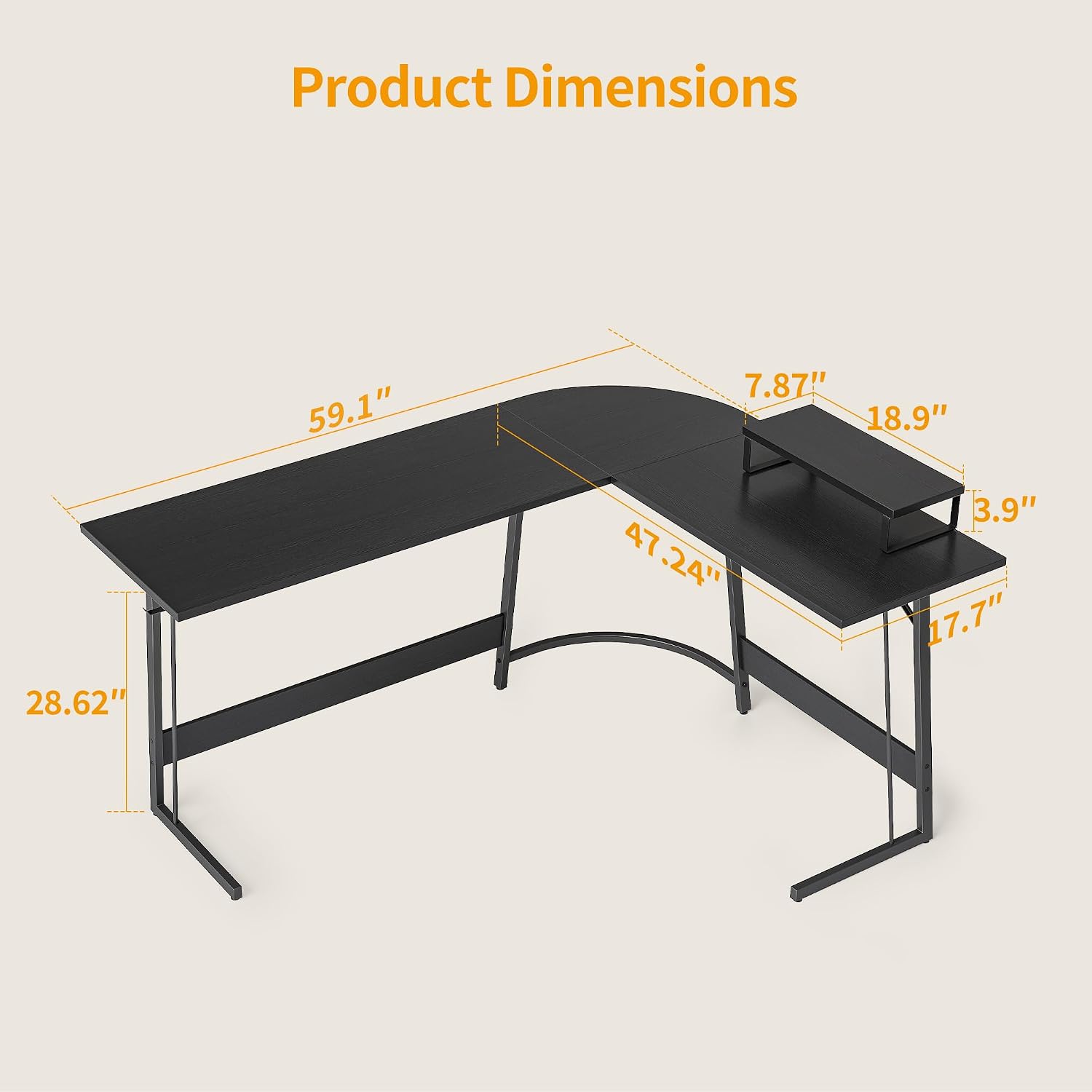
Image: Diagram illustrating the precise dimensions of the CubiCubi L-Shaped Desk, including width, depth, and height for both main and side sections.
Package Contents
Verify that all components are present before beginning assembly. If any parts are missing or damaged, contact customer support.
- Desk Panels (Main, Corner, Side)
- Steel Frame Components (Legs, Support Bars)
- Movable Monitor Shelf
- Assembly Hardware (Screws, Bolts, Allen Wrench)
- Instruction Manual
Setup and Assembly
Assembly typically requires one person and the included tools. Follow these steps carefully.
Step 1: Unpack and Identify Parts
Carefully remove all components from the packaging. Lay them out on a clean, soft surface to prevent scratches. Identify each part using the provided parts list in your physical manual.
Step 2: Assemble the Main Frame
Begin by connecting the main steel frame components. Ensure all connections are secure but do not fully tighten screws until all parts are aligned.
Step 3: Attach Desk Panels
Secure the engineered wood desk panels to the assembled frame. Pay attention to the orientation of each panel.
Step 4: Reversible Design Configuration
The desk can be assembled with the shorter side on either the left or right, depending on your space requirements. Refer to the diagrams for your preferred orientation.

Image: Illustration demonstrating the reversible design of the L-shaped desk, allowing the shorter section to be installed on either the left or right side.
Step 5: Install Movable Monitor Shelf
Position the movable monitor shelf on the desk surface as desired. This shelf is designed to be repositioned freely.

Image: A close-up view of the movable monitor shelf, showing its design and how it can be used to elevate a monitor or tablet.
Step 6: Final Tightening
Once all components are in place and aligned, fully tighten all screws and bolts. Ensure the desk is stable before placing items on it.
Assembly Video
For visual guidance, refer to the official installation video provided by the manufacturer.
Video: Official installation guide for the CubiCubi L-Shaped Computer Desk, demonstrating step-by-step assembly.
Operating Instructions
Using the L-Shaped Configuration
The L-shaped design maximizes your workspace, allowing for multiple monitors, a laptop, and other office essentials. Utilize the corner section for optimal placement of your primary display or for organizing accessories.
Adjusting the Movable Monitor Shelf
The monitor shelf can be freely moved along the desk surface. Position it to achieve an ergonomic viewing height for your monitor, which can help reduce neck and shoulder strain.
Weight Capacity
Ensure that the total weight placed on the desk does not exceed its stated capacity to maintain stability and prevent damage. Distribute weight evenly across the desk surface.
Maintenance
Cleaning
Wipe the desk surface with a soft, damp cloth. Avoid using harsh chemicals or abrasive cleaners, as these can damage the finish.
Stability Check
Periodically check all screws and bolts to ensure they remain tight. Re-tighten if necessary to maintain the desk's stability.
Avoiding Damage
- Do not place hot items directly on the desk surface without a protective coaster.
- Avoid dragging sharp or heavy objects across the surface to prevent scratches.
- Keep the desk away from direct sunlight and excessive moisture to preserve the material integrity.
Troubleshooting
Desk Wobbles
If the desk feels unstable or wobbles, check all assembly screws and bolts. Ensure they are fully tightened. Verify that the desk is placed on a level surface. Adjustable feet, if present, can be used to compensate for uneven floors.
Missing or Damaged Parts
If you discover any missing or damaged parts upon unboxing, please contact CubiCubi customer support immediately for assistance. Do not attempt to assemble the desk with incomplete or damaged components.
Difficulty with Assembly
Review the assembly instructions and diagrams carefully. Ensure all parts are oriented correctly. If issues persist, consider watching the official assembly video or contacting customer support.
Warranty and Support
CubiCubi products are manufactured with quality in mind. For specific warranty details, please refer to the warranty card included with your product or visit the official CubiCubi website.
For technical support, replacement parts, or any inquiries regarding your CubiCubi Modern L-Shaped Desk, please contact CubiCubi customer service through their official channels.
You can find more information and contact details on the CubiCubi Brand Store.