
Sunbox BL-XK01
Sunbox Star Projector User Manual
Model: BL-XK01
Introduction
The Sunbox Star Projector is a versatile 3-in-1 device designed to transform any room into a captivating galaxy. It combines dynamic projection effects with soothing white noise and a built-in Bluetooth music speaker, offering a unique ambiance for relaxation, parties, or as a night light. This manual provides comprehensive instructions for setup, operation, and maintenance to ensure optimal performance and enjoyment of your projector.

Figure 1: The Sunbox Star Projector, showcasing its compact design, included remote control, and a smartphone connected via Bluetooth, projecting a vibrant galaxy scene onto a bedroom ceiling.
Safety Information
- Do not look directly into the projection lens to avoid eye damage.
- Keep the device away from water, moisture, and high temperatures.
- Use only the provided power adapter. Ensure the power supply matches the device's voltage (5V).
- Do not disassemble or attempt to repair the device yourself. Contact customer support for assistance.
- Keep out of reach of children and pets.
- Ensure proper ventilation around the device during operation.
Package Contents
Please check the package contents upon unboxing:
- Sunbox Star Projector Unit
- Remote Control
- USB Power Cable
- User Manual (this document)
Product Overview
Familiarize yourself with the main components and controls of your Sunbox Star Projector.

Figure 2: Detailed view of the projector's control panel, showing buttons for power, volume, mode selection, and ports for USB and DC 5V power input.
Main Unit:
- Projection Lens: Projects the galaxy and star effects.
- Control Buttons: Power On/Off, Volume Up/Down, Previous/Next Track, Mode Switch (Bluetooth/White Noise).
- USB Port: For connecting USB flash drives to play music.
- DC 5V Input: Power connection port.
- Speaker: Built-in speaker for music and white noise.
Remote Control:
- Power Button: Turns the projector On/Off.
- LED/Star Buttons: Controls the LED nebula and laser star effects independently.
- Brightness Adjustment: Adjusts the brightness of the projection.
- Music Mode: Switches between Bluetooth and White Noise modes.
- Volume Control: Adjusts audio volume.
- Timer Buttons: Sets auto-off timer (1H, 2H).
- Color Selection: Changes projection colors.
Setup
- Power Connection: Connect the provided USB power cable to the DC 5V input port on the projector. Plug the other end into a compatible USB power adapter (not included) or a USB port on a computer.
- Placement: Place the projector on a flat, stable surface. For optimal projection, position it in the center of the room or where you desire the effects to be displayed on the ceiling or walls. The coverage area is approximately 161-538 sq ft.
- Initial Power On: Press the power button on the projector or the remote control to turn on the device.
Operating Instructions
Projection Effects:
The projector offers 10 multi-color patterns with 4 base colors (Blue, White, Green, Red) and dynamic starlight effects. You can control the LED nebula and laser stars independently.
- Use the dedicated LED and Star buttons on the remote to turn these effects on or off.
- Press the color selection buttons on the remote to cycle through different color combinations.
- Adjust the brightness using the brightness control buttons on the remote.

Figure 3: Visual representation of the 10 distinct color projection effects available, including various combinations of red, green, blue, and white.

Figure 4: Demonstrates the versatility of the projector with examples of Ocean Wave, Star, and a combined Star + Ocean Wave projection, creating different atmospheric effects.
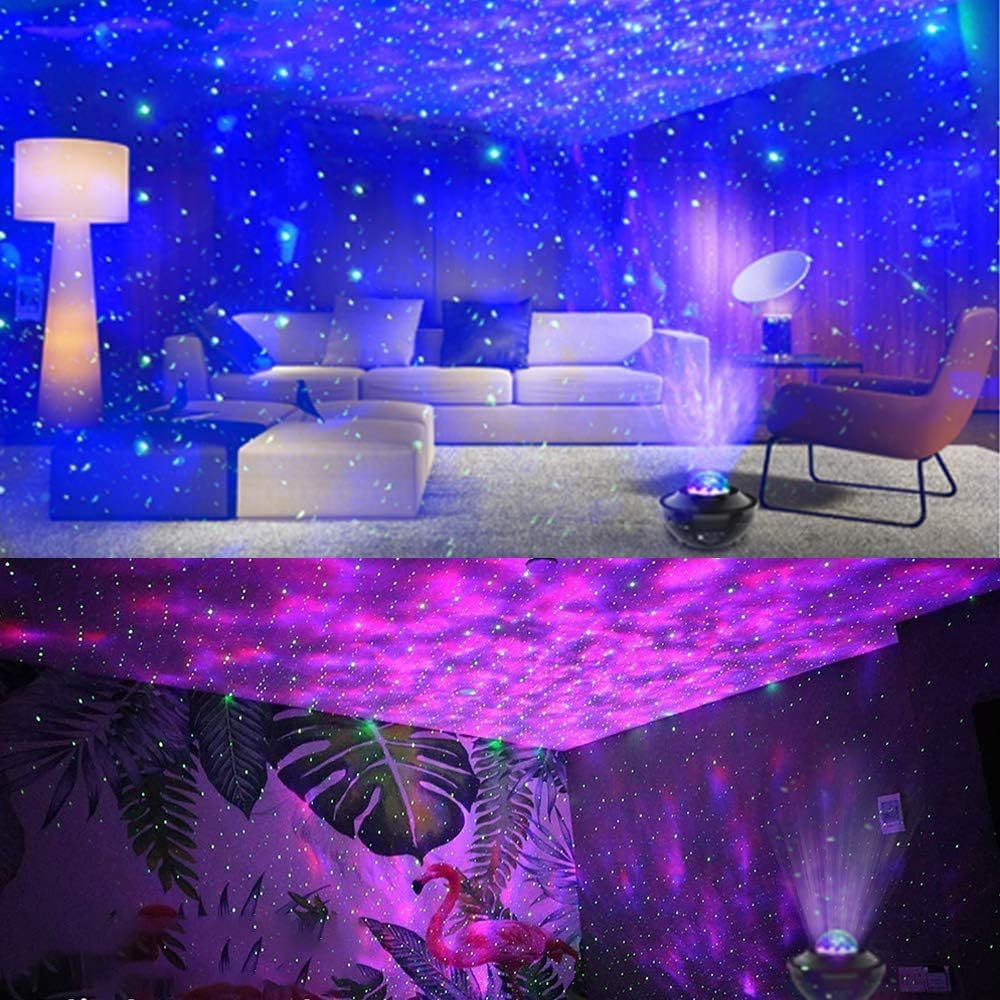
Figure 5: Examples of the projector's output in different room environments, highlighting the immersive blue and purple galaxy projections.
White Noise Function:
The projector includes 15 soothing nature-inspired white noise sounds to aid relaxation and mask intrusive noises.
- Press the "Music Mode" button on the remote or the main unit to switch to White Noise mode.
- Use the Previous/Next track buttons to cycle through the 15 available sounds (e.g., waves, thunderstorm, rain).
- Adjust the volume using the Volume Up/Down buttons.

Figure 6: Illustrates the 15 white noise options, such as Ocean Wave, Summer Night, and Thunderstorm, designed to create a tranquil environment.
Bluetooth Music Speaker:
Connect your smartphone or other Bluetooth-enabled devices to play your favorite music. The lights can sync with the music's beat for a dynamic experience.
- Ensure the projector is in Bluetooth mode (indicated by a voice prompt or LED indicator). If not, press the "Music Mode" button until it switches.
- On your device, search for Bluetooth devices and select "BL-XK01" to pair.
- Once connected, play music from your device. The projector's lights will react to the music.
- Adjust volume using the projector's buttons or your connected device.
Figure 7: Depicts the Bluetooth music speaker functionality, showing how the projector's lights can synchronize with music, creating a party atmosphere.
Remote Control & Timer Function:
The smart remote allows full control over the projector's features. The built-in timer provides convenience for automatic shut-off.
- Ensure the remote control is pointed towards the infrared sensor on the projector. The effective remote distance is approximately 12m (39.37ft).
- Use the 1H or 2H buttons on the remote to set the auto-off timer. The projector will automatically turn off after the set duration.
- To cancel the timer, press the "Timer Off" button.

Figure 8: Shows the timer settings (Timer off, 1H, 2H) and how to adjust ocean wave light brightness, emphasizing the remote control's functionality.
Voice Control Mode:
In this unique sound-activated mode, the projection lights will flicker and change patterns with the beat of music or even clapping hands, creating an interactive party atmosphere.
- Activate voice control mode via the remote control (refer to remote diagram for specific button).
- Play music or clap your hands to observe the dynamic light changes.
Official Product Video:
Video 1: An official product video from SunBox Live demonstrating the "3 in 1 Galaxy Night Light Projector" in action, showcasing its various light modes and features.
Maintenance
- Cleaning: Use a soft, dry cloth to wipe the surface of the projector. Do not use abrasive cleaners or solvents.
- Storage: When not in use for extended periods, store the projector in a cool, dry place away from direct sunlight.
- Lens Care: Gently clean the projection lens with a microfiber cloth to ensure clear projection.
Troubleshooting
| Problem | Possible Cause | Solution |
|---|---|---|
| Projector does not turn on. | No power supply or loose connection. | Ensure the USB cable is securely connected and the power adapter is working. Try a different USB port or adapter. |
| Remote control not working. | Remote battery low or not pointed correctly. | Replace the remote battery. Point the remote directly at the projector's infrared sensor. Ensure no obstacles are blocking the signal. |
| Bluetooth not connecting. | Projector not in Bluetooth mode or device not discoverable. | Press the "Music Mode" button on the projector/remote to switch to Bluetooth mode. Ensure Bluetooth is enabled on your device and it's within range. Try restarting both devices. |
| Projection is dim or blurry. | Lens is dirty or brightness setting is low. | Clean the projection lens with a soft, dry cloth. Increase the brightness using the remote control. Ensure the room is sufficiently dark. |
Specifications
| Feature | Detail |
|---|---|
| Model Number | BL-XK01 |
| Dimensions | 5.5"L x 5.5"W x 4.5"H |
| Item Weight | 14.4 ounces |
| Power Source | Corded Electric |
| Voltage | 5 Volts |
| Amperage | 2000 Milliamps |
| Wattage | 10 Watts |
| Light Source Type | LED |
| Projection Coverage | 161-538 ft² |
| Projection Colors | 10 multi-color patterns (Blue/White/Green/Red) |
| White Noise Sounds | 15 nature-inspired sounds |
| Connectivity | Bluetooth, USB |
| Timer Function | 1H, 2H auto-off |
| Control Method | Remote Control, On-device buttons, Voice Control (sound-activated) |
Warranty and Support
For warranty information or technical support, please contact Sunbox customer service through the retailer's platform or visit the official Sunbox website. Please have your model number (BL-XK01) and purchase details ready when contacting support.
We value our customers and are committed to ensuring a great experience with our products.
Ask a question about this manual
Ask about setup, troubleshooting, compatibility, parts, safety, or missing instructions. Manuals+ will review the question and use this page’s manual context to help answer it.