
KitchenAid 5KCM1209EER
KitchenAid 5KCM1209EER Drip Coffee Maker User Manual
Model: 5KCM1209EER | Brand: KitchenAid
Introduction
This manual provides essential information for the safe and efficient operation of your KitchenAid 5KCM1209EER Drip Coffee Maker. Please read all instructions carefully before using the appliance to ensure proper function and to prevent injury or damage.
Important Safeguards
When using electrical appliances, basic safety precautions should always be followed, including the following:
- Read all instructions.
- Do not touch hot surfaces. Use handles or knobs.
- To protect against fire, electric shock, and injury to persons, do not immerse cord, plugs, or coffee maker in water or other liquid.
- Close supervision is necessary when any appliance is used by or near children.
- Unplug from outlet when not in use and before cleaning. Allow to cool before putting on or taking off parts, and before cleaning the appliance.
- Do not operate any appliance with a damaged cord or plug or after the appliance malfunctions, or has been damaged in any manner. Return appliance to the nearest authorized service facility for examination, repair, or adjustment.
- The use of accessory attachments not recommended by the appliance manufacturer may result in fire, electric shock, or injury to persons.
- Do not use outdoors.
- Do not let cord hang over edge of table or counter, or touch hot surfaces.
- Do not place on or near a hot gas or electric burner, or in a heated oven.
- Always attach plug to appliance first, then plug cord into the wall outlet. To disconnect, turn any control to "off," then remove plug from wall outlet.
- Do not use appliance for other than intended use.
- Scalding may occur if the lid is removed during the brewing cycles.
Product Overview
Familiarize yourself with the components of your KitchenAid Drip Coffee Maker.
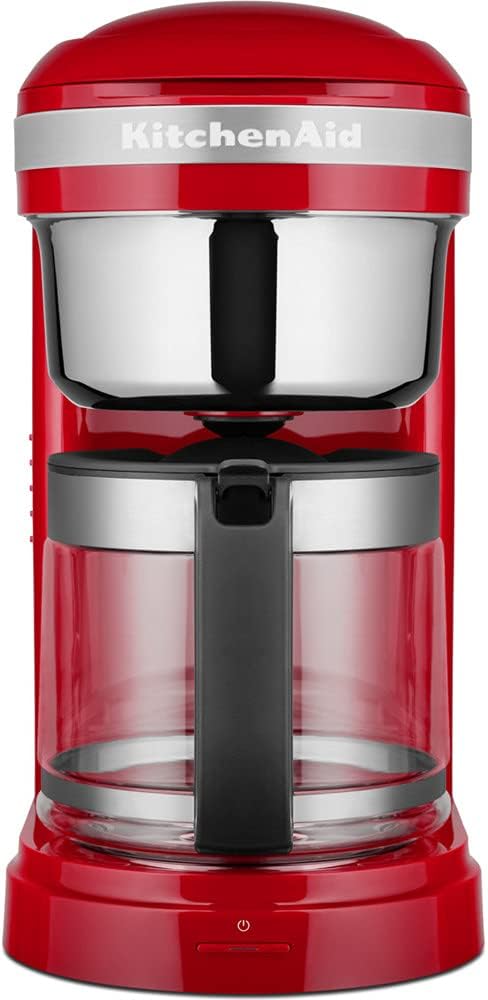
Image: Front view of the KitchenAid 5KCM1209EER Drip Coffee Maker in Empire Red. It features a red base and top, with a clear glass carafe and a silver-colored filter basket housing. The KitchenAid logo is visible on the front, and a power button with an indicator light is at the bottom.
Key Components:
- Water Reservoir: 1.7 L capacity, removable for easy filling and cleaning, with dosage markings.
- Permanent Gold-Tone Filter: Reusable filter with dosage indicator, replaces paper filters.
- Glass Carafe: Designed to hold up to 12 cups of coffee.
- Brew Basket: Holds the permanent filter.
- Spiral Showerhead: Ensures even saturation of coffee grounds.
- Heating Plate: Keeps coffee warm after brewing.
- LCD Display: Elegant and readable display for programming.
- Control Buttons: For power, brew strength, quantity, and programming.
- Power Button: Located at the base of the unit.
Setup
First Use and Cleaning:
- Unpack the coffee maker and all its components. Remove any packaging materials.
- Wash the glass carafe, permanent filter, and water reservoir with warm, soapy water. Rinse thoroughly and dry.
- Wipe the exterior of the coffee maker with a damp cloth.
- Before brewing coffee for the first time, run a full cycle with only water to clean the internal components. Fill the water reservoir to the maximum level, place the empty carafe on the heating plate, and start a brew cycle. Discard the water after the cycle is complete.
Placement:
Place the coffee maker on a flat, stable, heat-resistant surface, away from the edge of the counter and out of reach of children.
Operating Instructions
Brewing Coffee:
- Fill Water Reservoir: Remove the water reservoir and fill it with fresh, cold water up to the desired number of cups indicated by the markings. The maximum capacity is 1.7 liters (12 cups). Replace the reservoir securely.
- Add Coffee Grounds: Place the permanent gold-tone filter into the brew basket. Add your desired amount of ground coffee to the filter. The dosage indicator on the filter can assist. For best results, use medium-ground coffee.
- Place Carafe: Ensure the glass carafe is empty and properly positioned on the heating plate.
- Select Brew Strength (if desired): Use the control buttons to adjust the coffee intensity if your model supports this feature.
- Start Brewing: Press the brew button. The coffee maker will begin the brewing process. The LCD display will show the brewing status.
- Keep Warm Function: After brewing, the heating plate will automatically keep the coffee warm. The keep warm function maintains coffee at a perfect temperature (high or low setting) for up to 40 minutes.
Programming Automatic Brew Times:
Your coffee maker features 24-hour programming and allows for two automatic brew times.
- Set Current Time: Refer to your specific model's instructions for setting the current time on the LCD display.
- Program Brew Time 1: Press the "Program" button (or similar, refer to button labels). Use the hour and minute buttons to set the desired time for the first automatic brew cycle. Confirm the setting.
- Program Brew Time 2: If available, repeat the process to set a second automatic brew time, useful for weekday and weekend schedules.
- Activate Program: Ensure the program function is activated. The coffee maker will now automatically start brewing at the set times, provided it is filled with water and coffee grounds.
Maintenance
Daily Cleaning:
- Always unplug the coffee maker before cleaning and allow it to cool completely.
- Wash the glass carafe, permanent filter, and removable water reservoir after each use with warm, soapy water. These parts are typically top-rack dishwasher safe, but hand washing is recommended for longevity.
- Wipe the exterior of the coffee maker with a soft, damp cloth. Do not use abrasive cleaners or scouring pads.
- Do not immerse the main unit, cord, or plug in water or any other liquid.
Descaling (Cleaning Cycle):
Over time, mineral deposits (limescale) can build up in your coffee maker, affecting performance and coffee taste. Your coffee maker has a cleaning indicator and a cleaning cycle.
- When the cleaning indicator illuminates, it's time to descale the unit.
- Prepare a descaling solution according to the manufacturer's instructions (e.g., white vinegar and water, or a commercial descaling agent).
- Pour the descaling solution into the water reservoir.
- Place the empty carafe on the heating plate.
- Initiate the cleaning cycle as per your model's specific instructions (usually by pressing and holding a designated button).
- After the cleaning cycle is complete, run 2-3 cycles with fresh water only to rinse out any remaining descaling solution.
Troubleshooting
If you experience issues with your coffee maker, refer to the common problems and solutions below. If the problem persists, contact customer support.
| Problem | Possible Cause | Solution |
|---|---|---|
| Coffee does not brew. | No water in reservoir; unit not plugged in; brew cycle not started; carafe not properly placed. | Fill water reservoir; ensure unit is plugged in; press brew button; ensure carafe is correctly seated. |
| Coffee tastes weak or too strong. | Incorrect coffee-to-water ratio; wrong grind size; brew strength setting. | Adjust coffee amount; use medium grind; check brew strength setting. |
| Water leaks from unit. | Water reservoir not properly seated; overfilled reservoir; clogged brew basket. | Ensure reservoir is secure; do not exceed max fill line; clean brew basket and filter. |
| Cleaning indicator light is on. | Unit needs descaling. | Perform a descaling cycle as per maintenance instructions. |
Specifications
| Feature | Detail |
|---|---|
| Model Number | 5KCM1209EER |
| Brand | KitchenAid |
| Color | Empire Red |
| Capacity | 1.7 Liters (12 cups) |
| Power | 1100 Watts |
| Voltage | 220-240 V AC |
| Frequency | 50/60 Hz |
| Dimensions (L x W x H) | 34 x 18.2 x 36.4 cm (13.4 x 7.2 x 14.3 inches) |
| Weight | 4.4 Kilograms (9.7 lbs) |
| Material | Glass (Carafe) |
| Special Features | Permanent Filter, Timer, Programmable, Removable Reservoir, Keep Warm Function, Adjustable Coffee Intensity, LCD Display |
Warranty and Support
Information regarding product warranty and detailed customer support contacts is typically provided with the product packaging or available on the official KitchenAid website. Please refer to these resources for specific warranty terms, service centers, and technical assistance.
For further assistance, visit the official KitchenAid support page or contact their customer service directly.
Related documents5KCM1209EER


Ask a question about this manual
Ask about setup, troubleshooting, compatibility, parts, safety, or missing instructions. Manuals+ will review the question and use this page’s manual context to help answer it.